The Pattern Astrology
Aktualisiert
Aktuelle Version
5.1.1
Angeboten von

Machen Sie sich keine Sorgen mehr über überhöhte Gebühren, wenn Sie The Pattern Astrology auf Ihrem Mobiltelefon verwenden, befreien Sie sich von dem winzigen Bildschirm und genießen Sie die Nutzung der App auf einem viel größeren Display. Von nun an können Sie Ihre App mit Tastatur und Maus im Vollbildmodus nutzen. MEmu bietet Ihnen all die überraschenden Funktionen, die Sie erwartet haben: schnelle Installation und einfache Einrichtung, intuitive Steuerung, keine Einschränkungen mehr durch Batterie, mobile Daten und störende Anrufe. Der brandneue MEmu 9 ist die beste Wahl für die Nutzung von The Pattern Astrology auf Ihrem Computer. Mit unserer Absorption kodiert, ermöglicht der Multi-Instanz-Manager die Eröffnung von 2 oder mehr Konten zur gleichen Zeit. Und das Wichtigste, unsere exklusive Emulations-Engine kann das volle Potenzial Ihres PCs freisetzen und alles reibungslos und angenehm gestalten.
Mehr anzeigen
Laden Sie Play The Pattern Astrology auf dem PC mit MEmu Android Emulator. Viel Spaß beim Spielen auf großmundieren. Created to help you feel seen and understood.
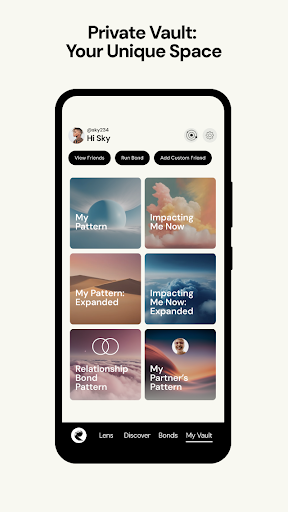
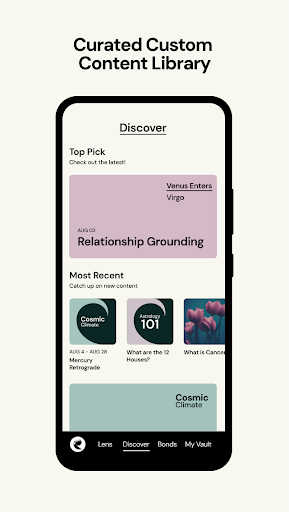
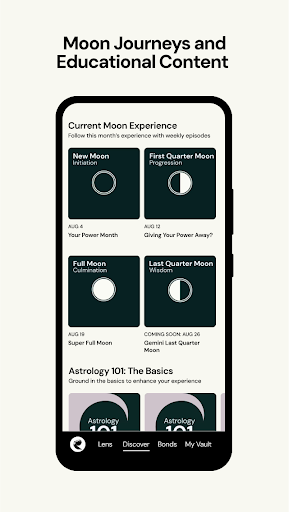
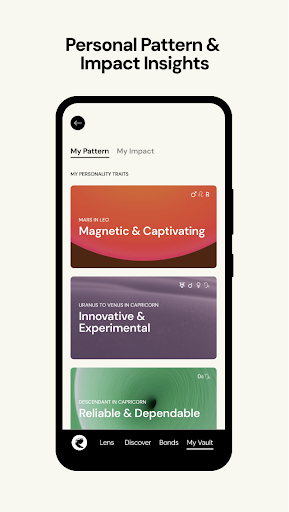
Created to help you feel seen and understood. A homegrown labor of love, The Pattern was born out of our founder’s personal journey of self-discovery. While trying to make sense of a challenging time, she recognized what an incredibly empowering tool our birth charts can be and sought to develop an application that could offer this information in a way that was easily digestible for all. Offering a psychological blueprint of one’s self and insight into the unique things they may be experiencing during a period of time, The Pattern acts as a mirror, helping you to better understand yourself and others, enabling connections to be made on a much deeper level. As featured in Vanity Fair, Time, TechCrunch, Vogue, Bustle, Mashable, Harper’s Bazaar, among others. For answers to commonly asked questions, please visit: https://thepattern.zendesk.com/hc/
For additional customer support, please email us: contact@thepattern.com
We are excited to bring The Pattern community a brand-new design and updated user experience. Things have changed in Version 5! This massive upgrade features access to brand-new content, including our classic reminders.
Enjoy even more personalized audios (now easier to find in your Vault!), as well as all new romantic relationship and timing insights. We are sending out monthly moon journeys, 360 immersive audios, astrology classes that help you go deeper into what's behind your chart and bonds, and so much more!
What everyone gets for free:
-Daily personalized updates about you and your romantic partner or friends
-Bonds that you can view to explore your compatibility with anyone
-Access to some of our content library, including chapters of Cosmic Climate
-Manage your Friends and Custom Friends directly from their profile
What our Go Deeper+ subscribers enjoy:
-ALL NEW Romantic timing cycles in Bond Impacts
-Unlimited access to the entire content library in Discover
-Unlimited access to audios, conversations, and 360 immersive sound meditations
-Traveling through time, which allows you to see how your life has been impacted during key moments in your life, both in the past and future
-View unlimited bonds with anyone in your friends list or in our extensive public figures database
-Classes in Astrology 101, to master all things astro in understandable terms
-Full access to our Connect dating feature to find and chat with your perfect match
Join our community today!
Follow @ThePattern on Instagram, TikTok and X. Share your favorite insights from The Pattern using #ThePattern. The Pattern offers in-app purchases that enhance the user experience. Auto-renewing "Go Deeper+" subscriptions may be purchased to unlock additional content starting at $29.99 for 3 months. Subscriptions are entirely optional and may be canceled at any time. Details are available in the Terms of Service, available here: https://www.thepattern.com/terms.html
Mehr anzeigen

1. Laden das MEmu-Installationsprogramm herunter und beenden die Installation

2. MEmu starten und Google Play auf der Homepage öffnen

3. Suchen The Pattern Astrology in Google Play
Install
4. Herunterladen und Installieren The Pattern Astrology
5. Klicken nach Abschluss der Installation auf das Symbol, um es zu starten

6. Verwenden Sie MEmu, um The Pattern Astrology auf Ihrem PC zu nutzen
MEmu Play ist aktuell der beste kostenlose Android-Emulator und bietet 50 Millionen Nutzern ein überragendes Android-App-Erlebnis. Dank der Virtualisierungstechnologie von MEmu können Sie Tausende von Android-Apps problemlos auf Ihrem Computer nutzen, selbst solche mit hohen Grafikanforderungen.
BGrößeres Bild mit besserer Grafik; Keine unterbrechungen, keine sorgen um Akku
Komplette Tastenbelegung unterstützt mit Maus und Tastatur oder Controller
Mit dem „Multi-Instance-Manager“ können Sie mehrere Spielkonten oder Spiele gleichzeitig auf einem PC ausführen.
Use The Pattern Astrology on PC by following steps: