Yakk
Aktualisiert
Aktuelle Version
1.4.1
Angeboten von

Machen Sie sich keine Sorgen mehr über überhöhte Gebühren, wenn Sie Yakk auf Ihrem Mobiltelefon verwenden, befreien Sie sich von dem winzigen Bildschirm und genießen Sie die Nutzung der App auf einem viel größeren Display. Von nun an können Sie Ihre App mit Tastatur und Maus im Vollbildmodus nutzen. MEmu bietet Ihnen all die überraschenden Funktionen, die Sie erwartet haben: schnelle Installation und einfache Einrichtung, intuitive Steuerung, keine Einschränkungen mehr durch Batterie, mobile Daten und störende Anrufe. Der brandneue MEmu 9 ist die beste Wahl für die Nutzung von Yakk auf Ihrem Computer. Mit unserer Absorption kodiert, ermöglicht der Multi-Instanz-Manager die Eröffnung von 2 oder mehr Konten zur gleichen Zeit. Und das Wichtigste, unsere exklusive Emulations-Engine kann das volle Potenzial Ihres PCs freisetzen und alles reibungslos und angenehm gestalten.
Mehr anzeigen
Laden Sie Play Yakk auf dem PC mit MEmu Android Emulator. Viel Spaß beim Spielen auf großmundieren. Simple and lightweight companion app for wall mounted or stationary devices used in home automation.
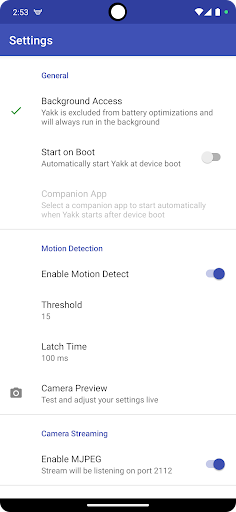
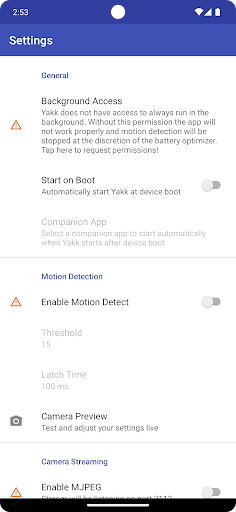
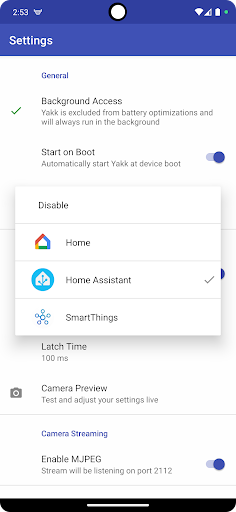
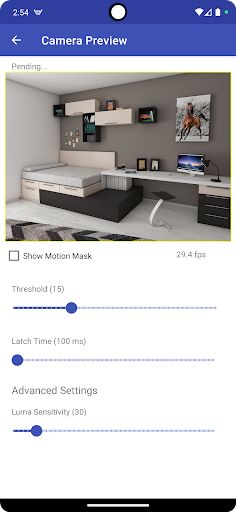
Simple and lightweight companion app for wall mounted or stationary devices used in home automation. Yakk can turn your device into both a security camera and a motion detection sensor.
Yakk runs in the background, parallel with your primary content provider app (e.g. Home Assistant Companion app) and provides management functionalities such as waking up the device when motion is detected. It does not try to embed or render the content leaving that to other apps that are better suited and purpose built to that task.
Features:
* Motion Detection - Let the device turn off its screen and allow it to enter low power mode but wake it up when movement is detected. The device MUST have an unsecured (no pin/no gesture) keypad in order for this to function. This is typically not a big deal in residential applications.
* Auto Start - Automatically start Yakk and an optional companion app after device boot.
* MJPEG Streaming - Turns the device into an MJPEG capable security camera. The stream can be accessed at :2112 and can be added to your home automation platform. e.g. using Home Assistant's MJPEG integration
Please visit our website and read through the documentation and FAQ section to make sure you can get the most out of Yakk. Some devices are finicky and require special configurations outside of the app!
Yakk stands for "Yet Another Kiosk Companion" due to lack of imagination to come up with a better name :)
Mehr anzeigen

1. Laden das MEmu-Installationsprogramm herunter und beenden die Installation

2. MEmu starten und Google Play auf der Homepage öffnen

3. Suchen Yakk in Google Play
Install
4. Herunterladen und Installieren Yakk
5. Klicken nach Abschluss der Installation auf das Symbol, um es zu starten

6. Verwenden Sie MEmu, um Yakk auf Ihrem PC zu nutzen
MEmu Play ist aktuell der beste kostenlose Android-Emulator und bietet 50 Millionen Nutzern ein überragendes Android-App-Erlebnis. Dank der Virtualisierungstechnologie von MEmu können Sie Tausende von Android-Apps problemlos auf Ihrem Computer nutzen, selbst solche mit hohen Grafikanforderungen.
BGrößeres Bild mit besserer Grafik; Keine unterbrechungen, keine sorgen um Akku
Komplette Tastenbelegung unterstützt mit Maus und Tastatur oder Controller
Mit dem „Multi-Instance-Manager“ können Sie mehrere Spielkonten oder Spiele gleichzeitig auf einem PC ausführen.
Use Yakk on PC by following steps: