OvoGoal
تاریخ بهروزرسانی
نسخه کنونی
3.11.0
ارائهکننده

در مورد استفاده بیش از حد در هنگام استفاده از OvoGoal بر روی تلفن همراه خود ، نگران نباشید ، خود را از صفحه ریز رها کنید و از استفاده از برنامه در یک صفحه نمایش بسیار بزرگتر لذت ببرید. از این پس ، تجربه تمام صفحه برنامه خود را با صفحه کلید و ماوس دریافت کنید .Mmu تمام ویژگی های شگفت انگیز مورد نظر شما را ارائه می دهد: نصب سریع و نصب آسان ، کنترل های بصری ، محدودیت بیشتر باتری ، داده های تلفن همراه و تماس های مزاحم. نام تجاری جدید MEmu 9 بهترین انتخاب برای استفاده از OvoGoal در رایانه شما است. با جذب ما ، مدیر چند نمونه باعث می شود همزمان 2 یا چند حساب را باز کنید. و از همه مهمتر ، موتور انحصاری منحصر به فرد ما می تواند پتانسیل کامل کامپیوتر شما را آزاد کند ، همه چیز را صاف و لذت بخش کند.
بیشتر نشان بده
از تجربه فوقالعاده استفاده از OvoGoal در کامپیوتر با MEmu Play لذت ببرید. این یک شبیهساز اندروید رایگان و قدرتمند است که هزاران برنامه اندروید را برای نسخه دسکتاپ در اختیار شما قرار میدهد. OvoGoal serves fans who want clear, reliable match storytelling without confusion about rights or access.
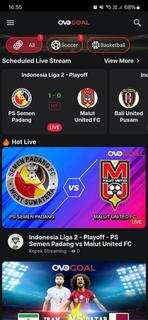
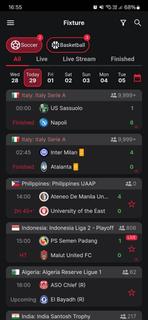
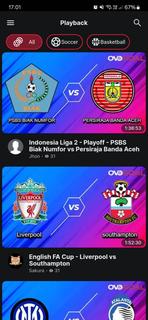

OvoGoal serves fans who want clear, reliable match storytelling without confusion about rights or access. It centers on major competitions such as the UEFA Champions League, the FIFA World Cup, and national championships, and keeps users engaged before, during, and after match days. Because live viewing availability can vary by region and licensing, the app leans on strong journalism, highlights, and contextual coverage to maintain consistency. For users who prefer simple installation, the OvoGoal APK is free to download and straightforward to set up. Key features for football fansGlobal tournament coverageOvoGoal organizes its content around marquee events including the UEFA Champions League, the FIFA World Cup, and national championships. You get a central hub that surfaces fixtures, storylines, and match pages so you can follow the competitions that matter. The coverage extends across regions, which helps you track international and domestic narratives in one place.Vivid match imagery and highlightsOvoGoal emphasizes crisp visuals that make key moments easy to follow. Match action is presented with clear imagery and highlight packages that help you revisit decisive plays. You can move from one highlight to the next without losing the thread of the game, which keeps the experience simple and consistent.Expert commentary and analysisSeasoned sports journalists lead the storytelling, providing context before kick-off and insight after the whistle. Previews outline tactical talking points, while recaps and breakdowns explain what changed the match. This editorial layer brings structure to the coverage and helps you understand why moments mattered.Fan-focused content between live eventsOvoGoal does not rely solely on live streams. Between matches, you can browse previews, feature pieces, and recap articles to stay informed. This steady flow of content keeps the app useful on non-match days and gives you continuity throughout the season.Free access with adsOvoGoal is free to download and operates with an ad-supported model. Ads may appear during browsing or playback, which helps sustain the service. The approach keeps core content accessible while avoiding paywalls, though live availability can still vary by region and rights. Important notes about OvoGoalOvoGoal positions itself as “The Foremost Live Football Channel,” focusing on vivid imagery and trusted journalism rather than promising specific live rights. Live match access can differ by territory based on licensing, so some events may appear as highlights, analysis, or editorial coverage instead of live streams. The app’s ad-supported experience keeps access free, and the editorial focus ensures continuity even when rights shift. Version and download contextDistribution is provided via APK, which helps users install the app directly on Android devices. Availability may change over time as releases are updated, so check for the OvoGoal latest version on the app detail page when you plan an Ovogoal app download. If listing status varies across marketplaces, installation through the APK remains a consistent path for users who prefer manual setup. How to use OvoGoal on AndroidAfter installing the OvoGoal APK, open the app to reach the main football hub. The layout is designed to get you into match coverage, highlights, and analysis with minimal steps. Launch OvoGoal and allow the app to load its home hub, which surfaces key competitions and active match pages. Tap a tournament card, such as the UEFA Champions League or FIFA World Cup, to view schedules, stories, and highlight entries. Select a match tile to open its dedicated page, then choose live coverage or highlights if available in your region. Scroll through expert previews and post-match recaps to understand line-ups, tactics, and decisive moments. Return to the hub to explore national championships and ongoing series so you can keep track of new content as it updates. Get started with OvoGoalOvoGoal centers its experience on clear visuals, expert storytelling, and accessible coverage around top football tournaments. To begin, download OvoGoal and follow the hub to live pages, highlight reels, and analysis that help you keep pace with the season.
بیشتر نشان بده

1. نصب کننده Memu را دانلود کرده و راه اندازی را تمام کنید

2. Memu را اجرا کنید و سپس گوگل پلی را بر روی دستکتاپ باز کنید

3. OvoGoal را بر روی گوگل پلی جستجو کنید
Install
4. OvoGoal را دانلود و نصب کنید
5. پس از اتمام نصب روی آیکون کلیک کنید تا اجرا شود

6. با استفاده از MEmu، OvoGoal را روی کامپیوتر خود تجربه کنید.
MEmu در حال حاضر بهترین شبیهساز رایگان اندروید است که ۵۰ میلیون کاربر از تجربه استثنایی برنامههای اندروید لذت میبرند. فناوری مجازیسازی MEmu به شما امکان میدهد هزاران برنامه اندروید، حتی بازیهای با گرافیک بالا را به راحتی روی رایانه خود اجرا کنید.
صفحه نمایش بزرگتر با گرافیک بهتر؛ زمان طولانی تر، بدون محدودیت باتری یا داده تلفن همراه.
پشتیبانی کامل از Keymapping برای کنترل دقیق صفحه کلید و ماوس یا گیم پد.
چندین حساب بازی یا وظایف در یک رایانه شخصی در یک زمان با مدیریت همزمان همه
Use OvoGoal on PC by following steps: