OvoGoal
Updated
Current Version
3.11.0
Offered By

Stop worrying about high battery drain when using OvoGoal on your phone. Free yourself from the tiny screen and enjoy the app on a much larger display. From now on, get a full-screen experience of your app with the convenience of a keyboard and mouse. MEmu offers you all the surprising features you’d expect: quick installation and easy setup, intuitive controls, and no more worries about battery life, mobile data, or unexpected calls. The all-new MEmu 9 is the choice for using OvoGoal on your computer. With the MEmu multi-instance manager, you can run two or more accounts at the same time. Most importantly, our exclusive emulation engine unlocks your PC’s full potential, delivering smooth and enjoyable performance.
Show more
Enjoy superb experience of using OvoGoal on PC with MEMU App Player. It's a powerful free Android emulator which provides you with thousands of android apps for their desktop version. Enjoy connecting with friends and polishing your work with higher efficiency! OvoGoal serves fans who want clear, reliable match storytelling without confusion about rights or access.
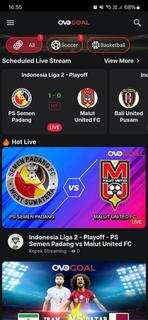
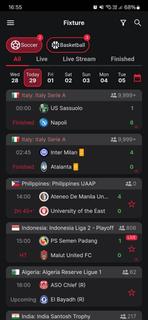
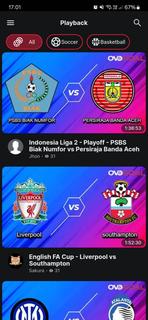

OvoGoal serves fans who want clear, reliable match storytelling without confusion about rights or access. It centers on major competitions such as the UEFA Champions League, the FIFA World Cup, and national championships, and keeps users engaged before, during, and after match days. Because live viewing availability can vary by region and licensing, the app leans on strong journalism, highlights, and contextual coverage to maintain consistency. For users who prefer simple installation, the OvoGoal APK is free to download and straightforward to set up. Key features for football fansGlobal tournament coverageOvoGoal organizes its content around marquee events including the UEFA Champions League, the FIFA World Cup, and national championships. You get a central hub that surfaces fixtures, storylines, and match pages so you can follow the competitions that matter. The coverage extends across regions, which helps you track international and domestic narratives in one place.Vivid match imagery and highlightsOvoGoal emphasizes crisp visuals that make key moments easy to follow. Match action is presented with clear imagery and highlight packages that help you revisit decisive plays. You can move from one highlight to the next without losing the thread of the game, which keeps the experience simple and consistent.Expert commentary and analysisSeasoned sports journalists lead the storytelling, providing context before kick-off and insight after the whistle. Previews outline tactical talking points, while recaps and breakdowns explain what changed the match. This editorial layer brings structure to the coverage and helps you understand why moments mattered.Fan-focused content between live eventsOvoGoal does not rely solely on live streams. Between matches, you can browse previews, feature pieces, and recap articles to stay informed. This steady flow of content keeps the app useful on non-match days and gives you continuity throughout the season.Free access with adsOvoGoal is free to download and operates with an ad-supported model. Ads may appear during browsing or playback, which helps sustain the service. The approach keeps core content accessible while avoiding paywalls, though live availability can still vary by region and rights. Important notes about OvoGoalOvoGoal positions itself as “The Foremost Live Football Channel,” focusing on vivid imagery and trusted journalism rather than promising specific live rights. Live match access can differ by territory based on licensing, so some events may appear as highlights, analysis, or editorial coverage instead of live streams. The app’s ad-supported experience keeps access free, and the editorial focus ensures continuity even when rights shift. Version and download contextDistribution is provided via APK, which helps users install the app directly on Android devices. Availability may change over time as releases are updated, so check for the OvoGoal latest version on the app detail page when you plan an Ovogoal app download. If listing status varies across marketplaces, installation through the APK remains a consistent path for users who prefer manual setup. How to use OvoGoal on AndroidAfter installing the OvoGoal APK, open the app to reach the main football hub. The layout is designed to get you into match coverage, highlights, and analysis with minimal steps. Launch OvoGoal and allow the app to load its home hub, which surfaces key competitions and active match pages. Tap a tournament card, such as the UEFA Champions League or FIFA World Cup, to view schedules, stories, and highlight entries. Select a match tile to open its dedicated page, then choose live coverage or highlights if available in your region. Scroll through expert previews and post-match recaps to understand line-ups, tactics, and decisive moments. Return to the hub to explore national championships and ongoing series so you can keep track of new content as it updates. Get started with OvoGoalOvoGoal centers its experience on clear visuals, expert storytelling, and accessible coverage around top football tournaments. To begin, download OvoGoal and follow the hub to live pages, highlight reels, and analysis that help you keep pace with the season.
Show more

1. Download MEmu installer and finish the setup

2. Start MEmu then open Google Play on the desktop

3. Search OvoGoal in Google Play
Install
4. Download and Install OvoGoal
5. On install completion click the icon to start

6. Enjoy using OvoGoal on PC with MEmu
MEmu Play is the best Android emulator, and 100 million users already enjoy its superb Android app experience. Powered by advanced virtualization technology, it lets you enjoy thousands of Android apps smoothly on your PC—including the most graphics-intensive ones.
Bigger screen with better graphics; Long duration, without limitation of battery or mobile data.
Full Keymapping support for precise control of keyboard and mouse or gamepad.
Multiple game accounts or tasks on single PC at one time with Multi-Instance manager.
Use OvoGoal on PC by following steps: