Wuthering Waves
تاریخ بهروزرسانی
نسخه کنونی
3.4.1
ارائهکننده

با تمام اشتیاق شما به بازی Wuthering Waves، قرار نیست دست های شما روی صفحه نمایش کوچک گوشی شما محدود شود. مانند یک حرفه ای بازی کنید و کنترل کامل بازی خود را با صفحه کلید و ماوس بدست آورید.MEmu همه ی انتظاراتی که دارید را برآورده می کند.Wuthering Waves را بر روی رایانه شخصی دانلود و بازی کنید. تا زمانی که می خواهید بازی کنید، دیگر محدودیتی در باتری، داده تلفن همراه و تماس های مزاحم وجود ندارد.MEmu 9 کاملاً جدید و بهترین انتخاب برای بازی Wuthering Waves روی رایانه شخصی است. با تخصص ما، سیستم keymapping از پیش تعیین شده عالی،Wuthering Waves را به یک بازی رایانه شخصی واقعی تبدیل می کند.مدیریت چند موردی MEmu امکان اجرای 2 یا چندین حساب در یک دستگاه را فراهم می کند.و مهمتر از همه، موتور شبیهسازی انحصاری ما میتواند پتانسیل کامل رایانه شما را آزاد کند و همه چیز را روان کند.
بیشتر نشان بده
Download Wuthering Waves on PC with MEmu Android Emulator. Enjoy playing on big screen. Wuthering Waves is a story-rich open-world action RPG with a high degree of freedom.
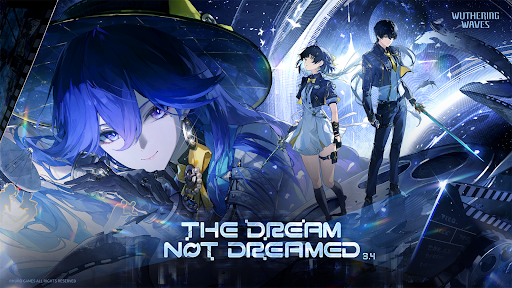
Wuthering Waves is a story-rich open-world action RPG with a high degree of freedom. You wake from your slumber as Rover, joined by a vibrant cast of Resonators on a journey to reclaim your lost memories and change the world.
◆Winner of Players' Voice at The Game Awards 2025◆
◆Nominee of Best Mobile Game at The Game Awards 2025◆
◆Nominee of Players' Voice at The Game Awards 2024◆
◆Nominee of Best Mobile Game at The Game Awards 2024◆
◆Introduction◆
Welcome aboard, roving voyager.
Upon the shores lay the silent embers of a world during the Ebb Tide.
Desolated by the Lament, the erstwhile creations and earthly beings are left static.
But they strike back, strong enough to penetrate the silence.
Humanity has risen anew from the ashes of the apocalypse.
And you, Rover, are poised for an adventure of Awakening.
Companions to meet, enemies to conquer, new powers to gain, hidden truths to unveil, and unseen spectacles to behold... A vast world of endless possibilities awaits. The choice rests in your hands. Be the answer, be the leader, and follow the sounds to arrive at a new future.
As Wuthering Waves echo endlessly, mankind set sail on a new journey.
Rise and embark on your odyssey, Rover.
◆Features◆
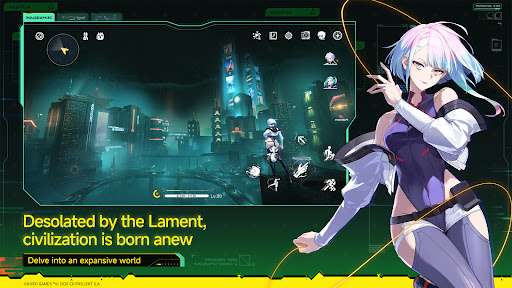
Delve into an expansive world / Desolated by the Lament, civilization is born anew
Embrace high degrees of freedom in immersive overworld explorations. Free yourself from stamina limits, dash and parkour on walls, take Flight, and ride a high-mobility expedition motorbike to enjoy open-world exploration. As the world of Solaris-3 unfolds, your lost memory begins to see its recovery through this ceaseless quest.
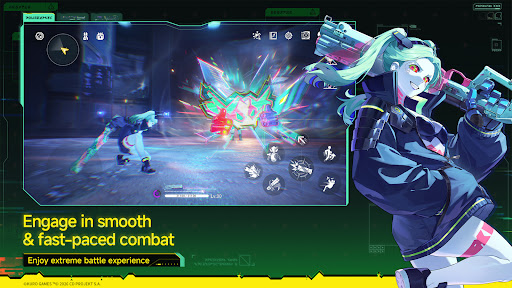
Enjoy extreme battle experience / Engage in smooth & fast-paced combat
Avail against enemy attacks in smooth and fast-paced combat. Apply easy controls of Extreme Evasion, Dodge Counter, Echo Skill, and unique QTE mechanisms that allow the fullest possibility of battle experience.
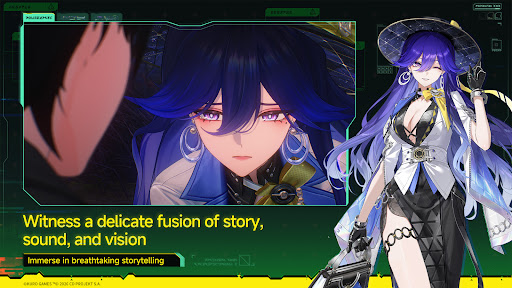
Immerse in breathtaking storytelling / Witness a delicate fusion of story, sound, and vision
With cinematic narratives, rich music, and stunning animation, Solaris delivers a high-quality sensory journey that brings every story to life.
Encounter Resonators / Forte awakened, journey alongside your companions
Compose a harmonious battle concerto with Resonators of different abilities. Their unique Fortes revealing distinctive personalities will be your strong assets for the journey ahead.
◆Official Social Media◆
Official Website: https://wutheringwaves.kurogames.com/en/
X (Twitter): https://twitter.com/Wuthering_Waves
Facebook: https://www.facebook.com/WutheringWaves.Official
YouTube: https://www.youtube.com/@WutheringWaves
Discord: https://discord.com/invite/wutheringwaves
Reddit: https://www.reddit.com/r/WutheringWaves/
Instagram: https://www.instagram.com/wuthering_waves
Tik Tok: https://www.tiktok.com/@wutheringwaves_official
※IGRS-certified and suitable for users aged 13 and above.
【App Permissions】
To provide the following services while you use this app, we may request certain permissions.
【Optional Permissions】
-Photos: Used for uploading, downloading, or sharing pictures, such as saving pictures to the photo library.
-Microphone: Used for providing feedback through methods such as sending voice messages or recording videos.
-Camera: Used for providing feedback through methods such as taking photos or recording videos, as well as for scanning QR codes.
*For optional permissions, you can continue to use the app normally even if you deny them.
【How to Withdraw Permission Consent】
Settings → Privacy & Security → Select the relevant permission → Choose to allow or revoke access.
بیشتر نشان بده

1. نصب کننده Memu را دانلود کرده و راه اندازی را تمام کنید

2. Memu را اجرا کنید و سپس گوگل پلی را بر روی دستکتاپ باز کنید

3. Wuthering Waves را بر روی گوگل پلی جستجو کنید
Install
4. Wuthering Waves را دانلود و نصب کنید
5. پس از اتمام نصب روی آیکون کلیک کنید تا اجرا شود

6. از بازی کردن Wuthering Waves بر روی رایانه شخصی با MEmu لذت ببرید
MEmu بهترین نمونه ساز رایگان اندروید است و پیش از این 50 میلیون نفر از تجربه بسیار خوب بازی اندروید در آن لذت برده اند. تکنولوژی مجازی ساز MEmu شما را قادر می سازد هزاران بازی اندرویدی را در کامپیوتر به طور روان اجرا کنید، حتی آنهایی که گرافیک سنگین تری دارند.
صفحه نمایش بزرگتر با گرافیک بهتر؛ زمان طولانی تر، بدون محدودیت باتری یا داده تلفن همراه.
پشتیبانی کامل از Keymapping برای کنترل دقیق صفحه کلید و ماوس یا گیم پد.
چندین حساب بازی یا وظایف در یک رایانه شخصی در یک زمان با مدیریت همزمان همه
Play Wuthering Waves on PC by following steps:






![Delta Touch [10 x Doom engine] PC](https://dl.memuplay.com/new_market/img/com.opentouchgaming.deltatouch.icon.2026-07-31-11-58-34.png)