Wuthering Waves
Diupdate
Versi Saat Ini
3.7.0
Ditawarkan Oleh

Dengan sepenuh kebulatan hati Anda dalam memainkan Wuthering Waves, tangan Anda tak seharusnya hanya terbatas pada layar kecil handphone Anda.Bermainlah layaknya seorang profesional dan dapatkan kendali penuh dalam permainan Anda dengan papan ketik dan tetikus.MEmu menawarkan seluruh hal yang Anda harapkan.Unduh dan mainkan Wuthering Waves pada PC. Bermainlah selama yang Anda inginkan, tanpa keterbatasan dari baterai, data seluler dan panggilan yang mengganggu.MEmu 9 baru merupakan pilihan terbaik untuk memainkan Wuthering Waves pada PC. Dipersiapkan bersama teknologi ahli kami, sistem pemetaan kunci preset yang canggih menjadikan Wuthering Waves sebagai permainan PC sejati.Manajer banyak hal dari MEmu memungkinkan Anda untuk memainkan 2 atau banyak akun pada perangkat yang sama.Dan yang terpenting, mesin emulasi eksklusif kami bisa melepaskan potensi penuh PC Anda, membuat segalanya berjalan lancar.
Tampilkan Lebih banyak
Unduh Wuthering Waves di PC dengan Emulator Android MEmu. Nikmati permainan pada layar yang besar. Wuthering Waves is a story-rich open-world action RPG with a high degree of freedom.
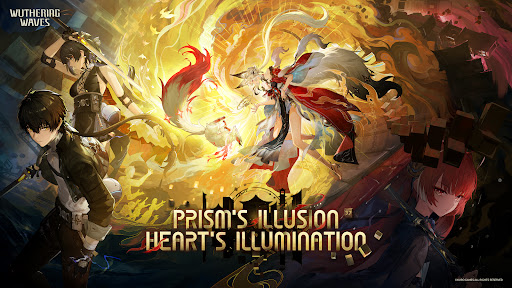
Wuthering Waves is a story-rich open-world action RPG with a high degree of freedom. You wake from your slumber as Rover, joined by a vibrant cast of Resonators on a journey to reclaim your lost memories and change the world.
◆Winner of Players' Voice at The Game Awards 2025◆
◆Nominee of Best Mobile Game at The Game Awards 2025◆
◆Nominee of Players' Voice at The Game Awards 2024◆
◆Nominee of Best Mobile Game at The Game Awards 2024◆
◆Introduction◆
Welcome aboard, roving voyager.
Upon the shores lay the silent embers of a world during the Ebb Tide.
Desolated by the Lament, the erstwhile creations and earthly beings are left static.
But they strike back, strong enough to penetrate the silence.
Humanity has risen anew from the ashes of the apocalypse.
And you, Rover, are poised for an adventure of Awakening.
Companions to meet, enemies to conquer, new powers to gain, hidden truths to unveil, and unseen spectacles to behold... A vast world of endless possibilities awaits. The choice rests in your hands. Be the answer, be the leader, and follow the sounds to arrive at a new future.
As Wuthering Waves echo endlessly, mankind set sail on a new journey.
Rise and embark on your odyssey, Rover.
◆Features◆
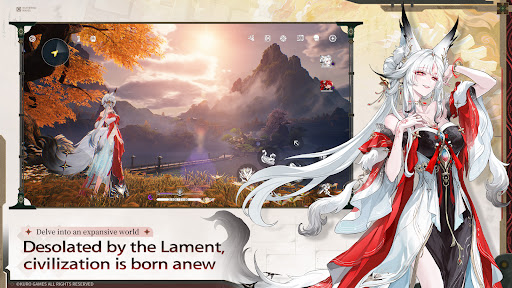
Delve into an expansive world / Desolated by the Lament, civilization is born anew
Embrace high degrees of freedom in immersive overworld explorations. Free yourself from stamina limits, dash and parkour on walls, take Flight, and ride a high-mobility expedition motorbike to enjoy open-world exploration. As the world of Solaris-3 unfolds, your lost memory begins to see its recovery through this ceaseless quest.
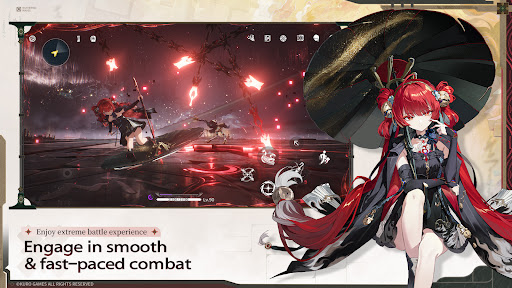
Enjoy extreme battle experience / Engage in smooth & fast-paced combat
Avail against enemy attacks in smooth and fast-paced combat. Apply easy controls of Extreme Evasion, Dodge Counter, Echo Skill, and unique QTE mechanisms that allow the fullest possibility of battle experience.
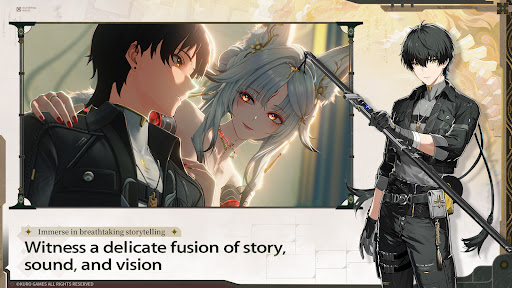
Immerse in breathtaking storytelling / Witness a delicate fusion of story, sound, and vision
With cinematic narratives, rich music, and stunning animation, Solaris delivers a high-quality sensory journey that brings every story to life.
Encounter Resonators / Forte awakened, journey alongside your companions
Compose a harmonious battle concerto with Resonators of different abilities. Their unique Fortes revealing distinctive personalities will be your strong assets for the journey ahead.
◆Official Social Media◆
Official Website: https://wutheringwaves.kurogames.com/en/
X (Twitter): https://twitter.com/Wuthering_Waves
Facebook: https://www.facebook.com/WutheringWaves.Official
YouTube: https://www.youtube.com/@WutheringWaves
Discord: https://discord.com/invite/wutheringwaves
Reddit: https://www.reddit.com/r/WutheringWaves/
Instagram: https://www.instagram.com/wuthering_waves
Tik Tok: https://www.tiktok.com/@wutheringwaves_official
※IGRS-certified and suitable for users aged 13 and above.
【App Permissions】
To provide the following services while you use this app, we may request certain permissions.
【Optional Permissions】
-Photos: Used for uploading, downloading, or sharing pictures, such as saving pictures to the photo library.
-Microphone: Used for providing feedback through methods such as sending voice messages or recording videos.
-Camera: Used for providing feedback through methods such as taking photos or recording videos, as well as for scanning QR codes.
*For optional permissions, you can continue to use the app normally even if you deny them.
【How to Withdraw Permission Consent】
Settings → Privacy & Security → Select the relevant permission → Choose to allow or revoke access.
Tampilkan Lebih banyak

1. Unduh dan instal MEmu APP

2. Menjalankan MEmu lalu buka Google Play di halaman

3. Cari Wuthering Waves di Google Play
Install
4. Unduh dan instal Wuthering Waves
5. Setelah insatl APP selesai,klik ikon untuk mulai

6. Nikmati bermain Wuthering Waves di PC dengan MEmu
MEmu App Player adalah emulator Android gratis terbaik dan 50 Juta orang sudah menikmati pengalaman luar biasa dalam bermain gim Android. Teknologi virtualisasi MEmu memberi kekuasaan untuk memainkan ribuan gim Android dengan lancar di PC anda, bahkan gim dengan grafis yang paling tinggi.
Layar lebih besar dengan grafis yang lebih baik; durasi panjang, tanpa batasan baterai atau data seluler.
Didukung penuh oleh Pemetaan tombol yang lengkap untuk keakuratan kontrol keyboard dan mouse maupun gamepad.
Membuka beberapa akun game atau tugas di waktu yang sama hanya pada satu PC, dengan Multi-Instance manager.
Play Wuthering Waves on PC by following steps: