APK Installer
تاریخ بهروزرسانی
نسخه کنونی
8.6.2
ارائهکننده

در مورد استفاده بیش از حد در هنگام استفاده از APK Installer بر روی تلفن همراه خود ، نگران نباشید ، خود را از صفحه ریز رها کنید و از استفاده از برنامه در یک صفحه نمایش بسیار بزرگتر لذت ببرید. از این پس ، تجربه تمام صفحه برنامه خود را با صفحه کلید و ماوس دریافت کنید .Mmu تمام ویژگی های شگفت انگیز مورد نظر شما را ارائه می دهد: نصب سریع و نصب آسان ، کنترل های بصری ، محدودیت بیشتر باتری ، داده های تلفن همراه و تماس های مزاحم. نام تجاری جدید MEmu 9 بهترین انتخاب برای استفاده از APK Installer در رایانه شما است. با جذب ما ، مدیر چند نمونه باعث می شود همزمان 2 یا چند حساب را باز کنید. و از همه مهمتر ، موتور انحصاری منحصر به فرد ما می تواند پتانسیل کامل کامپیوتر شما را آزاد کند ، همه چیز را صاف و لذت بخش کند.
بیشتر نشان بده
از تجربه فوقالعاده استفاده از APK Installer در کامپیوتر با MEmu Play لذت ببرید. این یک شبیهساز اندروید رایگان و قدرتمند است که هزاران برنامه اندروید را برای نسخه دسکتاپ در اختیار شما قرار میدهد. APK Installer is built for users who install and manage many apps and want a simple way to keep everything organized.
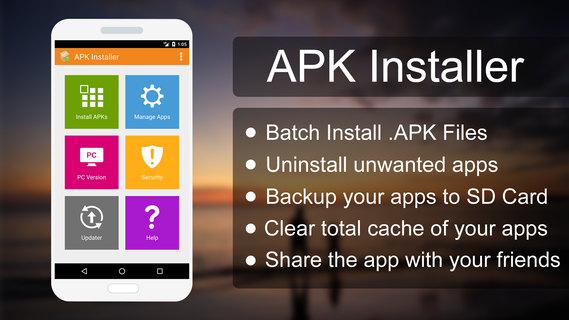
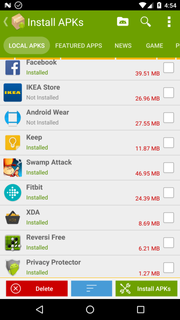
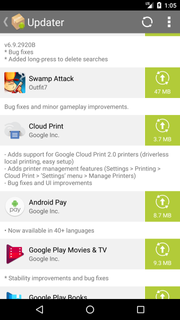
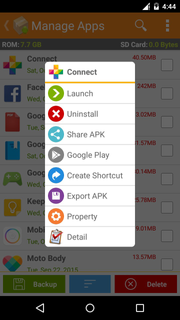
APK Installer is built for users who install and manage many apps and want a simple way to keep everything organized. It offers a clear layout that guides you through setup and everyday maintenance, so common tasks feel quicker and more consistent. Additionally, it helps you understand app information before making changes, which reduces mistakes and saves time. To begin, download APK Installer and use the on-screen prompts to handle routine actions with fewer steps. This helps keep your device tidy without extra effort.APK Installer FeaturesBatch App InstallerAPK Installer lets you install multiple APK files from internal storage or a secondary SD card in one go. You select files, confirm, and the app guides the process with clear prompts. This reduces repeated steps when setting up a device or restoring apps. Once the APK Installer APK is installed, batch actions run with simple, consistent steps.Batch UninstallerAfter installing in batches, you may also need to remove unused apps. You can select several items and confirm to free space quickly. The grouped view helps you review what stays and what goes before you proceed.Backup and ShareTo keep reliable copies, export installed apps as APK files to your SD card. This is useful for safe storage or moving apps to another device. When needed, you can share the APK file directly with contacts for easy transfer.Security Scanner and App InfoFor safer management, the security scanner verifies APK signatures and detects embedded advertising or analytics add-ons. You can also view package name, file location, install date, permissions, UID and shared UID, minimum and target API levels, and component information. These details support informed decisions before installing or removing apps.Start Managing Your AppsAPK Installer focuses on everyday app tasks, including batch installation, removal, backups, and security checks. Open the app and follow the prompts to organize and maintain your device. For the most reliable experience, update to the APK Installer latest version.
بیشتر نشان بده

1. نصب کننده Memu را دانلود کرده و راه اندازی را تمام کنید

2. Memu را اجرا کنید و سپس گوگل پلی را بر روی دستکتاپ باز کنید

3. APK Installer را بر روی گوگل پلی جستجو کنید
Install
4. APK Installer را دانلود و نصب کنید
5. پس از اتمام نصب روی آیکون کلیک کنید تا اجرا شود

6. با استفاده از MEmu، APK Installer را روی کامپیوتر خود تجربه کنید.
MEmu در حال حاضر بهترین شبیهساز رایگان اندروید است که ۵۰ میلیون کاربر از تجربه استثنایی برنامههای اندروید لذت میبرند. فناوری مجازیسازی MEmu به شما امکان میدهد هزاران برنامه اندروید، حتی بازیهای با گرافیک بالا را به راحتی روی رایانه خود اجرا کنید.
صفحه نمایش بزرگتر با گرافیک بهتر؛ زمان طولانی تر، بدون محدودیت باتری یا داده تلفن همراه.
پشتیبانی کامل از Keymapping برای کنترل دقیق صفحه کلید و ماوس یا گیم پد.
چندین حساب بازی یا وظایف در یک رایانه شخصی در یک زمان با مدیریت همزمان همه
Use APK Installer on PC by following steps: