
HiCine
تاریخ بهروزرسانی
نسخه کنونی
1.0.1
ارائهکننده

در مورد استفاده بیش از حد در هنگام استفاده از HiCine بر روی تلفن همراه خود ، نگران نباشید ، خود را از صفحه ریز رها کنید و از استفاده از برنامه در یک صفحه نمایش بسیار بزرگتر لذت ببرید. از این پس ، تجربه تمام صفحه برنامه خود را با صفحه کلید و ماوس دریافت کنید .Mmu تمام ویژگی های شگفت انگیز مورد نظر شما را ارائه می دهد: نصب سریع و نصب آسان ، کنترل های بصری ، محدودیت بیشتر باتری ، داده های تلفن همراه و تماس های مزاحم. نام تجاری جدید MEmu 9 بهترین انتخاب برای استفاده از HiCine در رایانه شما است. با جذب ما ، مدیر چند نمونه باعث می شود همزمان 2 یا چند حساب را باز کنید. و از همه مهمتر ، موتور انحصاری منحصر به فرد ما می تواند پتانسیل کامل کامپیوتر شما را آزاد کند ، همه چیز را صاف و لذت بخش کند.
بیشتر نشان بده
از تجربه فوقالعاده استفاده از HiCine در کامپیوتر با MEmu Play لذت ببرید. این یک شبیهساز اندروید رایگان و قدرتمند است که هزاران برنامه اندروید را برای نسخه دسکتاپ در اختیار شما قرار میدهد. Find your next movie night pick with HiCine, a cinematic movie and TV show discovery guide built for browsing, searching, and saving entertainment you want to remember.
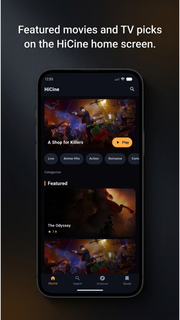
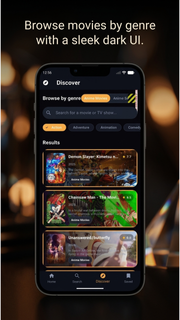
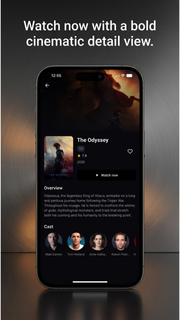
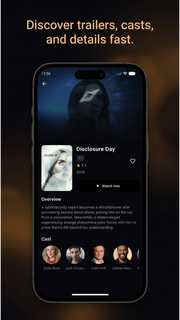
Find your next movie night pick with HiCine, a cinematic movie and TV show discovery guide built for browsing, searching, and saving entertainment you want to remember.Explore trending movies, popular TV series, top-rated titles, and what's now playing. Browse by genre or search for a specific film or show, then open a detailed page to view ratings, release years, story overviews, cast members, posters, and backdrops.WHY HICINE?⢠Discover trending and popular movies⢠Explore TV shows and series⢠Search movies and TV by title⢠Browse action, comedy, drama, romance, animation and more⢠Watch official trailers on YouTube when available⢠Check ratings, release dates, summaries and cast information⢠Save movies and shows to favorites⢠Switch between multiple supported languages⢠Enjoy a clean, cinematic dark interfaceMOVIE DISCOVERY MADE SIMPLENot sure what to watch next? HiCine helps you compare new movies, popular films, top-rated cinema, and TV shows in one place. Use genre filters to narrow your choices, open a title for more details, and save favorites for later.YOUR PERSONAL WATCHLISTBuild a personal collection of movies and series you want to revisit. Add or remove favorites in one tap and keep your next picks organized.TRAILERS AND TITLE DETAILSPreview official movie trailers, explore cast profiles, review summaries, ratings, release information, and discover related titles before deciding what to watch.HiCine is a discovery and information guide. It does not host or stream full movies or TV episodes. Trailer availability depends on external providers.Install HiCine and make every Hi Cine search the start of your next movie discovery.
بیشتر نشان بده

1. نصب کننده Memu را دانلود کرده و راه اندازی را تمام کنید

2. Memu را اجرا کنید و سپس گوگل پلی را بر روی دستکتاپ باز کنید

3. HiCine را بر روی گوگل پلی جستجو کنید
Install
4. HiCine را دانلود و نصب کنید
5. پس از اتمام نصب روی آیکون کلیک کنید تا اجرا شود

6. با استفاده از MEmu، HiCine را روی کامپیوتر خود تجربه کنید.
MEmu در حال حاضر بهترین شبیهساز رایگان اندروید است که ۵۰ میلیون کاربر از تجربه استثنایی برنامههای اندروید لذت میبرند. فناوری مجازیسازی MEmu به شما امکان میدهد هزاران برنامه اندروید، حتی بازیهای با گرافیک بالا را به راحتی روی رایانه خود اجرا کنید.
صفحه نمایش بزرگتر با گرافیک بهتر؛ زمان طولانی تر، بدون محدودیت باتری یا داده تلفن همراه.
پشتیبانی کامل از Keymapping برای کنترل دقیق صفحه کلید و ماوس یا گیم پد.
چندین حساب بازی یا وظایف در یک رایانه شخصی در یک زمان با مدیریت همزمان همه
Use HiCine on PC by following steps: