
HiCine
अपडेट किया गया
वर्तमान वर्शन
1.0.1
संसाधन

HiCine पर अपनी मोबाइल डेटा सीमा पार करने को अलविदा कहें और छोटी स्क्रीन की सीमाओं से मुक्त होकर बड़े डिस्प्ले के लाभों का अनुभव करें। अब, आप अपने कीबोर्ड और माउस का उपयोग करके फुल-स्क्रीन मोड में टॉपर्स क्लैन की शक्ति का अनुभव कर सकते हैं। MEmu Play में वे सभी बेहतरीन सुविधाएँ हैं जिनकी आप अपेक्षा करते हैं: त्वरित इंस्टॉलेशन और आसान सेटअप, सहज नियंत्रण, बैटरी की आवश्यकता नहीं, और कोई डेटा या कॉल समय सीमा नहीं। नया MEmu 9 आपके कंप्यूटर पर HiCine का उपयोग करने के लिए सबसे अच्छा विकल्प है। हमारा मालिकाना मल्टी-इंस्टेंस मैनेजर एक साथ दो या अधिक खातों को चलाने का समर्थन करता है। इससे भी महत्वपूर्ण बात यह है कि हमारा अनूठा इम्यूलेशन इंजन आपके कंप्यूटर के प्रदर्शन का पूरा उपयोग करता है, जिससे एक सहज और निर्बाध अनुभव मिलता है।
और दिखाएं
MEmu Play के साथ PC पर HiCine इस्तेमाल करने के शानदार अनुभव का आनंद लें। यह एक शक्तिशाली मुफ़्त Android एमुलेटर है जो आपको डेस्कटॉप वर्ज़न के लिए हज़ारों Android ऐप्स उपलब्ध कराता है। दोस्तों से जुड़ने और अपने काम को और भी बेहतर बनाने का आनंद लें! Find your next movie night pick with HiCine, a cinematic movie and TV show discovery guide built for browsing, searching, and saving entertainment you want to remember.
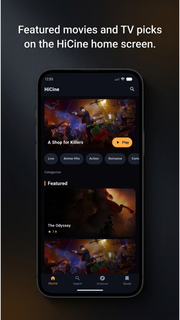
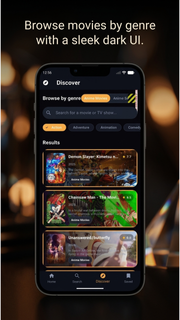
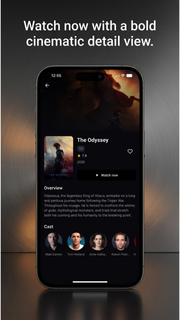
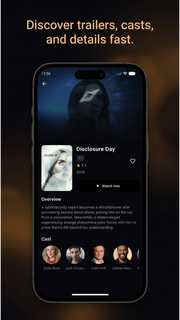
Find your next movie night pick with HiCine, a cinematic movie and TV show discovery guide built for browsing, searching, and saving entertainment you want to remember.Explore trending movies, popular TV series, top-rated titles, and what's now playing. Browse by genre or search for a specific film or show, then open a detailed page to view ratings, release years, story overviews, cast members, posters, and backdrops.WHY HICINE?• Discover trending and popular movies• Explore TV shows and series• Search movies and TV by title• Browse action, comedy, drama, romance, animation and more• Watch official trailers on YouTube when available• Check ratings, release dates, summaries and cast information• Save movies and shows to favorites• Switch between multiple supported languages• Enjoy a clean, cinematic dark interfaceMOVIE DISCOVERY MADE SIMPLENot sure what to watch next? HiCine helps you compare new movies, popular films, top-rated cinema, and TV shows in one place. Use genre filters to narrow your choices, open a title for more details, and save favorites for later.YOUR PERSONAL WATCHLISTBuild a personal collection of movies and series you want to revisit. Add or remove favorites in one tap and keep your next picks organized.TRAILERS AND TITLE DETAILSPreview official movie trailers, explore cast profiles, review summaries, ratings, release information, and discover related titles before deciding what to watch.HiCine is a discovery and information guide. It does not host or stream full movies or TV episodes. Trailer availability depends on external providers.Install HiCine and make every Hi Cine search the start of your next movie discovery.
और दिखाएं

1. MEmu इंस्टॉलर को डाउनलोड करें और इंस्टॉलेशन को पूरा करें

2. MEmu शुरू करें फिर होमपेज पर Google Play खोलें

3. Google Play में HiCine खोजें
Install
4. HiCine डाउनलोड कर इंस्टॉल करें
5. इंस्टॉल पूरा होने पर आइकन दबाएं

6. MEmu का उपयोग करके अपने कंप्यूटर पर HiCine का अनुभव करें
MEmu Play सबसे बेहतरीन मुफ़्त Android एमुलेटर है और 5 करोड़ लोग पहले ही इसके शानदार Android ऐप अनुभव का आनंद ले चुके हैं। MEmu 9 वर्चुअलाइज़ेशन तकनीक आपको अपने PC पर हज़ारों Android ऐप्स, यहाँ तक कि सबसे ज़्यादा ग्राफ़िक्स वाले ऐप्स भी, आसानी से चलाने की सुविधा देती है।
असीमित बैटरी या मोबाइल डेटा के साथ बेहतर ग्राफिक्स के साथ बड़ी स्क्रीन; लंबी अवधि।
कीबोर्ड और माउस या गेमपैड के उत्तम नियंत्रण के लिए संपूर्ण कीमैपिंग का समर्थन करता हैं।
एक ही पीसी पर मल्टी-इंस्टेंस मैनेजर के साथ एक समय में कई गेम खाते या कार्य कर सकते हैं।
Use HiCine on PC by following steps:







![티비핫 [TVHOT] :: 티비위키 시즌 2 PC](https://dl.memuplay.com/new_market/img/com.tvhot.tvhot.icon.2025-01-16-10-12-57.png)