
HiCine
อัปเดตเมื่อ
เวอร์ชันปัจจุบัน
1.0.1
ให้บริการโดย

เมื่อใช้ HiCine บนโทรศัพท์ของคุณไม่ต้องกังวลกับการชาร์จไฟมากเกินไปปลดปล่อยตัวคุณเองจากหน้าจอขนาดเล็กและสนุกกับการใช้แอพนี้บนหน้าจอขนาดใหญ่ จากนี้ไปรับประสบการณ์เต็มหน้าจอของแอปพลิเคชันของคุณด้วยคีย์บอร์ดและเมาส์ MEmu มีคุณสมบัติที่น่าแปลกใจที่คุณคาดหวัง: การติดตั้งที่รวดเร็วและการตั้งค่าที่ง่ายควบคุมได้ง่ายไม่ จำกัด แบตเตอรี่ข้อมูลมือถือและการโทรที่รบกวน MEmu 9 ใหม่ล่าสุดเป็นตัวเลือกที่ดีที่สุดสำหรับการใช้ Meitu – โปรแกรมแก้ไขภาพแนวธรรมชาติ บนคอมพิวเตอร์ของคุณ ด้วยรหัสการดูดซึมของเราผู้จัดการหลายอินสแตนซ์ทำให้สามารถเปิดบัญชี 2 บัญชีขึ้นไปในเวลาเดียวกันได้ และที่สำคัญที่สุดเอ็นจิ้นจำลองพิเศษของเราสามารถปลดปล่อยศักยภาพของPCของคุณและทำให้ทุกอย่างราบรื่นและสนุกสนาน
แสดงเพิ่มเติม
สัมผัสประสบการณ์สุดยอดการใช้งาน HiCine บนพีซีด้วย MEmu Play นี่คือโปรแกรมจำลอง Android ฟรีที่ทรงพลัง ให้คุณใช้งานแอป Android นับพันบนเดสก์ท็อป สนุกกับการเชื่อมต่อกับเพื่อนๆ และขัดเกลาผลงานของคุณอย่างมีประสิทธิภาพยิ่งขึ้น! Find your next movie night pick with HiCine, a cinematic movie and TV show discovery guide built for browsing, searching, and saving entertainment you want to remember.
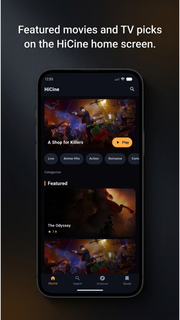
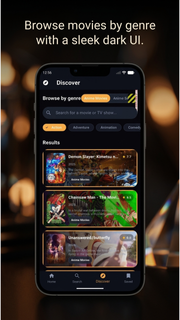
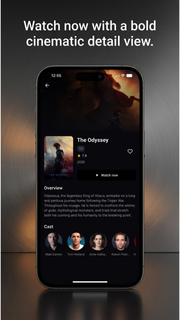
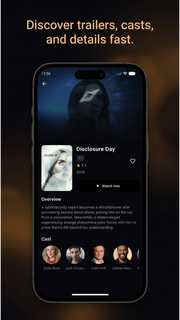
Find your next movie night pick with HiCine, a cinematic movie and TV show discovery guide built for browsing, searching, and saving entertainment you want to remember.Explore trending movies, popular TV series, top-rated titles, and what's now playing. Browse by genre or search for a specific film or show, then open a detailed page to view ratings, release years, story overviews, cast members, posters, and backdrops.WHY HICINE?• Discover trending and popular movies• Explore TV shows and series• Search movies and TV by title• Browse action, comedy, drama, romance, animation and more• Watch official trailers on YouTube when available• Check ratings, release dates, summaries and cast information• Save movies and shows to favorites• Switch between multiple supported languages• Enjoy a clean, cinematic dark interfaceMOVIE DISCOVERY MADE SIMPLENot sure what to watch next? HiCine helps you compare new movies, popular films, top-rated cinema, and TV shows in one place. Use genre filters to narrow your choices, open a title for more details, and save favorites for later.YOUR PERSONAL WATCHLISTBuild a personal collection of movies and series you want to revisit. Add or remove favorites in one tap and keep your next picks organized.TRAILERS AND TITLE DETAILSPreview official movie trailers, explore cast profiles, review summaries, ratings, release information, and discover related titles before deciding what to watch.HiCine is a discovery and information guide. It does not host or stream full movies or TV episodes. Trailer availability depends on external providers.Install HiCine and make every Hi Cine search the start of your next movie discovery.
แสดงเพิ่มเติม

1. ดาวน์โหลดตัวติดตั้ง MEmu และสิ้นสุดการติดตั้ง

2. เริ่ม MEmu จากนั้นเปิด Google Play บนหน้าแรก

3. ค้นหา HiCine ใน Google Play
Install
4. ดาวน์โหลดและติดตั้ง HiCine
5. เมื่อติดตั้งเสร็จให้คลิกที่ไอคอนเพื่อเริ่มใช้งาน

6. ใช้ MEmu เพื่อสัมผัสประสบการณ์ HiCine บนคอมพิวเตอร์ของคุณ
MEmu Play คือโปรแกรมจำลอง Android ที่ดีที่สุด มีผู้ใช้มากกว่า 50 ล้านคน มอบประสบการณ์การใช้งานแอป Android ขั้นสุดยอดให้กับคุณ เทคโนโลยีจำลองเสมือนของ MEmu ช่วยให้คุณรันแอป Android หลายพันแอปบนคอมพิวเตอร์ได้อย่างราบรื่น แม้แอปที่กินทรัพยากรเครื่องสูงที่สุด
จอใหญ่และกราฟฟิกสวยกว่า; เล่นได้นาน, ไม่ต้องใช้แบตเตอรี่โทรศัพท์หรือเน็ตโทรศัพท์.
ระบบปรับแต่งปุ่มคีย์บอร์ดและเม้าส์ตามที่คุณเลือก
เล่นมากกว่าหนึ่งเกมบน PC ในเวลาเดียวกันด้วยระบบหลายจอหรือ Multi-Instance manager.
Use HiCine on PC by following steps: