
KissAsian
تاریخ بهروزرسانی
نسخه کنونی
1.0
ارائهکننده

در مورد استفاده بیش از حد در هنگام استفاده از KissAsian بر روی تلفن همراه خود ، نگران نباشید ، خود را از صفحه ریز رها کنید و از استفاده از برنامه در یک صفحه نمایش بسیار بزرگتر لذت ببرید. از این پس ، تجربه تمام صفحه برنامه خود را با صفحه کلید و ماوس دریافت کنید .Mmu تمام ویژگی های شگفت انگیز مورد نظر شما را ارائه می دهد: نصب سریع و نصب آسان ، کنترل های بصری ، محدودیت بیشتر باتری ، داده های تلفن همراه و تماس های مزاحم. نام تجاری جدید MEmu 9 بهترین انتخاب برای استفاده از KissAsian در رایانه شما است. با جذب ما ، مدیر چند نمونه باعث می شود همزمان 2 یا چند حساب را باز کنید. و از همه مهمتر ، موتور انحصاری منحصر به فرد ما می تواند پتانسیل کامل کامپیوتر شما را آزاد کند ، همه چیز را صاف و لذت بخش کند.
بیشتر نشان بده
از تجربه فوقالعاده استفاده از KissAsian در کامپیوتر با MEmu Play لذت ببرید. این یک شبیهساز اندروید رایگان و قدرتمند است که هزاران برنامه اندروید را برای نسخه دسکتاپ در اختیار شما قرار میدهد. KissAsian helps viewers who want an easy way to find and stream Asian dramas and movies on mobile.
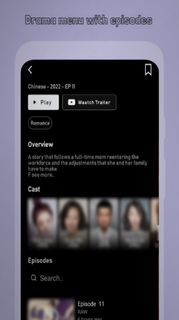


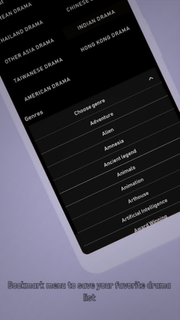
KissAsian helps viewers who want an easy way to find and stream Asian dramas and movies on mobile. Whether you are catching up on a long running series or trying a new film, the app keeps browsing straightforward and playback quick. You can explore by show type or genre and follow ongoing releases as new episodes appear. Because access can shift across regions, the catalog may vary. To try it on an Android phone, some users look for the KissAsian APK to install and test availability.KissAsian FeaturesWide Asian catalogKissAsian offers a large selection of titles from Korea, Japan, China, Thailand, Taiwan, and more. You can browse dramas, movies, and TV shows without digging through scattered sources. This makes it easier to settle on a series or film that matches your mood at any moment.English subtitles and RAW labelingYou can watch with soft English subtitles on many entries. Some items may be marked as RAW, which indicates they do not include subtitles. Checking the episode or title details first helps you avoid surprises before starting playback.Multiple servers for playbackIf a stream buffers or stalls, you can switch among several available servers. Choosing another server often aligns better with your current network conditions and improves loading times. This gives you a practical way to continue watching without waiting.Bookmarks and progress trackingYou can bookmark favorites and resume from where you left off. Browsing tools like Series List, A to Z List, and a Schedule with Ongoing and Completed status help you track new episodes as they arrive. This steady structure supports regular viewing without losing your place.Discovery and filtersWhen you want a quick pick, KissAsian includes Trending This Week, Latest Release, and Surprise Me to surface options fast. You can also filter by genre such as Romance, Action, Comedy, or Thriller, and sort by ratings and type. These discovery tools keep choices fresh while reducing decision time.Availability notes for KissAsianAvailability can change due to domain shifts and regional blocks. The original service has faced shutdowns and domain changes over time, so clones and unofficial apps may appear. If you are searching for the KissAsian latest version, be aware that naming and access can vary by region and over time.Content sourcing and legalityA common notice associated with the service states that KissAsian does not store files and contents are provided by non affiliated third parties. Because content may be sourced from other sites, legality is not guaranteed and users are advised to avoid illegal downloads. For licensed viewing with proper rights, legal alternatives such as Viki, Viu, iQIYI, and WeTV are available in many regions.Playback compatibility tipsSome users report that lightweight or mini browsers struggle with playback stability. If the app opens streams in a browser window, use a mainstream Android browser for more reliable results. A stable network connection further reduces buffering during long episodes.How to use KissAsian on AndroidThis quick guide explains how to browse, play, and track shows on the KissAsian app. For easy setup, make sure the app opens links with a mainstream Android browser if prompted by the system, then continue watching inside the app as needed. This helps keep the experience consistent while you explore this Asian drama app. Open KissAsian after installation, then allow any required permissions for playback. Browse by Genre, Type, or the Series List and A to Z List, then choose a title. Select an episode or movie, then pick a server and wait briefly for the player to load. Check the subtitle toggle and confirm if subs are available, or note RAW if no subs are listed. Bookmark the title to track progress, and check the Schedule for new episodes when they release.Start watching with KissAsianKissAsian organizes Asian dramas and movies into a clear catalog with subtitles, discovery tools, and server options for stable playback. To begin, download KissAsian and use bookmarks, filters, and schedule views to keep your watchlist on track.
بیشتر نشان بده

1. نصب کننده Memu را دانلود کرده و راه اندازی را تمام کنید

2. Memu را اجرا کنید و سپس گوگل پلی را بر روی دستکتاپ باز کنید

3. KissAsian را بر روی گوگل پلی جستجو کنید
Install
4. KissAsian را دانلود و نصب کنید
5. پس از اتمام نصب روی آیکون کلیک کنید تا اجرا شود

6. با استفاده از MEmu، KissAsian را روی کامپیوتر خود تجربه کنید.
MEmu در حال حاضر بهترین شبیهساز رایگان اندروید است که ۵۰ میلیون کاربر از تجربه استثنایی برنامههای اندروید لذت میبرند. فناوری مجازیسازی MEmu به شما امکان میدهد هزاران برنامه اندروید، حتی بازیهای با گرافیک بالا را به راحتی روی رایانه خود اجرا کنید.
صفحه نمایش بزرگتر با گرافیک بهتر؛ زمان طولانی تر، بدون محدودیت باتری یا داده تلفن همراه.
پشتیبانی کامل از Keymapping برای کنترل دقیق صفحه کلید و ماوس یا گیم پد.
چندین حساب بازی یا وظایف در یک رایانه شخصی در یک زمان با مدیریت همزمان همه
Use KissAsian on PC by following steps: