
KissAsian
Updated
Current Version
1.0
Offered By

Stop worrying about high battery drain when using KissAsian on your phone. Free yourself from the tiny screen and enjoy the app on a much larger display. From now on, get a full-screen experience of your app with the convenience of a keyboard and mouse. MEmu offers you all the surprising features you’d expect: quick installation and easy setup, intuitive controls, and no more worries about battery life, mobile data, or unexpected calls. The all-new MEmu 9 is the choice for using KissAsian on your computer. With the MEmu multi-instance manager, you can run two or more accounts at the same time. Most importantly, our exclusive emulation engine unlocks your PC’s full potential, delivering smooth and enjoyable performance.
Show more
Enjoy superb experience of using KissAsian on PC with MEMU App Player. It's a powerful free Android emulator which provides you with thousands of android apps for their desktop version. Enjoy connecting with friends and polishing your work with higher efficiency! KissAsian helps viewers who want an easy way to find and stream Asian dramas and movies on mobile.
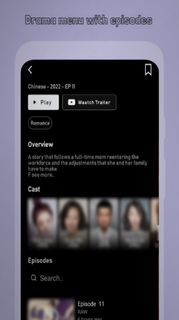


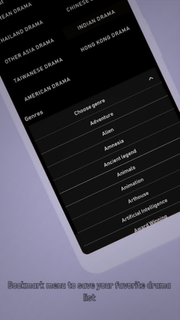
KissAsian helps viewers who want an easy way to find and stream Asian dramas and movies on mobile. Whether you are catching up on a long running series or trying a new film, the app keeps browsing straightforward and playback quick. You can explore by show type or genre and follow ongoing releases as new episodes appear. Because access can shift across regions, the catalog may vary. To try it on an Android phone, some users look for the KissAsian APK to install and test availability.KissAsian FeaturesWide Asian catalogKissAsian offers a large selection of titles from Korea, Japan, China, Thailand, Taiwan, and more. You can browse dramas, movies, and TV shows without digging through scattered sources. This makes it easier to settle on a series or film that matches your mood at any moment.English subtitles and RAW labelingYou can watch with soft English subtitles on many entries. Some items may be marked as RAW, which indicates they do not include subtitles. Checking the episode or title details first helps you avoid surprises before starting playback.Multiple servers for playbackIf a stream buffers or stalls, you can switch among several available servers. Choosing another server often aligns better with your current network conditions and improves loading times. This gives you a practical way to continue watching without waiting.Bookmarks and progress trackingYou can bookmark favorites and resume from where you left off. Browsing tools like Series List, A to Z List, and a Schedule with Ongoing and Completed status help you track new episodes as they arrive. This steady structure supports regular viewing without losing your place.Discovery and filtersWhen you want a quick pick, KissAsian includes Trending This Week, Latest Release, and Surprise Me to surface options fast. You can also filter by genre such as Romance, Action, Comedy, or Thriller, and sort by ratings and type. These discovery tools keep choices fresh while reducing decision time.Availability notes for KissAsianAvailability can change due to domain shifts and regional blocks. The original service has faced shutdowns and domain changes over time, so clones and unofficial apps may appear. If you are searching for the KissAsian latest version, be aware that naming and access can vary by region and over time.Content sourcing and legalityA common notice associated with the service states that KissAsian does not store files and contents are provided by non affiliated third parties. Because content may be sourced from other sites, legality is not guaranteed and users are advised to avoid illegal downloads. For licensed viewing with proper rights, legal alternatives such as Viki, Viu, iQIYI, and WeTV are available in many regions.Playback compatibility tipsSome users report that lightweight or mini browsers struggle with playback stability. If the app opens streams in a browser window, use a mainstream Android browser for more reliable results. A stable network connection further reduces buffering during long episodes.How to use KissAsian on AndroidThis quick guide explains how to browse, play, and track shows on the KissAsian app. For easy setup, make sure the app opens links with a mainstream Android browser if prompted by the system, then continue watching inside the app as needed. This helps keep the experience consistent while you explore this Asian drama app. Open KissAsian after installation, then allow any required permissions for playback. Browse by Genre, Type, or the Series List and A to Z List, then choose a title. Select an episode or movie, then pick a server and wait briefly for the player to load. Check the subtitle toggle and confirm if subs are available, or note RAW if no subs are listed. Bookmark the title to track progress, and check the Schedule for new episodes when they release.Start watching with KissAsianKissAsian organizes Asian dramas and movies into a clear catalog with subtitles, discovery tools, and server options for stable playback. To begin, download KissAsian and use bookmarks, filters, and schedule views to keep your watchlist on track.
Show more

1. Download MEmu installer and finish the setup

2. Start MEmu then open Google Play on the desktop

3. Search KissAsian in Google Play
Install
4. Download and Install KissAsian
5. On install completion click the icon to start

6. Enjoy using KissAsian on PC with MEmu
MEmu Play is the best Android emulator, and 100 million users already enjoy its superb Android app experience. Powered by advanced virtualization technology, it lets you enjoy thousands of Android apps smoothly on your PC—including the most graphics-intensive ones.
Bigger screen with better graphics; Long duration, without limitation of battery or mobile data.
Full Keymapping support for precise control of keyboard and mouse or gamepad.
Multiple game accounts or tasks on single PC at one time with Multi-Instance manager.
Use KissAsian on PC by following steps: