One Store
تاریخ بهروزرسانی
نسخه کنونی
4.8.0-release
ارائهکننده

در مورد استفاده بیش از حد در هنگام استفاده از One Store بر روی تلفن همراه خود ، نگران نباشید ، خود را از صفحه ریز رها کنید و از استفاده از برنامه در یک صفحه نمایش بسیار بزرگتر لذت ببرید. از این پس ، تجربه تمام صفحه برنامه خود را با صفحه کلید و ماوس دریافت کنید .Mmu تمام ویژگی های شگفت انگیز مورد نظر شما را ارائه می دهد: نصب سریع و نصب آسان ، کنترل های بصری ، محدودیت بیشتر باتری ، داده های تلفن همراه و تماس های مزاحم. نام تجاری جدید MEmu 9 بهترین انتخاب برای استفاده از One Store در رایانه شما است. با جذب ما ، مدیر چند نمونه باعث می شود همزمان 2 یا چند حساب را باز کنید. و از همه مهمتر ، موتور انحصاری منحصر به فرد ما می تواند پتانسیل کامل کامپیوتر شما را آزاد کند ، همه چیز را صاف و لذت بخش کند.
بیشتر نشان بده
از تجربه فوقالعاده استفاده از One Store در کامپیوتر با MEmu Play لذت ببرید. این یک شبیهساز اندروید رایگان و قدرتمند است که هزاران برنامه اندروید را برای نسخه دسکتاپ در اختیار شما قرار میدهد. One Store helps users who want a reliable place to find Android apps, games, and digital content tailored to local tastes.
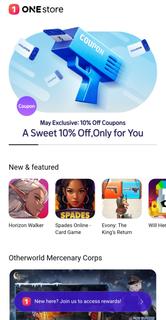
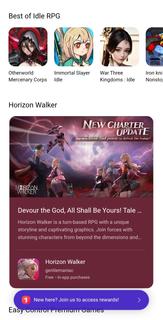
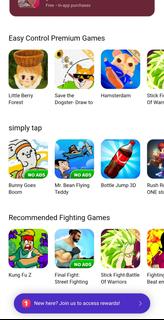
One Store helps users who want a reliable place to find Android apps, games, and digital content tailored to local tastes. It brings together everyday purchases and entertainment in one app, so browsing and buying feel straightforward from the start. With an emphasis on convenience, it supports familiar payment methods and organized categories for simple navigation. As content changes over time, users see fresh options and timely deals. For easy access, many users look for the One Store APK to install and update on their devices.One Store featuresExtensive catalogOne Store offers a broad range of Android apps, games, eâbooks, music, and other digital content. It organizes these categories so you can move from browsing to downloading without confusion. As new releases arrive, the catalog expands and maintains a mix of local and global selections.Exclusive titles and regional releasesOne Store includes exclusive apps and games that may debut in specific regions first. These releases appear alongside standard listings, so users can see what is newly available without searching elsewhere. Over time, exclusives rotate and keep the lineup fresh for local audiences.Secure payment optionsOne Store supports carrier billing, credit cards, and gift cards, which reduces friction at checkout. Users choose the method that suits their situation, then confirm purchases in a straightforward flow. This flexibility helps purchases feel predictable and reduces failed transactions.Daily deals and reward pointsOne Store provides regular discounts and a rewards system that grants points and benefits. You can apply points during checkout or save them for future purchases, which adds value over time. Because promotions change daily or seasonally, checking the deals section helps you plan purchases more efficiently.Personalized discovery and quick downloadsOne Store uses recommendations and an intuitive layout to surface relevant apps and content. As you browse, suggestions adapt and guide you toward items that fit your interests. When you decide to install, downloads begin promptly, and progress indicators help you track completion.Legitimacy and regional availability of One StoreOne Store is recognized as Koreaâs leading Android marketplace and is backed by major carriers and regional partners. This foundation supports verified payment options and ongoing security updates for the client app. Availability, featured content, and promotions can vary by country and carrier, so the experience may differ across regions. To access the latest releases and stability improvements, confirm you are using the One Store latest version on your device.Preinstalled One Store on some devicesOn certain phones, especially those sold through specific carriers or partners, One Store may come preinstalled. In many cases, you can uninstall or disable it in the device settings like other apps. On some models, full removal is restricted, and disabling the app is the available option. This setup reflects carrier or partner choices for the default marketplace on those devices.How to use One Store on AndroidThis short guide outlines the basic flow from browsing to purchase inside One Store. If you prefer a manual install, locate the One Store APK from a trusted source, then open the app to begin.Open One Store, grant any required permissions, choose your language, and sign in or create an account.Browse categories or use search to find apps, games, eâbooks, or music that match your interests.Open a product page to read details, then tap purchase or install. Select carrier billing, credit card, or gift card as needed.Confirm the payment and start the download. Wait for the progress to complete before opening the item.Return to your library to manage updates, view purchases, and adjust notification or payment settings for future use.Start using One Store todayOne Store brings localized content, flexible payments, and ongoing deals into a single Android marketplace. To explore apps, games, and media without delay, download One Store and begin browsing.
بیشتر نشان بده

1. نصب کننده Memu را دانلود کرده و راه اندازی را تمام کنید

2. Memu را اجرا کنید و سپس گوگل پلی را بر روی دستکتاپ باز کنید

3. One Store را بر روی گوگل پلی جستجو کنید
Install
4. One Store را دانلود و نصب کنید
5. پس از اتمام نصب روی آیکون کلیک کنید تا اجرا شود

6. با استفاده از MEmu، One Store را روی کامپیوتر خود تجربه کنید.
MEmu در حال حاضر بهترین شبیهساز رایگان اندروید است که ۵۰ میلیون کاربر از تجربه استثنایی برنامههای اندروید لذت میبرند. فناوری مجازیسازی MEmu به شما امکان میدهد هزاران برنامه اندروید، حتی بازیهای با گرافیک بالا را به راحتی روی رایانه خود اجرا کنید.
صفحه نمایش بزرگتر با گرافیک بهتر؛ زمان طولانی تر، بدون محدودیت باتری یا داده تلفن همراه.
پشتیبانی کامل از Keymapping برای کنترل دقیق صفحه کلید و ماوس یا گیم پد.
چندین حساب بازی یا وظایف در یک رایانه شخصی در یک زمان با مدیریت همزمان همه
Use One Store on PC by following steps: