LUDO SIX PLAYER
Mise à jour
Version actuelle
1.8.0
Proposée par

Avec toute la passion que vous avez à jouer LUDO SIX PLAYER, vos mains ne sont pas sensées se limiter à l’infime écran de votre téléphone. Jouez comme un pro et ayez le contrôle total de votre jeu à l’aide du clavier et de la souris. MEmu satisfait toutes vos attentes. Téléchargez et jouez LUDO SIX PLAYER sur PC. Jouez aussi longtemps que vous souhaitez sans aucune limitation de batterie, de données mobiles et d’appels embêtants. La toute nouvelle version de MEmu 9 est la meilleure option de jouer LUDO SIX PLAYER sur PC. Réalisé par nos experts, l’e magnifique système d’affectation de touches prédéfini fait de LUDO SIX PLAYER un jeu réaliste sur PC. Le gestionnaire multi-instances de MEmu permet 2 ou plusieurs comptes de jeu sur le même appareil. Et le plus important, le moteur d’émulation exclusif peut libérer le plein potentiel de votre PC, ce qui facilite tout.
Afficher plus
Téléchargez LUDO SIX PLAYER avec le simulateur d’Android MEmu sur votre PC. Profitez de jouer sur un grand écran. LUDO SIX PLAYER – Classic Multiplayer Board Game.



LUDO SIX PLAYER – Classic Multiplayer Board Game
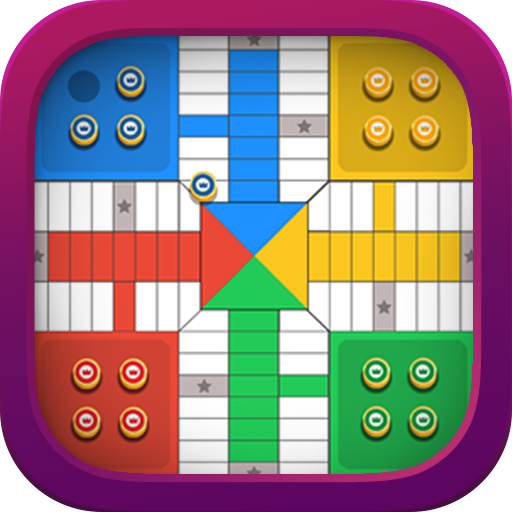
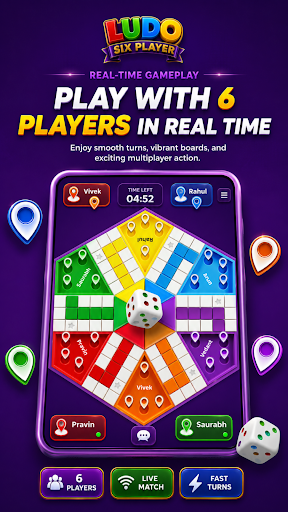
Enjoy a smooth, amazing, and exciting Ludo gaming experience with LUDO SIX PLAYER, a classic multiplayer board game made for friends, family, kids, and casual game lovers. Play the traditional Ludo game with up to 6 players in one match and enjoy a colorful, fast, and easy-to-play dice board game anytime, anywhere.
If you love online ludo games, multiplayer board games, Indian ludo, classic dice games, or six player ludo games, this game gives you the perfect mix of fun, strategy, and entertainment. Whether you want to play with friends, family members, or smart AI opponents, LUDO SIX PLAYER brings the classic Ludo experience to your mobile device.
Play Classic Ludo with Up to 6 Players
LUDO SIX PLAYER is designed for players who want more fun than a normal 4-player Ludo game. Play with up to six players in one exciting match and enjoy a bigger, more competitive board game experience.
Roll the dice, move your tokens, capture opponents, block their path, and race to bring all your pieces home before everyone else. Every match feels fresh, fun, and full of strategy.
Indian Ludo Board Game Experience
Ludo is one of the most loved board games in India and around the world. From family game nights to casual fun with friends, Ludo has always been a favorite dice game for all ages.
LUDO SIX PLAYER brings that same Indian Ludo game experience with colorful graphics, smooth gameplay, simple controls, and exciting matches. It is easy for beginners and fun for experienced Ludo players.
Challenge Smart AI Opponents
No friends available? No problem.
Play single-player Ludo against smart AI opponents and enjoy a challenging board game experience anytime. You can play against up to five computer players and improve your Ludo strategy with every match.
Each game is different, every dice roll matters, and every move can change the result.
Offline Ludo Game – Play Anytime
LUDO SIX PLAYER is also perfect for players looking for an offline Ludo game. Enjoy classic Ludo gameplay without needing internet access.
Play at home, while traveling, during breaks, or whenever you want a quick and fun board game. It is a great choice for family entertainment, casual gaming, and relaxing dice game sessions.
Perfect for Fans of Online Ludo and Multiplayer Games
If you enjoy online ludo, multiplayer games, board games, dice games, Indian ludo, or family games, LUDO SIX PLAYER is made for you.
The game gives you a fast, smooth, colorful, and enjoyable Ludo experience with support for more players, more fun, and more exciting matches.
Features
• Smooth and amazing Ludo gaming experience
• Play with up to 6 players in one match
• Classic Indian Ludo board game style
• Single-player mode with smart AI opponents
• Offline Ludo gameplay – play without internet
• Fun multiplayer board game experience
• Colorful graphics and beautiful themes
• Simple controls and easy-to-play interface
• Fast dice rolling and exciting token movement
• Suitable for kids, adults, friends, and families
• Great for family game nights and casual gaming
• Perfect for fans of online ludo and classic dice games
Why You’ll Love LUDO SIX PLAYER
Six Player Ludo Game
Classic Indian Ludo
Offline Board Game
Multiplayer Dice Game Experience
Smooth and Colorful Graphics
Smart AI Opponents
Family-Friendly Gameplay
Easy Controls
Fun for Kids and Adults
Great Alternative for Online Ludo Fans
Download LUDO SIX PLAYER Now
Download LUDO SIX PLAYER and enjoy one of the most exciting classic multiplayer board games with up to 6 players. Roll the dice, move your tokens, defeat your opponents, and become the Ludo champion.
Play now and experience a smooth, colorful, and fun Ludo game made for everyone.
Afficher plus

1. Téléchargez l'installateur MEmu et terminez l'installation

2. Démarrez MEmu puis ouvrez Google Play sur la page d'accueil

3. Recherchez LUDO SIX PLAYER dans Google Play
Install
4. Téléchargez et installez LUDO SIX PLAYER
5. Une fois l'installation terminée, cliquez sur l'icône pour démarrer

6. Profitez de jouer LUDO SIX PLAYER sur PC avec MEmu
Le lecteur d'application MEmu est le meilleur émulateur Android gratuit, et 50 millions de personnes profitent déjà de sa fantastique expérience de jeu Android. La technologie de virtualisation MEmu vous donne la possibilité de jouer à des milliers de jeux Android sur votre PC sans aucune difficulté, même aux plus gourmands.
L’écran plus grand avec de meilleurs graphismes; Une longue durée, sans limitation de batterie ou de données mobiles.
Soutien du Keymapping pour un contrôle précis du clavier et de la souris ou de la manette de jeu
Plusieurs comptes de jeu ou tâches sur un seul PC en même temps avec le gestionnaire de multi-instance.
Play LUDO SIX PLAYER on PC by following steps: