BenBen TV
Mise à jour
Version actuelle
1.0.0
Proposée par

Ne vous inquiétez plus des surcharges lorsque vous utilisez BenBen TV sur votre téléphone portable, libérez-vous de l'écran minuscule et profitez de l'application sur un écran beaucoup plus grand. Désormais, vous pouvez utiliser votre application en plein écran avec le clavier et la souris. MEmu vous offre toutes les fonctionnalités surprenantes que vous attendiez : installation rapide et configuration facile, commandes intuitives, plus de limitations de batterie, de données mobiles et d'appels dérangeants. Le tout nouveau MEmu 9 est le meilleur choix pour utiliser BenBen TV sur votre ordinateur. Codé avec notre absorption, le gestionnaire multi-instance permet d'ouvrir 2 ou plusieurs comptes en même temps. Et le plus important, notre moteur d'émulation exclusif peut libérer tout le potentiel de votre PC, rendre tout cela fluide et agréable.
Afficher plus
Profitez d'une expérience BenBen TV exceptionnelle sur PC grâce à MEmu Play. Cet émulateur Android gratuit et performant vous donne accès à des milliers d'applications Android pour votre ordinateur. Restez en contact avec vos amis et travaillez plus efficacement ! BenBen TV is a simple, fast video player for your own streams and playlists.
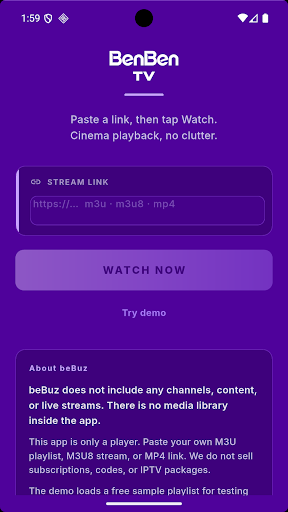
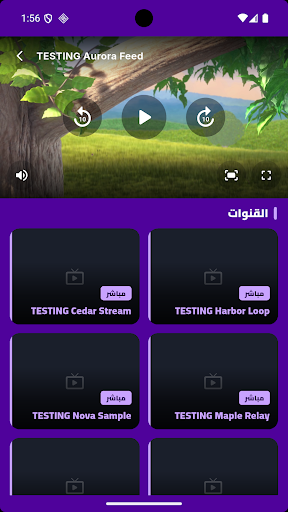
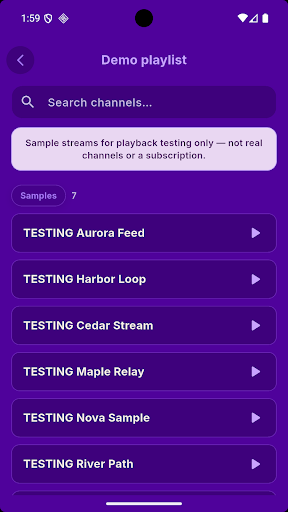
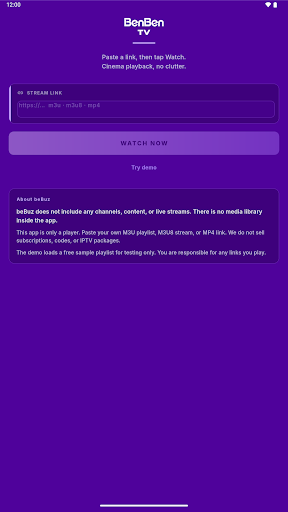
BenBen TV is a simple, fast video player for your own streams and playlists.
Paste a link, tap Watch, and your video starts playing in a clean, distraction-free player. BenBen TV supports the most common streaming formats, so you can open the playlists and links you already have in one place.
IMPORTANT: BenBen TV does not include any channels, content or live streams. There is no media library inside the app. You must add your own links or playlists. We do not sell subscriptions, codes or playlists, and we are not affiliated with any content provider. Please only play content you have the right to access.
WHAT YOU CAN DO
• Paste an M3U or M3U8 playlist link, or a direct MP4 / HLS video link
• Browse your playlist as a clean list, with search to find a stream quickly
• Watch in a smooth player with play / pause and 10-second rewind and forward
• Switch to fullscreen with one tap, or rotate your phone for landscape
• Mute and unmute instantly
• Change the video fit to fill the screen or keep the original size
• Switch between items in your playlist without leaving the player
• Works on phones and tablets
TRY IT FIRST
Not sure how it works? Tap "Try demo" to load a free sample playlist made for playback testing, and see the player in action before adding your own links.
SIMPLE BY DESIGN
• No account or sign-up required
• Lightweight and quick to open
• Clean dark purple interface that keeps the focus on your video
SUPPORTED FORMATS
• M3U and M3U8 playlists
• HLS streams (.m3u8)
• MP4 video files
Playback depends on the link you provide and your internet connection. Some streams may not work if the source is offline, restricted or uses an unsupported format.
ADS
BenBen TV is free and shows ads to support development.
FEEDBACK
Have a suggestion or found a problem? Contact us through the email on this page. We read every message and keep improving the player.
Afficher plus

1. Téléchargez l'installateur MEmu et terminez l'installation

2. Démarrez MEmu puis ouvrez Google Play sur la page d'accueil

3. Recherchez BenBen TV dans Google Play
Install
4. Téléchargez et installez BenBen TV
5. Une fois l'installation terminée, cliquez sur l'icône pour démarrer

6. Utiliser MEmu pour utiliser BenBen TV sur votre ordinateur
MEmu Play est actuellement le meilleur émulateur Android gratuit, avec 50 millions d'utilisateurs qui profitent d'une expérience Android exceptionnelle. La technologie de virtualisation de MEmu vous permet de jouer facilement à des milliers d'applications Android sur votre ordinateur, même les plus gourmandes en ressources.
L’écran plus grand avec de meilleurs graphismes; Une longue durée, sans limitation de batterie ou de données mobiles.
Soutien du Keymapping pour un contrôle précis du clavier et de la souris ou de la manette de jeu
Plusieurs comptes de jeu ou tâches sur un seul PC en même temps avec le gestionnaire de multi-instance.
Use BenBen TV on PC by following steps: