iQuran Lite – القران الكريم
Mise à jour
Version actuelle
2.7.4
Proposée par

Ne vous inquiétez plus des surcharges lorsque vous utilisez iQuran Lite – القران الكريم sur votre téléphone portable, libérez-vous de l'écran minuscule et profitez de l'application sur un écran beaucoup plus grand. Désormais, vous pouvez utiliser votre application en plein écran avec le clavier et la souris. MEmu vous offre toutes les fonctionnalités surprenantes que vous attendiez : installation rapide et configuration facile, commandes intuitives, plus de limitations de batterie, de données mobiles et d'appels dérangeants. Le tout nouveau MEmu 9 est le meilleur choix pour utiliser iQuran Lite – القران الكريم sur votre ordinateur. Codé avec notre absorption, le gestionnaire multi-instance permet d'ouvrir 2 ou plusieurs comptes en même temps. Et le plus important, notre moteur d'émulation exclusif peut libérer tout le potentiel de votre PC, rendre tout cela fluide et agréable.
Afficher plus
Téléchargez iQuran Lite – القران الكريم avec le simulateur d’Android MEmu sur votre PC. Profitez de jouer sur un grand écran. ** iPray for Android FREE for a LIMITED time **.
** iPray for Android FREE for a LIMITED time **
********************************************
** NEWS
**
** Full version of iQuran will now be sold for a fraction of its original price, down to $1.99 from $6.99. InshAllah
** the new price will reflect only the costs we need to cover for the fast and excellent audio download service
** we provide. BarakAllahufikum and Ramadan Kareem.
********************************************
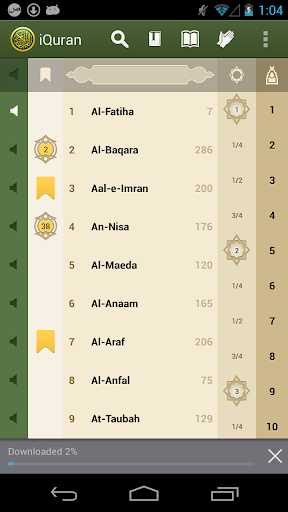
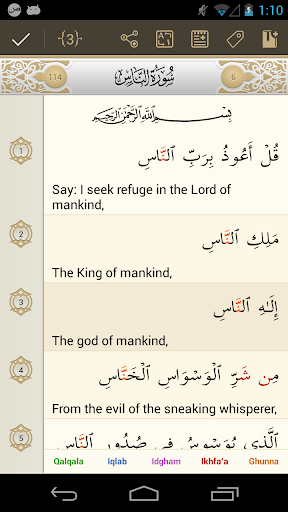
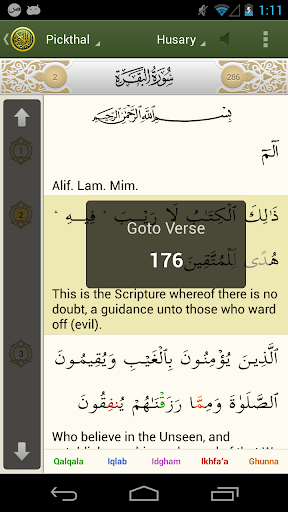
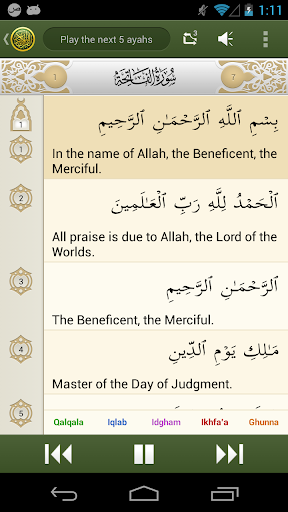
Read the Holy Quran in Arabic alongside its translation. This app provides you with the full Qur'an as well as its full english translation along with a full set of audio recitation files. iQuran offers you verse by verse audio playback, color coded Tajweed (pronunciation) rules, repeat functions, bookmarks, tags, search, excellent navigational controls, a side by side english translation, audio recitation and much more.
NOTE: Permission to "read phone state" is only required in order to pause recitation in case the phone rings or in case you place a call while recitation is playing in the background.
Apart from offering an immersed user experience, the free version of iQuran includes the following limitations only:
* Full Landscape supported
* Color coded Tajweed (Pronunciation) rules for the last Juz / Para
* Bookmark and Tags. A maximum of 5 bookmarks and 3 Tags.
* One english translation: Shakir
* Search results limited to 20 per search
* One recitation: Sheikh Husary
* Powerful audio controls with an option to group playback of verses to aid in memorization
All other features are fully enabled and there is no expiration date on this app.
iQuran has been designed to work on all Android devices.
Afficher plus

1. Téléchargez l'installateur MEmu et terminez l'installation

2. Démarrez MEmu puis ouvrez Google Play sur la page d'accueil

3. Recherchez iQuran Lite – القران الكريم dans Google Play
Install
4. Téléchargez et installez iQuran Lite – القران الكريم
5. Une fois l'installation terminée, cliquez sur l'icône pour démarrer

6. Utiliser MEmu pour utiliser iQuran Lite – القران الكريم sur votre ordinateur
MEmu Play est actuellement le meilleur émulateur Android gratuit, avec 50 millions d'utilisateurs qui profitent d'une expérience Android exceptionnelle. La technologie de virtualisation de MEmu vous permet de jouer facilement à des milliers d'applications Android sur votre ordinateur, même les plus gourmandes en ressources.
L’écran plus grand avec de meilleurs graphismes; Une longue durée, sans limitation de batterie ou de données mobiles.
Soutien du Keymapping pour un contrôle précis du clavier et de la souris ou de la manette de jeu
Plusieurs comptes de jeu ou tâches sur un seul PC en même temps avec le gestionnaire de multi-instance.
Use iQuran Lite – القران الكريم on PC by following steps: