Dcoder, Compiler IDE :Code & P
Mise à jour
Version actuelle
4.0.199
Proposée par

Ne vous inquiétez plus des surcharges lorsque vous utilisez Dcoder, Compiler IDE :Code & P sur votre téléphone portable, libérez-vous de l'écran minuscule et profitez de l'application sur un écran beaucoup plus grand. Désormais, vous pouvez utiliser votre application en plein écran avec le clavier et la souris. MEmu vous offre toutes les fonctionnalités surprenantes que vous attendiez : installation rapide et configuration facile, commandes intuitives, plus de limitations de batterie, de données mobiles et d'appels dérangeants. Le tout nouveau MEmu 9 est le meilleur choix pour utiliser Dcoder, Compiler IDE :Code & P sur votre ordinateur. Codé avec notre absorption, le gestionnaire multi-instance permet d'ouvrir 2 ou plusieurs comptes en même temps. Et le plus important, notre moteur d'émulation exclusif peut libérer tout le potentiel de votre PC, rendre tout cela fluide et agréable.
Afficher plus
Téléchargez Dcoder, Compiler IDE :Code & P avec le simulateur d’Android MEmu sur votre PC. Profitez de jouer sur un grand écran. Dcoder is a mobile coding IDE and platform (Compiler for mobile), where you can run your projects, code and learn algorithms by programming on mobile.
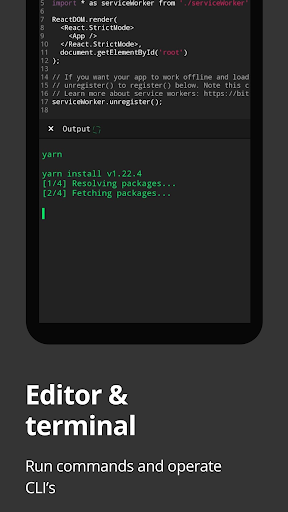
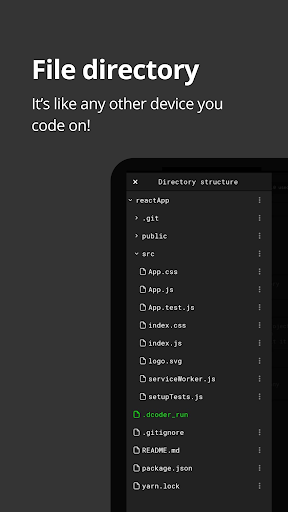
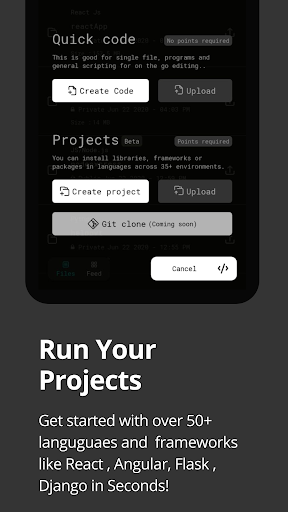
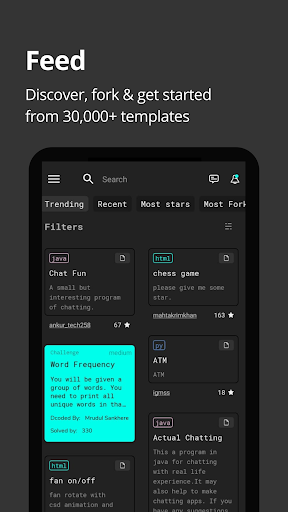
Dcoder is a mobile coding IDE and platform (Compiler for mobile), where you can run your projects, code and learn algorithms by programming on mobile. Build and deploy your projects straight from the mobile and integrate with Git (Gtihub, bitbucker) and sync with vs code, use of code compilations to make coding easy. Now code anytime, anywhere and on the go.
Choose from frameworks like:
1. React js
2. Angular js
3. Django
4. Flask
5. Flutter
6. Git support (Github or bitbucket)
7. Ruby on rails
.. and many many more...
Or choose from languages like:
1. C : learn C programming, a powerful general-purpose language.
2. C++ : GCC compiler 6.3
3. Java : best Java Programming ide, JDK 8
4. Python : learn Python 2.7 and Python 3.
5. C# : Mono Compiler 4
6. Php : Php Interpreter 7.0
7. Objective-C : GCC compiler
8. Ruby : Ruby version 1.9
9. Lua : Lua Interpreter 5.2
10. JS/NodeJS : Node.js engine 6.5
11. Go : Go Lang 1.6
12. VB.Net
13. F#
14. Common Lisp
15. R
16. Scala
17. Perl
18. Pascal
19. Swift
20. Tcl
21, Prolog
22. Assembly
23. Haskell
24. Clojure
25. Kotlin
26. Groovy
27. Scheme
28. Rust
29. Bf
30. Html
31. Css
Dcoder uses a Rich Text Editor supporting syntax highlighting and packed with the necessary tools to offer you all the edge that an IDE or code compiler is supposed to.
Its the fastest code compiler (IDE), coding and programming app available for android so far.
With Dcoder one can:
Write a program/code in any of the available 50+ Programming Languages and frameworks.
Code and Debug the code, see compilation results and errors at the same time on the same screen.
Enjoy the power and ease of coding on your favourite Code Editor like Notepad++ or Sublime Text with compilation power, makes it equivalent to a powerful IDE like eclipse.
Test your problem solving skills by solving challenges from the number of algorithm based challenges available in Challenges section.
Learn Html, Css, JavaScript, Ruby programming, C Programming, Python and Java in the app along with many more programming languages.
Irrespective of your coding skills be it beginner or expert Dcoder helps you to learn code and improve your skills while in a boring lecture or whenever you feel like.
The main features include:
1. Rich Text Editor with Syntax highlighting.(Code Editor)
2. Line number, Auto indent, Autocomplete Parenthesis.
3. Undo Redo.
4. File Open/Save.
5. Custom Suggestion View.
6. Multiple Language Support.
7. User input for languages like C, C++, Java, Php, JavaScript, Node.js and others.
8. Active debug view for faster access to Output.
9. Thoroughly designed Algorithm problems to improve coding Skills and make programmers industry ready.
10. Leader Board: To know where you stand amongst the vast Dcoder community.
11. Custom Menu Drawer, Custom Code Editor Themes, Editable font Size for Editor and much more!!
Disclaimer: Dcoder uses an array of strong cloud based compilers to compile the code and display output, it is the fastest one and has helped to bring app size to ~8 MB, Please don't rate low or demand offline features that is not possible here. Also instead of rating low, you can write your problems to us at support@dcoder.tech that will let us help you better.
Dcoder is an online compiler, now run, compile and execute your code snippets on your own android mobile devices.
Begin the journey to enhance your skills.
How to solve algorithms?
https://youtu.be/rwzdKkgWKV4
For a brief video:
https://youtu.be/X9lsvumpFGI
Join the Social Groups
For any help, questions related to Dcoder reach out on
https://www.linkedin.com/company/dcodermobile/
https://www.facebook.com/groups/dcodermobile
https://www.instagram.com/dcodermobile/
https://twitter.com/dcodermobile
Loved it? Be a beta tester, for early access to experimental features
https://play.google.com/apps/testing/com.paprbit.dcoder
Privacy policy: https://dcoder.tech/privacy.html
Terms of use: https://dcoder.tech/termsofuse.html
Afficher plus

1. Téléchargez l'installateur MEmu et terminez l'installation

2. Démarrez MEmu puis ouvrez Google Play sur la page d'accueil

3. Recherchez Dcoder, Compiler IDE :Code & P dans Google Play
Install
4. Téléchargez et installez Dcoder, Compiler IDE :Code & P
5. Une fois l'installation terminée, cliquez sur l'icône pour démarrer

6. Utiliser MEmu pour utiliser Dcoder, Compiler IDE :Code & P sur votre ordinateur
MEmu Play est actuellement le meilleur émulateur Android gratuit, avec 50 millions d'utilisateurs qui profitent d'une expérience Android exceptionnelle. La technologie de virtualisation de MEmu vous permet de jouer facilement à des milliers d'applications Android sur votre ordinateur, même les plus gourmandes en ressources.
L’écran plus grand avec de meilleurs graphismes; Une longue durée, sans limitation de batterie ou de données mobiles.
Soutien du Keymapping pour un contrôle précis du clavier et de la souris ou de la manette de jeu
Plusieurs comptes de jeu ou tâches sur un seul PC en même temps avec le gestionnaire de multi-instance.
Use Dcoder, Compiler IDE :Code & P on PC by following steps: