
Dcoder, Compiler IDE :Code & P
Đã cập nhật
Phiên bản hiện tại
4.0.199
Cung cấp bởi

Bạn không cần phải lo lắng về việc sạc quá mức khi sử dụng Dcoder, Compiler IDE :Code & P trên điện thoại của bạn, không phải sử dụng trên màn hình nhỏ bé và tận hưởng ứng dụng trên màn hình lớn hơn rất nhiều. Từ bây giờ, bạn hãy trải nghiệm ứng dụng của bạn toàn màn hình bằng bàn phím và chuột. MEmu cung cấp cho bạn tất cả các tính năng đáng ngạc nhiên mà bạn mong đợi: cài đặt nhanh, cài đặt dễ dàng, điều khiển trực quan, không còn giới hạn về pin, dữ liệu di động và các cuộc gọi làm phiền. MEmu 9 hoàn toàn mới là sự lựa chọn tốt nhất để sử dụng Dcoder, Compiler IDE :Code & P trên máy tính của bạn. Được mã hóa với sự hợp nhất của chúng tôi, trình quản lý multi-instance giúp mở 2 tài khoản trở lên cùng một lúc. Và điều quan trọng nhất là, công cụ mô phỏng độc quyền của chúng tôi có thể tận dụng hết toàn bộ tiềm năng trên PC của bạn, giúp mọi thứ vận hành trơn tru và thú vị.
Nhiều hơn
Tải Dcoder, Compiler IDE :Code & P trên PC với Trình giả lập Android MEmu. Tận hưởng trải nghiệm chơi game trên màn hình lớn Dcoder is a mobile coding IDE and platform (Compiler for mobile), where you can run your projects, code and learn algorithms by programming on mobile.
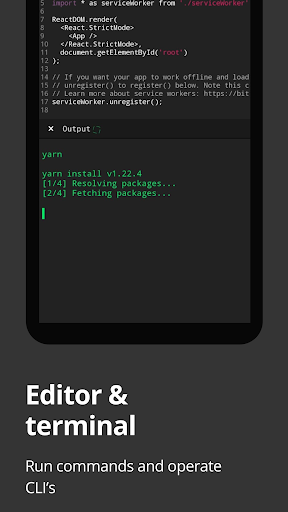
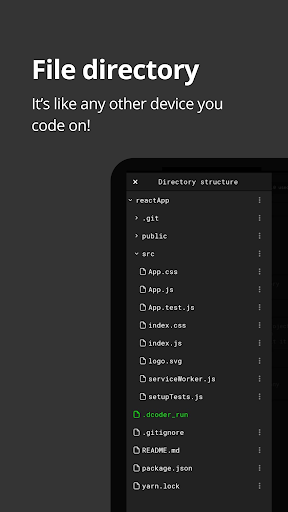
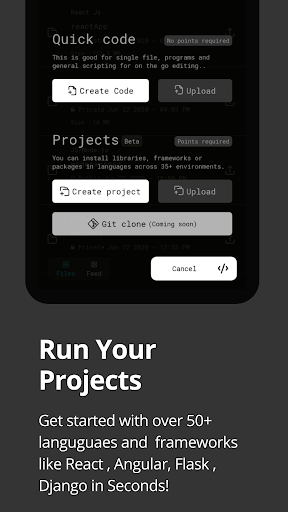
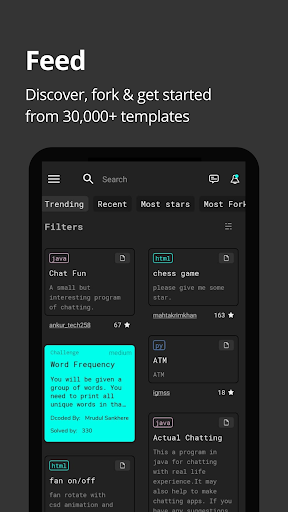
Dcoder is a mobile coding IDE and platform (Compiler for mobile), where you can run your projects, code and learn algorithms by programming on mobile. Build and deploy your projects straight from the mobile and integrate with Git (Gtihub, bitbucker) and sync with vs code, use of code compilations to make coding easy. Now code anytime, anywhere and on the go.
Choose from frameworks like:
1. React js
2. Angular js
3. Django
4. Flask
5. Flutter
6. Git support (Github or bitbucket)
7. Ruby on rails
.. and many many more...
Or choose from languages like:
1. C : learn C programming, a powerful general-purpose language.
2. C++ : GCC compiler 6.3
3. Java : best Java Programming ide, JDK 8
4. Python : learn Python 2.7 and Python 3.
5. C# : Mono Compiler 4
6. Php : Php Interpreter 7.0
7. Objective-C : GCC compiler
8. Ruby : Ruby version 1.9
9. Lua : Lua Interpreter 5.2
10. JS/NodeJS : Node.js engine 6.5
11. Go : Go Lang 1.6
12. VB.Net
13. F#
14. Common Lisp
15. R
16. Scala
17. Perl
18. Pascal
19. Swift
20. Tcl
21, Prolog
22. Assembly
23. Haskell
24. Clojure
25. Kotlin
26. Groovy
27. Scheme
28. Rust
29. Bf
30. Html
31. Css
Dcoder uses a Rich Text Editor supporting syntax highlighting and packed with the necessary tools to offer you all the edge that an IDE or code compiler is supposed to.
Its the fastest code compiler (IDE), coding and programming app available for android so far.
With Dcoder one can:
Write a program/code in any of the available 50+ Programming Languages and frameworks.
Code and Debug the code, see compilation results and errors at the same time on the same screen.
Enjoy the power and ease of coding on your favourite Code Editor like Notepad++ or Sublime Text with compilation power, makes it equivalent to a powerful IDE like eclipse.
Test your problem solving skills by solving challenges from the number of algorithm based challenges available in Challenges section.
Learn Html, Css, JavaScript, Ruby programming, C Programming, Python and Java in the app along with many more programming languages.
Irrespective of your coding skills be it beginner or expert Dcoder helps you to learn code and improve your skills while in a boring lecture or whenever you feel like.
The main features include:
1. Rich Text Editor with Syntax highlighting.(Code Editor)
2. Line number, Auto indent, Autocomplete Parenthesis.
3. Undo Redo.
4. File Open/Save.
5. Custom Suggestion View.
6. Multiple Language Support.
7. User input for languages like C, C++, Java, Php, JavaScript, Node.js and others.
8. Active debug view for faster access to Output.
9. Thoroughly designed Algorithm problems to improve coding Skills and make programmers industry ready.
10. Leader Board: To know where you stand amongst the vast Dcoder community.
11. Custom Menu Drawer, Custom Code Editor Themes, Editable font Size for Editor and much more!!
Disclaimer: Dcoder uses an array of strong cloud based compilers to compile the code and display output, it is the fastest one and has helped to bring app size to ~8 MB, Please don't rate low or demand offline features that is not possible here. Also instead of rating low, you can write your problems to us at support@dcoder.tech that will let us help you better.
Dcoder is an online compiler, now run, compile and execute your code snippets on your own android mobile devices.
Begin the journey to enhance your skills.
How to solve algorithms?
https://youtu.be/rwzdKkgWKV4
For a brief video:
https://youtu.be/X9lsvumpFGI
Join the Social Groups
For any help, questions related to Dcoder reach out on
https://www.linkedin.com/company/dcodermobile/
https://www.facebook.com/groups/dcodermobile
https://www.instagram.com/dcodermobile/
https://twitter.com/dcodermobile
Loved it? Be a beta tester, for early access to experimental features
https://play.google.com/apps/testing/com.paprbit.dcoder
Privacy policy: https://dcoder.tech/privacy.html
Terms of use: https://dcoder.tech/termsofuse.html
Nhiều hơn

1. Tải trình cài đặt MEmu và hoàn tất cài đặt

2. Khởi động MEmu, sau đó mở Google Play trên trang chủ

3. Tìm kiếm Dcoder, Compiler IDE :Code & P trong Google Play
Install
4. Tải và Cài Đặt Dcoder, Compiler IDE :Code & P
5. Khi cài đặt hoàn tất, nhấp vào biểu tượng để bắt đầu

6. Trải nghiệm Dcoder, Compiler IDE :Code & P trên PC của bạn bằng MEmu
MEmu Play là trình giả lập Android miễn phí tốt nhất, với 50 triệu người dùng trải nghiệm ứng dụng Android tuyệt vời. Công nghệ ảo hóa của MEmu cho phép bạn chạy mượt mà hàng ngàn ứng dụng Android trên máy tính, ngay cả những ứng dụng đòi hỏi cấu hình cao nhất.
Màn hình lớn hơn cùng với đồ hoạ tốt hơn; thời lượng dài, không giới hạn về pin hoặc dữ liệu di động
Hỗ trợ đầy đủ Keymapping cho việc kiểm soát chính xác bàn phím và chuột hoặc gamepad
Nhiều tài khoản trò chơi hoặc tác vụ cùng lúc trên một PC với Quản lý Đa năng
Use Dcoder, Compiler IDE :Code & P on PC by following steps: