Flowx: Weather Map Forecast
Mise à jour
Version actuelle
3.422
Proposée par

Ne vous inquiétez plus des surcharges lorsque vous utilisez Flowx: Weather Map Forecast sur votre téléphone portable, libérez-vous de l'écran minuscule et profitez de l'application sur un écran beaucoup plus grand. Désormais, vous pouvez utiliser votre application en plein écran avec le clavier et la souris. MEmu vous offre toutes les fonctionnalités surprenantes que vous attendiez : installation rapide et configuration facile, commandes intuitives, plus de limitations de batterie, de données mobiles et d'appels dérangeants. Le tout nouveau MEmu 9 est le meilleur choix pour utiliser Flowx: Weather Map Forecast sur votre ordinateur. Codé avec notre absorption, le gestionnaire multi-instance permet d'ouvrir 2 ou plusieurs comptes en même temps. Et le plus important, notre moteur d'émulation exclusif peut libérer tout le potentiel de votre PC, rendre tout cela fluide et agréable.
Afficher plus
Téléchargez Flowx: Weather Map Forecast avec le simulateur d’Android MEmu sur votre PC. Profitez de jouer sur un grand écran. Visualize the forecast with the unique Flowx weather map and graphs.
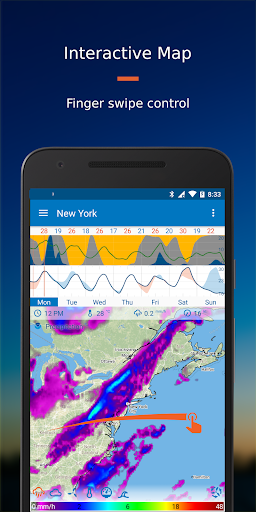
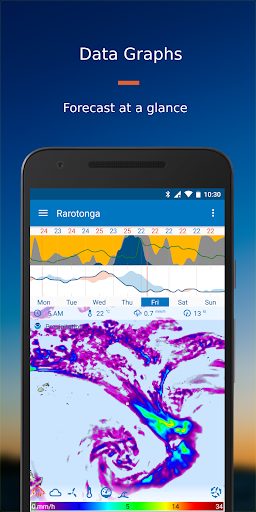
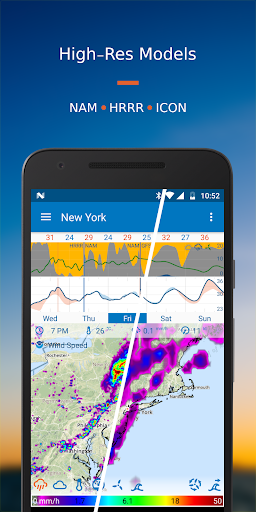
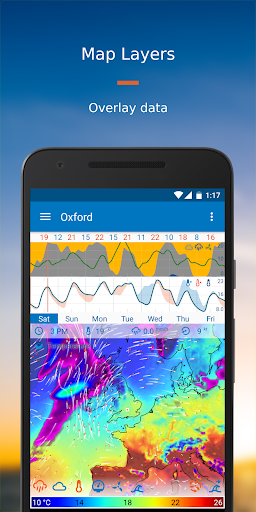
Visualize the forecast with the unique Flowx weather map and graphs. Get superior user experience with all your data on one screen, finger swipe control and absolutely no ads, no tracking. Select the data for your needs from 30+ data types and 20+ forecast models, plus radar reflectivity, sun/moon-rise/set, and hurricane tracks. Use Flowx to plan around the weather, for aviation, fishing, sailing, surfing, cycling, hiking, photography, storm tracking or anyone interested in the weather.
The advantage of Flowx is the ability to easily compare models, to understand the weather and what it means for you. Customize your data options and visuals to your preference.
User Experience
Map
Use finger swipe to control the forecast animation over time. Choose multiple data layers to display on the map, and easily switch between models.
Graphs
View the week’s weather forecast data at a glance. Choose from a selection of graphs and use the compare function to view all data sources at once.
Widget
Get a quick update on your homescreen with the graph widget. Choose the graphs and location to display.
Pro Version Options
Free: No ads, no tracking
GFS, GDPS and ECMWF global forecast models, updated 4 times daily. Plus global wave, air quality and UV index models, storm/hurricane tracks, sun/moon-rise/set and USA high-res smoke.
Silver Subscription: Best Value for Global Data
All Free features plus up to 16-day forecasts and 3-day history, Radar Reflectivity, ICON global forecast model, and additional regional forecast models.
Gold Subscription: Best Value for High-Resolution USA, Canada & Europe
All Free and Silver features plus 3 high-res regional models for USA & Canada, 7 high-res regional models for Europe and additional high-res models including ocean temp/current, and air quality.
Data Sources & other Features
Data Sources - Free
• NOAA GFS (FV3) - Global
• NOAA GFS Waves - Global
• CMC GDPS - Global
• CMC GDWPS Waves - Global
• ECMWF HRES 35km - Global
• NOAA HYSPLIT Smoke Data - Continental USA
• NOAA HRRR Smoke Data (Experimental) - Continental USA
• CAMS Air Quality/UV Index - Global
• Storm/Hurricane Tracks (NOAA & CMC) - Global tropical storms
• Sunrise/set and Moonrise/set
Data Sources - Silver
• Free sources plus:
• RainViewer Radar - 82 countries
• DWD ICON - Global
• NOAA NAM12km - Continental USA
• CMC RDPS - Canada, USA (incl. Alaska), Greenland, Iceland
• MeteoFrance ARPEGE - Europe
Data Sources - Gold
• Free & Silver sources plus:
• NOAA HRRR - Continental USA
• NOAA NAM3km - Continental USA
• CMC HRDPS - Canada
• DWD ICON-EU - Europe
• DWD ICON-D2 - Germany
• MeteoFrance AROME - France
• KNMI HARMONIE 2km - Netherlands+
• RMI Alaro - Belgium
• Expedition Marine - Various locations incl Australia & NZ
• NOAA RTOFS Ocean Model - Global
• CAMS-EU Air Quality - Europe
• SILAM Air Quality - Europe
Animations: wind streamlines indicate wind speed and direction, while wavefront lines indicate wave direction.
Travel Mode: automatically updates the forecast for wherever you are in the world.
Offline Use: after updating the data, use the app offline to view the forecast without internet.
Permissions: minimal permissions required.
Try Flowx Today: visualize the forecast and understand weather systems - it’s the smart way to plan around the weather.
Contact:
Join us at forum.flowx.io to ask questions and discuss ideas.
Follow us on social media:
facebook.com/flowxapp
twitter.com/flowxapp
youtube.com/flowxapp
Afficher plus

1. Téléchargez l'installateur MEmu et terminez l'installation

2. Démarrez MEmu puis ouvrez Google Play sur la page d'accueil

3. Recherchez Flowx: Weather Map Forecast dans Google Play
Install
4. Téléchargez et installez Flowx: Weather Map Forecast
5. Une fois l'installation terminée, cliquez sur l'icône pour démarrer

6. Utiliser MEmu pour utiliser Flowx: Weather Map Forecast sur votre ordinateur
MEmu Play est actuellement le meilleur émulateur Android gratuit, avec 50 millions d'utilisateurs qui profitent d'une expérience Android exceptionnelle. La technologie de virtualisation de MEmu vous permet de jouer facilement à des milliers d'applications Android sur votre ordinateur, même les plus gourmandes en ressources.
L’écran plus grand avec de meilleurs graphismes; Une longue durée, sans limitation de batterie ou de données mobiles.
Soutien du Keymapping pour un contrôle précis du clavier et de la souris ou de la manette de jeu
Plusieurs comptes de jeu ou tâches sur un seul PC en même temps avec le gestionnaire de multi-instance.
Use Flowx: Weather Map Forecast on PC by following steps: