Flowx: Weather Map Forecast
Aktualisiert
Aktuelle Version
3.422
Angeboten von

Machen Sie sich keine Sorgen mehr über überhöhte Gebühren, wenn Sie Flowx: Weather Map Forecast auf Ihrem Mobiltelefon verwenden, befreien Sie sich von dem winzigen Bildschirm und genießen Sie die Nutzung der App auf einem viel größeren Display. Von nun an können Sie Ihre App mit Tastatur und Maus im Vollbildmodus nutzen. MEmu bietet Ihnen all die überraschenden Funktionen, die Sie erwartet haben: schnelle Installation und einfache Einrichtung, intuitive Steuerung, keine Einschränkungen mehr durch Batterie, mobile Daten und störende Anrufe. Der brandneue MEmu 9 ist die beste Wahl für die Nutzung von Flowx: Weather Map Forecast auf Ihrem Computer. Mit unserer Absorption kodiert, ermöglicht der Multi-Instanz-Manager die Eröffnung von 2 oder mehr Konten zur gleichen Zeit. Und das Wichtigste, unsere exklusive Emulations-Engine kann das volle Potenzial Ihres PCs freisetzen und alles reibungslos und angenehm gestalten.
Mehr anzeigen
Laden Sie Play Flowx: Weather Map Forecast auf dem PC mit MEmu Android Emulator. Viel Spaß beim Spielen auf großmundieren. Visualize the forecast with the unique Flowx weather map and graphs.
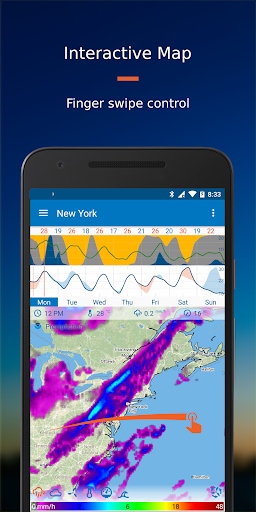
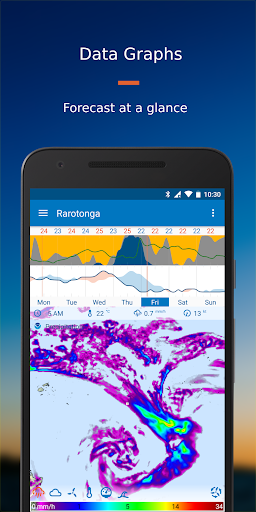
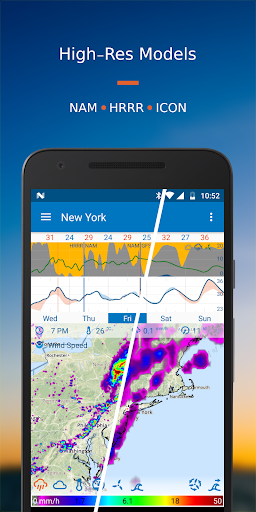
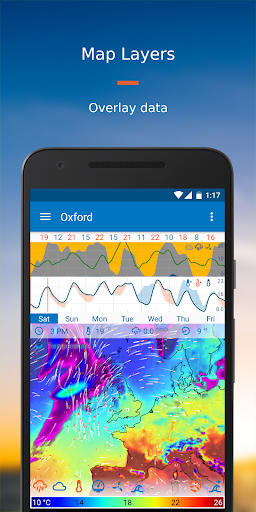
Visualize the forecast with the unique Flowx weather map and graphs. Get superior user experience with all your data on one screen, finger swipe control and absolutely no ads, no tracking. Select the data for your needs from 30+ data types and 20+ forecast models, plus radar reflectivity, sun/moon-rise/set, and hurricane tracks. Use Flowx to plan around the weather, for aviation, fishing, sailing, surfing, cycling, hiking, photography, storm tracking or anyone interested in the weather.
The advantage of Flowx is the ability to easily compare models, to understand the weather and what it means for you. Customize your data options and visuals to your preference.
User Experience
Map
Use finger swipe to control the forecast animation over time. Choose multiple data layers to display on the map, and easily switch between models.
Graphs
View the week’s weather forecast data at a glance. Choose from a selection of graphs and use the compare function to view all data sources at once.
Widget
Get a quick update on your homescreen with the graph widget. Choose the graphs and location to display.
Pro Version Options
Free: No ads, no tracking
GFS, GDPS and ECMWF global forecast models, updated 4 times daily. Plus global wave, air quality and UV index models, storm/hurricane tracks, sun/moon-rise/set and USA high-res smoke.
Silver Subscription: Best Value for Global Data
All Free features plus up to 16-day forecasts and 3-day history, Radar Reflectivity, ICON global forecast model, and additional regional forecast models.
Gold Subscription: Best Value for High-Resolution USA, Canada & Europe
All Free and Silver features plus 3 high-res regional models for USA & Canada, 7 high-res regional models for Europe and additional high-res models including ocean temp/current, and air quality.
Data Sources & other Features
Data Sources - Free
• NOAA GFS (FV3) - Global
• NOAA GFS Waves - Global
• CMC GDPS - Global
• CMC GDWPS Waves - Global
• ECMWF HRES 35km - Global
• NOAA HYSPLIT Smoke Data - Continental USA
• NOAA HRRR Smoke Data (Experimental) - Continental USA
• CAMS Air Quality/UV Index - Global
• Storm/Hurricane Tracks (NOAA & CMC) - Global tropical storms
• Sunrise/set and Moonrise/set
Data Sources - Silver
• Free sources plus:
• RainViewer Radar - 82 countries
• DWD ICON - Global
• NOAA NAM12km - Continental USA
• CMC RDPS - Canada, USA (incl. Alaska), Greenland, Iceland
• MeteoFrance ARPEGE - Europe
Data Sources - Gold
• Free & Silver sources plus:
• NOAA HRRR - Continental USA
• NOAA NAM3km - Continental USA
• CMC HRDPS - Canada
• DWD ICON-EU - Europe
• DWD ICON-D2 - Germany
• MeteoFrance AROME - France
• KNMI HARMONIE 2km - Netherlands+
• RMI Alaro - Belgium
• Expedition Marine - Various locations incl Australia & NZ
• NOAA RTOFS Ocean Model - Global
• CAMS-EU Air Quality - Europe
• SILAM Air Quality - Europe
Animations: wind streamlines indicate wind speed and direction, while wavefront lines indicate wave direction.
Travel Mode: automatically updates the forecast for wherever you are in the world.
Offline Use: after updating the data, use the app offline to view the forecast without internet.
Permissions: minimal permissions required.
Try Flowx Today: visualize the forecast and understand weather systems - it’s the smart way to plan around the weather.
Contact:
Join us at forum.flowx.io to ask questions and discuss ideas.
Follow us on social media:
facebook.com/flowxapp
twitter.com/flowxapp
youtube.com/flowxapp
Mehr anzeigen

1. Laden das MEmu-Installationsprogramm herunter und beenden die Installation

2. MEmu starten und Google Play auf der Homepage öffnen

3. Suchen Flowx: Weather Map Forecast in Google Play
Install
4. Herunterladen und Installieren Flowx: Weather Map Forecast
5. Klicken nach Abschluss der Installation auf das Symbol, um es zu starten

6. Verwenden Sie MEmu, um Flowx: Weather Map Forecast auf Ihrem PC zu nutzen
MEmu Play ist aktuell der beste kostenlose Android-Emulator und bietet 50 Millionen Nutzern ein überragendes Android-App-Erlebnis. Dank der Virtualisierungstechnologie von MEmu können Sie Tausende von Android-Apps problemlos auf Ihrem Computer nutzen, selbst solche mit hohen Grafikanforderungen.
BGrößeres Bild mit besserer Grafik; Keine unterbrechungen, keine sorgen um Akku
Komplette Tastenbelegung unterstützt mit Maus und Tastatur oder Controller
Mit dem „Multi-Instance-Manager“ können Sie mehrere Spielkonten oder Spiele gleichzeitig auf einem PC ausführen.
Use Flowx: Weather Map Forecast on PC by following steps: