Glassify - Widgets & Themes
Mise à jour
Version actuelle
1.1
Proposée par

Ne vous inquiétez plus des surcharges lorsque vous utilisez Glassify - Widgets & Themes sur votre téléphone portable, libérez-vous de l'écran minuscule et profitez de l'application sur un écran beaucoup plus grand. Désormais, vous pouvez utiliser votre application en plein écran avec le clavier et la souris. MEmu vous offre toutes les fonctionnalités surprenantes que vous attendiez : installation rapide et configuration facile, commandes intuitives, plus de limitations de batterie, de données mobiles et d'appels dérangeants. Le tout nouveau MEmu 9 est le meilleur choix pour utiliser Glassify - Widgets & Themes sur votre ordinateur. Codé avec notre absorption, le gestionnaire multi-instance permet d'ouvrir 2 ou plusieurs comptes en même temps. Et le plus important, notre moteur d'émulation exclusif peut libérer tout le potentiel de votre PC, rendre tout cela fluide et agréable.
Afficher plus
Profitez d'une expérience Glassify - Widgets & Themes exceptionnelle sur PC grâce à MEmu Play. Cet émulateur Android gratuit et performant vous donne accès à des milliers d'applications Android pour votre ordinateur. Restez en contact avec vos amis et travaillez plus efficacement ! Transform your Android home screen with Glassify Widgets, a powerful widget app featuring stunning native designs and deep customization for every element.
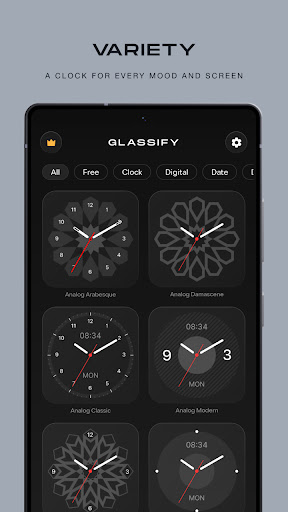
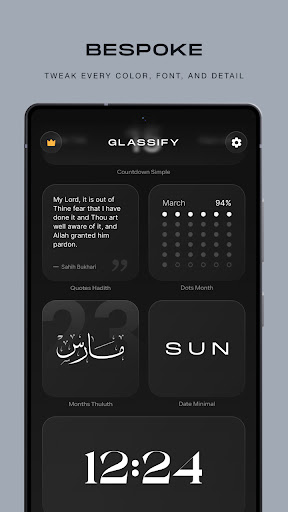
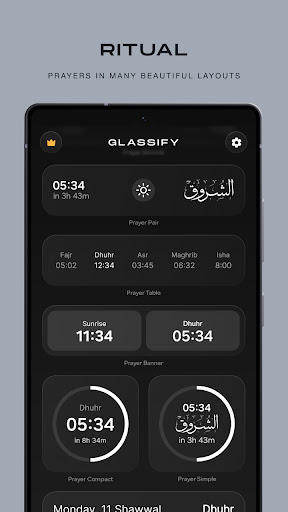
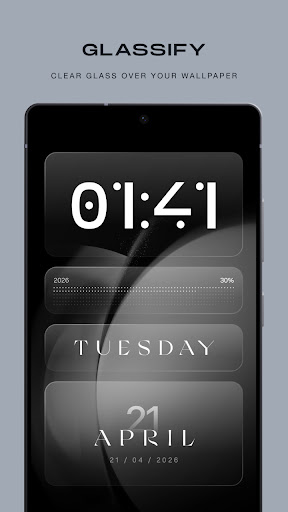
Transform your Android home screen with Glassify Widgets, a powerful widget app featuring stunning native designs and deep customization for every element. No more hunting through scattered widget packs or wrestling with complex editors - everything you need, beautifully crafted and ready to personalize, all in one place.
DEEP CUSTOMIZATION - GOODBYE KWGT
Every widget is fully customizable. Tweak colors, fonts, digit styles, layouts, and details on every element - no separate editor app required. Replace your entire KWGT setup and say goodbye to the headache, no more widgets that break after every update. Just beautiful widgets that work, right out of the box.
NATIVE ANDROID WIDGETS
Fast, smooth, and built the right way. Glassify widgets are native Android widgets - no lag, no weird rendering, no battery drain from background editors.
ARABIC CALLIGRAPHY, UNMATCHED
This is the heart of Glassify. Every weekday, month, quote, and Quranic verse is written in authentic Arabic calligraphy - Thuluth, Naskh, and other classical scripts - crafted with a level of accuracy and quality. Not fonts pretending to be calligraphy, but true hand-styled Arabic art, ready for your home screen.
LOCK SCREEN READY (SAMSUNG)
Love them on your home screen? Put them on your lock screen too. Samsung users can easily add any Glassify widget to the lock screen through Good Lock (LockStar).
CLOCK & TIME WIDGETS
Digital, analog, and elegant Arabic numeral designs. Display time with date in both Gregorian and Hijri calendars. Choose from minimalist looks to decorative Islamic geometric patterns.
WEATHER WIDGETS
Real-time weather widgets showing current temperature and daily forecasts. Multiple sizes and styles.
PRAYER TIMES
Accurate prayer time widgets based on your location. View all five daily prayers plus sunrise at a glance, with a countdown to the next prayer.
QURAN VERSES & HADITH
Display Quranic ayahs and Hadith on your home screen with Arabic calligraphy and English translations - a daily reminder of faith, right where you look most.
CALENDAR & DATE WIDGETS
Elegant date widgets in Arabic and English. Supports both Hijri and Gregorian calendars with day names in unique Arabic calligraphy.
COUNTDOWN WIDGETS
Fully customizable countdowns with your own titles, dates, and styles.
SYSTEM WIDGETS
Keep an eye on what's important - battery, storage, and system info in clean, beautiful layouts that actually match your home screen.
PROGRESS TRACKERS
See how much of your day, month, or year has passed. Stay motivated and mindful of time with visual progress indicators.
FRESH WIDGETS EVERY MONTH
New widgets added every single month. Your collection keeps growing - new categories, new styles, new seasonal designs.
FEATURES
- Deep per-element customization for every widget
- Beautiful Arabic calligraphy designs
- Lock screen widget support
- Arabic and English language support
- Hijri calendar with offset adjustment
- Elegant, calm color palettes for every taste
- Multiple widget sizes (small, medium, large)
- Weather with automatic location detection
- Regular monthly updates with new designs and categories
PREMIUM (PRO)
Upgrade to Pro for unlimited access to all widgets, all customization options, and every future update. Choose monthly, yearly, or lifetime.
Download Glassify and give your Android home screen the treatment it deserves.
Afficher plus

1. Téléchargez l'installateur MEmu et terminez l'installation

2. Démarrez MEmu puis ouvrez Google Play sur la page d'accueil

3. Recherchez Glassify - Widgets & Themes dans Google Play
Install
4. Téléchargez et installez Glassify - Widgets & Themes
5. Une fois l'installation terminée, cliquez sur l'icône pour démarrer

6. Utiliser MEmu pour utiliser Glassify - Widgets & Themes sur votre ordinateur
MEmu Play est actuellement le meilleur émulateur Android gratuit, avec 50 millions d'utilisateurs qui profitent d'une expérience Android exceptionnelle. La technologie de virtualisation de MEmu vous permet de jouer facilement à des milliers d'applications Android sur votre ordinateur, même les plus gourmandes en ressources.
L’écran plus grand avec de meilleurs graphismes; Une longue durée, sans limitation de batterie ou de données mobiles.
Soutien du Keymapping pour un contrôle précis du clavier et de la souris ou de la manette de jeu
Plusieurs comptes de jeu ou tâches sur un seul PC en même temps avec le gestionnaire de multi-instance.
Use Glassify - Widgets & Themes on PC by following steps:


![Color Changer Pro [root] PC](https://dl.memuplay.com/new_market/img/mobi.omegacentauri.red_pro.icon.2025-01-18-10-09-08.png)