ICE JUNIOR
Mise à jour
Version actuelle
1.1.2
Proposée par

Ne vous inquiétez plus des surcharges lorsque vous utilisez ICE JUNIOR sur votre téléphone portable, libérez-vous de l'écran minuscule et profitez de l'application sur un écran beaucoup plus grand. Désormais, vous pouvez utiliser votre application en plein écran avec le clavier et la souris. MEmu vous offre toutes les fonctionnalités surprenantes que vous attendiez : installation rapide et configuration facile, commandes intuitives, plus de limitations de batterie, de données mobiles et d'appels dérangeants. Le tout nouveau MEmu 9 est le meilleur choix pour utiliser ICE JUNIOR sur votre ordinateur. Codé avec notre absorption, le gestionnaire multi-instance permet d'ouvrir 2 ou plusieurs comptes en même temps. Et le plus important, notre moteur d'émulation exclusif peut libérer tout le potentiel de votre PC, rendre tout cela fluide et agréable.
Afficher plus
Téléchargez ICE JUNIOR avec le simulateur d’Android MEmu sur votre PC. Profitez de jouer sur un grand écran. Ice-Watch, the young and colourful brand, launches its SMARTWATCH which surfs both on current trends and on the brand's DNA.
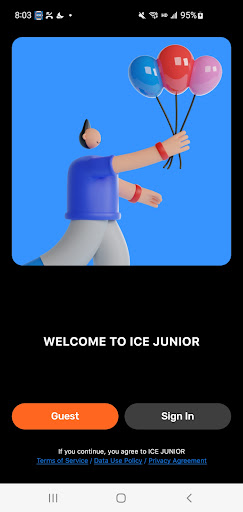
Ice-Watch, the young and colourful brand, launches its SMARTWATCH which surfs both on current trends and on the brand's DNA.
The watch faces remind the brand's best designs and offer you colourful, festive and fun backgrounds … enough to keep your watch matching your mood everyday
Compatible with all smartphones, the watch ICE JUNIOR will make your daily life energetic with its various functionalities.
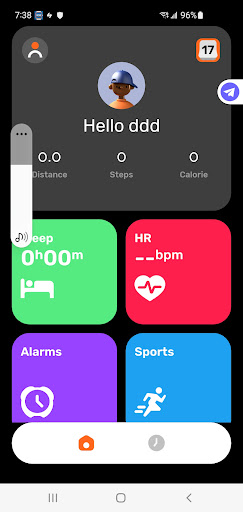
1.Sport: track the number of steps, covered distance and calories burned during your day.
2.Watch Faces changes and customisation: A wide range of watch face selection and customisation available when connecting to the APP.
3.Sleep: find out the total length of your sleep periods, as well as the deep and light sleep phases you experienced during your last night.
4.Heart Rate: Measure your heart rate on request or throughout the day (connected and set by the APP)
5.Workout: choose your sport activity and analyse your data.
6.Weather: view the weather conditions for the day (available on selected watch faces)
7.Notification: Synchronize the information of other applications on your mobile phone, incoming call information and SMS to your connected watch (connected and set by APP).
8.Funny Games: Number pairs, 3 to win, Fly a plane and Basketball.
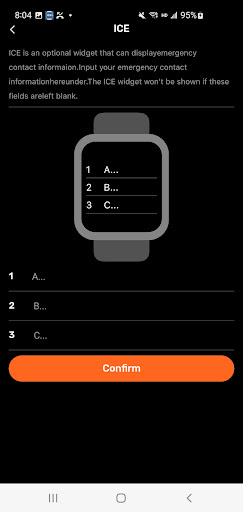
ICE widget: Enter emergency contact information directly from the app to the watch.
And many more... timer, alarm clock, stopwatch, screen brightness, and settings!
The watch can be used alone without connecting the APP with limited functions. Please see user manual for details.
Afficher plus

1. Téléchargez l'installateur MEmu et terminez l'installation

2. Démarrez MEmu puis ouvrez Google Play sur la page d'accueil

3. Recherchez ICE JUNIOR dans Google Play
Install
4. Téléchargez et installez ICE JUNIOR
5. Une fois l'installation terminée, cliquez sur l'icône pour démarrer

6. Utiliser MEmu pour utiliser ICE JUNIOR sur votre ordinateur
MEmu Play est actuellement le meilleur émulateur Android gratuit, avec 50 millions d'utilisateurs qui profitent d'une expérience Android exceptionnelle. La technologie de virtualisation de MEmu vous permet de jouer facilement à des milliers d'applications Android sur votre ordinateur, même les plus gourmandes en ressources.
L’écran plus grand avec de meilleurs graphismes; Une longue durée, sans limitation de batterie ou de données mobiles.
Soutien du Keymapping pour un contrôle précis du clavier et de la souris ou de la manette de jeu
Plusieurs comptes de jeu ou tâches sur un seul PC en même temps avec le gestionnaire de multi-instance.
Use ICE JUNIOR on PC by following steps: