ICE JUNIOR
Aktualisiert
Aktuelle Version
1.1.2
Angeboten von

Machen Sie sich keine Sorgen mehr über überhöhte Gebühren, wenn Sie ICE JUNIOR auf Ihrem Mobiltelefon verwenden, befreien Sie sich von dem winzigen Bildschirm und genießen Sie die Nutzung der App auf einem viel größeren Display. Von nun an können Sie Ihre App mit Tastatur und Maus im Vollbildmodus nutzen. MEmu bietet Ihnen all die überraschenden Funktionen, die Sie erwartet haben: schnelle Installation und einfache Einrichtung, intuitive Steuerung, keine Einschränkungen mehr durch Batterie, mobile Daten und störende Anrufe. Der brandneue MEmu 9 ist die beste Wahl für die Nutzung von ICE JUNIOR auf Ihrem Computer. Mit unserer Absorption kodiert, ermöglicht der Multi-Instanz-Manager die Eröffnung von 2 oder mehr Konten zur gleichen Zeit. Und das Wichtigste, unsere exklusive Emulations-Engine kann das volle Potenzial Ihres PCs freisetzen und alles reibungslos und angenehm gestalten.
Mehr anzeigen
Laden Sie Play ICE JUNIOR auf dem PC mit MEmu Android Emulator. Viel Spaß beim Spielen auf großmundieren. Ice-Watch, the young and colourful brand, launches its SMARTWATCH which surfs both on current trends and on the brand's DNA.
Ice-Watch, the young and colourful brand, launches its SMARTWATCH which surfs both on current trends and on the brand's DNA.
The watch faces remind the brand's best designs and offer you colourful, festive and fun backgrounds … enough to keep your watch matching your mood everyday
Compatible with all smartphones, the watch ICE JUNIOR will make your daily life energetic with its various functionalities.
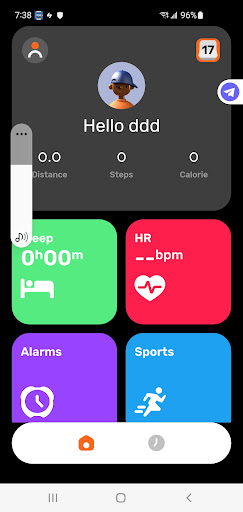
1.Sport: track the number of steps, covered distance and calories burned during your day.
2.Watch Faces changes and customisation: A wide range of watch face selection and customisation available when connecting to the APP.
3.Sleep: find out the total length of your sleep periods, as well as the deep and light sleep phases you experienced during your last night.
4.Heart Rate: Measure your heart rate on request or throughout the day (connected and set by the APP)
5.Workout: choose your sport activity and analyse your data.
6.Weather: view the weather conditions for the day (available on selected watch faces)
7.Notification: Synchronize the information of other applications on your mobile phone, incoming call information and SMS to your connected watch (connected and set by APP).
8.Funny Games: Number pairs, 3 to win, Fly a plane and Basketball.
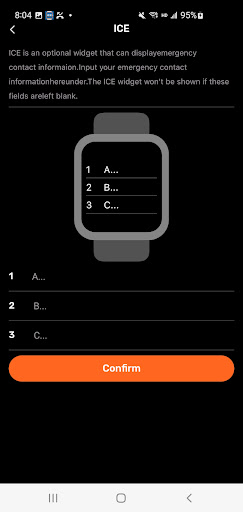
ICE widget: Enter emergency contact information directly from the app to the watch.
And many more... timer, alarm clock, stopwatch, screen brightness, and settings!
The watch can be used alone without connecting the APP with limited functions. Please see user manual for details.
Mehr anzeigen

1. Laden das MEmu-Installationsprogramm herunter und beenden die Installation

2. MEmu starten und Google Play auf der Homepage öffnen

3. Suchen ICE JUNIOR in Google Play
Install
4. Herunterladen und Installieren ICE JUNIOR
5. Klicken nach Abschluss der Installation auf das Symbol, um es zu starten

6. Verwenden Sie MEmu, um ICE JUNIOR auf Ihrem PC zu nutzen
MEmu Play ist aktuell der beste kostenlose Android-Emulator und bietet 50 Millionen Nutzern ein überragendes Android-App-Erlebnis. Dank der Virtualisierungstechnologie von MEmu können Sie Tausende von Android-Apps problemlos auf Ihrem Computer nutzen, selbst solche mit hohen Grafikanforderungen.
BGrößeres Bild mit besserer Grafik; Keine unterbrechungen, keine sorgen um Akku
Komplette Tastenbelegung unterstützt mit Maus und Tastatur oder Controller
Mit dem „Multi-Instance-Manager“ können Sie mehrere Spielkonten oder Spiele gleichzeitig auf einem PC ausführen.
Use ICE JUNIOR on PC by following steps: