Kraken Pro: Invest in Crypto
Mise à jour
Version actuelle
1
Proposée par

Ne vous inquiétez plus des surcharges lorsque vous utilisez Kraken Pro: Invest in Crypto sur votre téléphone portable, libérez-vous de l'écran minuscule et profitez de l'application sur un écran beaucoup plus grand. Désormais, vous pouvez utiliser votre application en plein écran avec le clavier et la souris. MEmu vous offre toutes les fonctionnalités surprenantes que vous attendiez : installation rapide et configuration facile, commandes intuitives, plus de limitations de batterie, de données mobiles et d'appels dérangeants. Le tout nouveau MEmu 9 est le meilleur choix pour utiliser Kraken Pro: Invest in Crypto sur votre ordinateur. Codé avec notre absorption, le gestionnaire multi-instance permet d'ouvrir 2 ou plusieurs comptes en même temps. Et le plus important, notre moteur d'émulation exclusif peut libérer tout le potentiel de votre PC, rendre tout cela fluide et agréable.
Afficher plus
Téléchargez Kraken Pro: Invest in Crypto avec le simulateur d’Android MEmu sur votre PC. Profitez de jouer sur un grand écran. Kraken Pro delivers all the security & features you love about the exchange, in a sleek mobile-first design for advanced crypto trading and funding on-the-go.
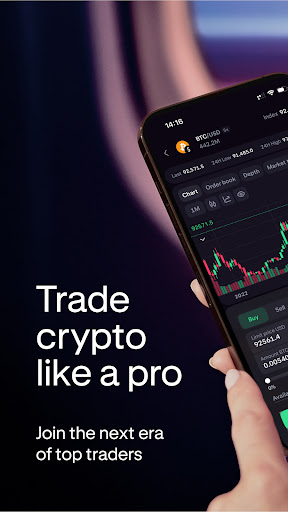
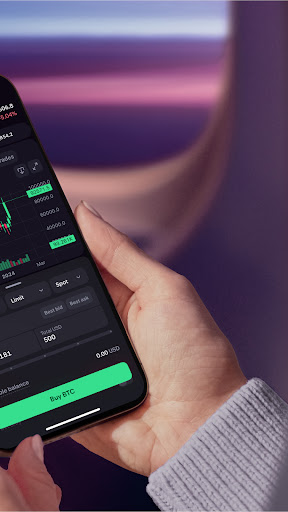
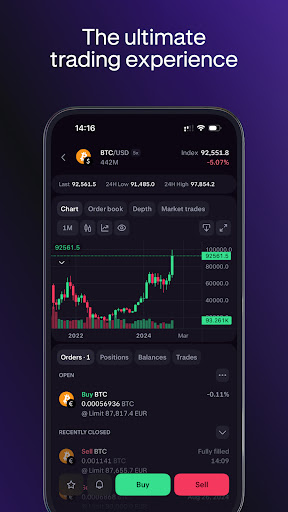
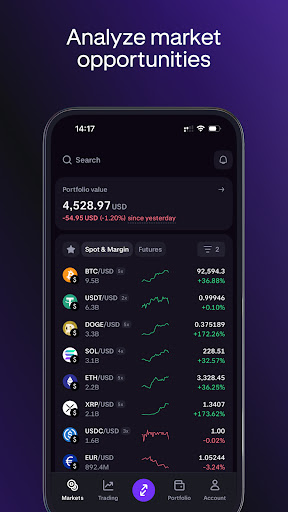
Kraken Pro delivers all the security & features you love about the exchange, in a sleek mobile-first design for advanced crypto trading and funding on-the-go.
—
WHY CHOOSE PRO?
—
• On-the-go deposits and withdrawals
• Fees as low as 0%
• Consistently rated the most secure exchange by 3rd parties
• Hundreds of cryptocurrencies to choose across 1000+ markets, including Bitcoin, Ethereum & XRP
• 24/7/365 global customer support
• Advanced crypto trading tools with an easy-to-use interface
• Deep liquidity across all markets
• Perfect for advanced traders looking to buy, sell and trade Bitcoin and other cryptocurrencies
—
1000+ LIVE CRYPTO MARKETS
—
• Blazing fast websockets and real-time price updates
• Multiple charting and order book display options
• Intuitive depth chart and recent trade history
• Colorized sparklines and change% over time for each currency
• Stay updated on Bitcoin & Ethereum market trends
—
ADVANCED CRYPTO TRADING FEATURES
—
• Buy ,sell and trade across 1000+ markets
• Margin trade up to 5x
• Open and close your positions in bulk with just one tap
• Advanced order types and conditional close parameters to automatically set a stop loss or take profit on any position
• Set start and expiry times to customize when your orders are placed or cancelled
• Custom fee payment options allow you to pay in fiat or crypto for each order
—
ORDER, TRADE AND FUNDING HISTORY
—
• Complete history of all orders, trades, positions, deposits and withdrawals
• View current balances for each asset, in your preferred quote currency
—
USABILITY AND DESIGN
—
• Built for traders with a mobile-first design aesthetic
• Elegant market selection via interactive base currency modules
• Extensive testing to achieve highly intuitive navigation & info architecture
• Sets a new standard in simplicity of design for such advanced crypto trading functionality
—
CRYPTOCURRENCY SELECTION
—
With 1000+ cryptocurrency markets to choose from, we have one of the largest selections of cryptocurrency assets to buy, sell and trade, including:
Bitcoin (BTC/XBT), Ethereum (ETH), Ripple (XRP), Litecoin (LTC), Dogecoin (DOGE/XDG), Tether (USDT), Bitcoin Cash (BCH), Monero (XMR), Dash, Siacoin (SC), Chainlink (LINK), Cosmos (ATOM), EOS, Tezos (XTZ), Zcash (ZEC), Stellar (XLM), Ethereum Classic (ETC), QTUM, Basic Attention Token (BAT), Cardano (ADA), Waves, ICON (ICX), Gnosis (GNO), Dai, WaterMelon (MLN), Nano, Augur (REP), Lisk (LSK), OmiseGo (OMG), PAX Gold (PAXG)
Not investment advice. Crypto trading involves risk of loss. Cryptocurrency services are provided to US and US territory customers by Payward Ventures Inc. (“PVI”) dba Kraken. View PVI’s disclosures at https://www.kraken.com/legal/disclosures
© Payward Interactive, Inc. 2024
NMLS ID 1843762, 106 E. Lincolnway, 4th Floor, Cheyenne, WY 82001
Payward Canada, 30 Adelaide St East, 12th Floor, Toronto, ON M5C 3G8
Afficher plus

1. Téléchargez l'installateur MEmu et terminez l'installation

2. Démarrez MEmu puis ouvrez Google Play sur la page d'accueil

3. Recherchez Kraken Pro: Invest in Crypto dans Google Play
Install
4. Téléchargez et installez Kraken Pro: Invest in Crypto
5. Une fois l'installation terminée, cliquez sur l'icône pour démarrer

6. Utiliser MEmu pour utiliser Kraken Pro: Invest in Crypto sur votre ordinateur
MEmu Play est actuellement le meilleur émulateur Android gratuit, avec 50 millions d'utilisateurs qui profitent d'une expérience Android exceptionnelle. La technologie de virtualisation de MEmu vous permet de jouer facilement à des milliers d'applications Android sur votre ordinateur, même les plus gourmandes en ressources.
L’écran plus grand avec de meilleurs graphismes; Une longue durée, sans limitation de batterie ou de données mobiles.
Soutien du Keymapping pour un contrôle précis du clavier et de la souris ou de la manette de jeu
Plusieurs comptes de jeu ou tâches sur un seul PC en même temps avec le gestionnaire de multi-instance.
Use Kraken Pro: Invest in Crypto on PC by following steps: