Kraken Pro: Invest in Crypto
Dikemas kini
Versi Semasa
Ditawarkan Oleh

Berhentilah bimbang dengan bayaran berlebihan semasa menggunakan Kraken Pro: Invest in Crypto di telefon bimbit anda, bebaskan diri anda dari layar kecil dan nikmati penggunaan aplikasi pada paparan yang jauh lebih besar. Mulai sekarang, dapatkan pengalaman skrin penuh aplikasi anda dengan papan kekunci dan tetikus. MEmu Play semua ciri mengejutkan yang anda harapkan: pemasangan cepat dan penyediaan mudah, kawalan intuitif, tidak ada batasan bateri, data mudah alih, dan panggilan yang mengganggu. MEmu 9 yang baru adalah pilihan terbaik untuk menggunakan Kraken Pro: Invest in Crypto di komputer anda. Dikodkan dengan penyerapan kami, pengurus multi-instance menjadikan pembukaan 2 atau lebih akaun pada masa yang sama mungkin. Dan yang paling penting, mesin emulasi eksklusif kami dapat melepaskan potensi penuh PC anda, menjadikan semuanya lancar dan menyeronokkan.
Tunjukkan Lagi
Download Kraken Pro: Invest in Crypto on PC with MEmu Android Emulator. Enjoy playing on big screen. Kraken Pro delivers all the security & features you love about the exchange, in a sleek mobile-first design for advanced crypto trading and funding on-the-go.
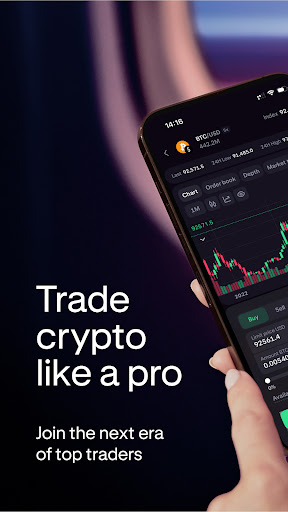
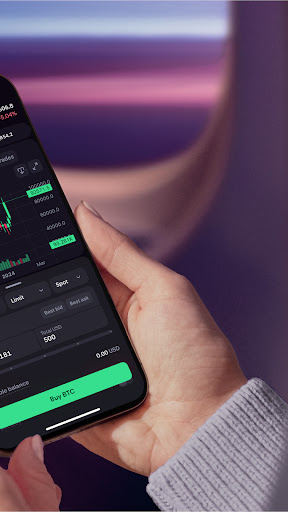
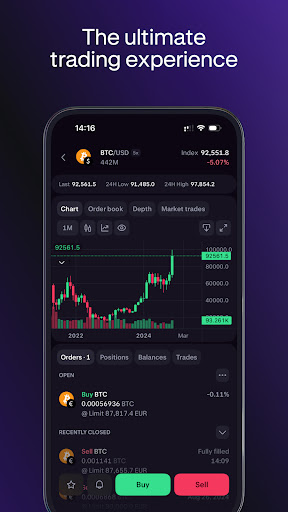
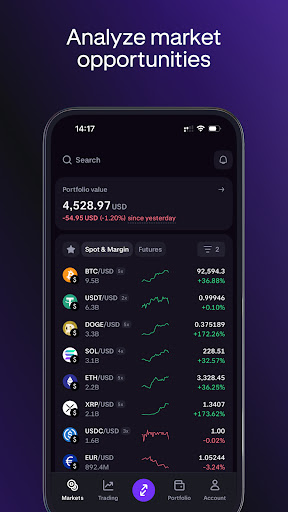
Kraken Pro delivers all the security & features you love about the exchange, in a sleek mobile-first design for advanced crypto trading and funding on-the-go.
—
WHY CHOOSE PRO?
—
• On-the-go deposits and withdrawals
• Fees as low as 0%
• Consistently rated the most secure exchange by 3rd parties
• Hundreds of cryptocurrencies to choose across 1000+ markets, including Bitcoin, Ethereum & XRP
• 24/7/365 global customer support
• Advanced crypto trading tools with an easy-to-use interface
• Deep liquidity across all markets
• Perfect for advanced traders looking to buy, sell and trade Bitcoin and other cryptocurrencies
—
1000+ LIVE CRYPTO MARKETS
—
• Blazing fast websockets and real-time price updates
• Multiple charting and order book display options
• Intuitive depth chart and recent trade history
• Colorized sparklines and change% over time for each currency
• Stay updated on Bitcoin & Ethereum market trends
—
ADVANCED CRYPTO TRADING FEATURES
—
• Buy ,sell and trade across 1000+ markets
• Margin trade up to 5x
• Open and close your positions in bulk with just one tap
• Advanced order types and conditional close parameters to automatically set a stop loss or take profit on any position
• Set start and expiry times to customize when your orders are placed or cancelled
• Custom fee payment options allow you to pay in fiat or crypto for each order
—
ORDER, TRADE AND FUNDING HISTORY
—
• Complete history of all orders, trades, positions, deposits and withdrawals
• View current balances for each asset, in your preferred quote currency
—
USABILITY AND DESIGN
—
• Built for traders with a mobile-first design aesthetic
• Elegant market selection via interactive base currency modules
• Extensive testing to achieve highly intuitive navigation & info architecture
• Sets a new standard in simplicity of design for such advanced crypto trading functionality
—
CRYPTOCURRENCY SELECTION
—
With 1000+ cryptocurrency markets to choose from, we have one of the largest selections of cryptocurrency assets to buy, sell and trade, including:
Bitcoin (BTC/XBT), Ethereum (ETH), Ripple (XRP), Litecoin (LTC), Dogecoin (DOGE/XDG), Tether (USDT), Bitcoin Cash (BCH), Monero (XMR), Dash, Siacoin (SC), Chainlink (LINK), Cosmos (ATOM), EOS, Tezos (XTZ), Zcash (ZEC), Stellar (XLM), Ethereum Classic (ETC), QTUM, Basic Attention Token (BAT), Cardano (ADA), Waves, ICON (ICX), Gnosis (GNO), Dai, WaterMelon (MLN), Nano, Augur (REP), Lisk (LSK), OmiseGo (OMG), PAX Gold (PAXG)
Not investment advice. Crypto trading involves risk of loss. Cryptocurrency services are provided to US and US territory customers by Payward Ventures Inc. (“PVI”) dba Kraken. View PVI’s disclosures at https://www.kraken.com/legal/disclosures
© Payward Interactive, Inc. 2024
NMLS ID 1843762, 106 E. Lincolnway, 4th Floor, Cheyenne, WY 82001
Payward Canada, 30 Adelaide St East, 12th Floor, Toronto, ON M5C 3G8
Tunjukkan Lagi

1. Muat turun pemasang MEmu dan selesaikan persediaan

2. Mulakan MEnu kemudian buka Google Play di desktop

3. Cari Kraken Pro: Invest in Crypto di Google Play
Install
4. Muat turun dan Pasang Kraken Pro: Invest in Crypto
5. Apabila selesai pemasangan, menekan ikon itu untuk memulakan

6. Gunakan MENu untuk mengalami Kraken Pro: Invest in Crypto pada komputer anda
MEmu Play ialah emulator Android terbaik, dengan lebih 100 juta pengguna mengalami pengalaman aplikasi Android yang unggul. Teknologi virtualisasi MEmu membolehkan anda menjalankan beribu-ribu aplikasi Android dengan lancar pada komputer anda, walaupun yang paling mencabar.
Skrin lebih besar dengan grafik yang lebih baik; Tempoh yang panjang, tanpa had bateri atau data mudah alih.
Sokongan Keymapping penuh untuk kawalan tepat papan kekunci dan tetikus atau gamepad.
Pelbagai akaun permainan atau tugas pada satu PC sekaligus dengan pengurus pelbagai contoh.
Use Kraken Pro: Invest in Crypto on PC by following steps: