Play Tube : Video Tube Player
Mise à jour
Version actuelle
1.1.2
Proposée par

Ne vous inquiétez plus des surcharges lorsque vous utilisez Play Tube : Video Tube Player sur votre téléphone portable, libérez-vous de l'écran minuscule et profitez de l'application sur un écran beaucoup plus grand. Désormais, vous pouvez utiliser votre application en plein écran avec le clavier et la souris. MEmu vous offre toutes les fonctionnalités surprenantes que vous attendiez : installation rapide et configuration facile, commandes intuitives, plus de limitations de batterie, de données mobiles et d'appels dérangeants. Le tout nouveau MEmu 9 est le meilleur choix pour utiliser Play Tube : Video Tube Player sur votre ordinateur. Codé avec notre absorption, le gestionnaire multi-instance permet d'ouvrir 2 ou plusieurs comptes en même temps. Et le plus important, notre moteur d'émulation exclusif peut libérer tout le potentiel de votre PC, rendre tout cela fluide et agréable.
Afficher plus
Téléchargez Play Tube : Video Tube Player avec le simulateur d’Android MEmu sur votre PC. Profitez de jouer sur un grand écran. Play Tube - Video Tube Player is a free lite third party client for YouTube , allows you to easily find great videos and free music in all over of the world and your country.
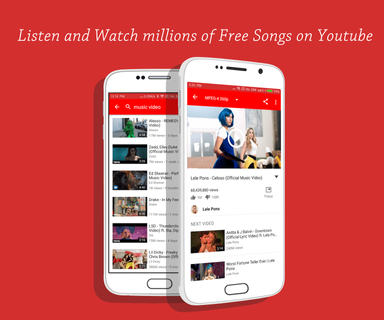

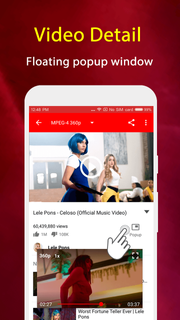
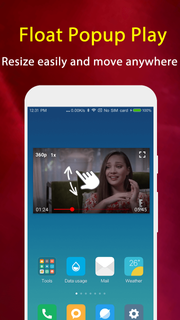
Play Tube - Video Tube Player is a free lite third party client for YouTube , allows you to easily find great videos and free music in all over of the world and your country.Play Tube & Video Tube Player can search videos, channels and playlists, play music tube and movie tube with full screen or floating popup window which always keeps on top. The floating tube popup player allows you to use your apps while playing YouTube music and tube video.FEATURES: ☆ Collection of favorite videos☆ Watch unlimited YouTube videos and music☆ Popup mode (floating player)☆ Search videos, channels and playlists☆ Listen to YouTube videos (experimental)☆ Display general information about a videoNow just get this cool app and enjoy millions of free music and videos!Important NOTE:1. Play Tube HD & video tube lite player is using the third-party API source from YouTube. All the free video is provided by Youtube services. And you can search and play the videos on Youtube.2. By complying with the API Terms of Use, we do not provide caching and downloading any tracks (not a video downloader)3. Please use the following link to report any content that may infringe copyrights:https://www.youtube.com/yt/copyright/4.Playing music when the screen is off or on the lock screen is not allowed by YouTube terms of use.
Afficher plus

1. Téléchargez l'installateur MEmu et terminez l'installation

2. Démarrez MEmu puis ouvrez Google Play sur la page d'accueil

3. Recherchez Play Tube : Video Tube Player dans Google Play
Install
4. Téléchargez et installez Play Tube : Video Tube Player
5. Une fois l'installation terminée, cliquez sur l'icône pour démarrer

6. Utiliser MEmu pour utiliser Play Tube : Video Tube Player sur votre ordinateur
MEmu Play est actuellement le meilleur émulateur Android gratuit, avec 50 millions d'utilisateurs qui profitent d'une expérience Android exceptionnelle. La technologie de virtualisation de MEmu vous permet de jouer facilement à des milliers d'applications Android sur votre ordinateur, même les plus gourmandes en ressources.
L’écran plus grand avec de meilleurs graphismes; Une longue durée, sans limitation de batterie ou de données mobiles.
Soutien du Keymapping pour un contrôle précis du clavier et de la souris ou de la manette de jeu
Plusieurs comptes de jeu ou tâches sur un seul PC en même temps avec le gestionnaire de multi-instance.
Use Play Tube : Video Tube Player on PC by following steps: