Design Match 3D: Matching Game
Ενημερώθηκε
Τρέχουσα έκδοση
1734347787
Προσφέρεται από

Με όλο το πάθος σας για το παιχνίδι Design Match 3D: Matching Game, τα χέρια σας δεν πρέπει να περιορίζονται σε μια μικροσκοπική οθόνη του τηλεφώνου σας. Παίξτε σαν επαγγελματίας και αποκτήστε τον πλήρη έλεγχο του παιχνιδιού σας με πληκτρολόγιο και ποντίκι. Το MEmu σας προσφέρει όλα όσα περιμένετε. Κατεβάστε και παίξτε Design Match 3D: Matching Game σε υπολογιστή. Παίξτε όσο θέλετε, χωρίς άλλους περιορισμούς μπαταρίας, δεδομένων κινητής τηλεφωνίας και ενοχλητικών κλήσεων. Το ολοκαίνουργιο MEmu 9 είναι η καλύτερη επιλογή για να παίξετε Design Match 3D: Matching Game σε υπολογιστή. Ετοιμασμένο με την εμπειρία μας, το εξαιρετικό σύστημα προκαθορισμένης αντιστοίχισης πλήκτρων καθιστά το Design Match 3D: Matching Game ένα πραγματικό παιχνίδι υπολογιστή. Ο διαχειριστής πολλαπλών περιπτώσεων MEmu καθιστά δυνατό το παιχνίδι με 2 ή περισσότερους λογαριασμούς στην ίδια συσκευή. Και το πιο σημαντικό, η αποκλειστική μηχανή εξομοίωσης μας μπορεί να απελευθερώσει πλήρως τις δυνατότητες του υπολογιστή σας, κάνοντας τα πάντα ομαλά.
Show more
Απολαύστε την υπέροχη εμπειρία αναπαραγωγής του Design Match 3D: Matching Game σε υπολογιστή με το MEMU App Player. Πρόκειται για έναν ισχυρό δωρεάν εξομοιωτή Android που σας επιτρέπει να παίζετε χιλιάδες παιχνίδια Android. Welcome to Design Match 3D: A triple matching game that you just need to connect 3 same items to clear the board and win the challenge.
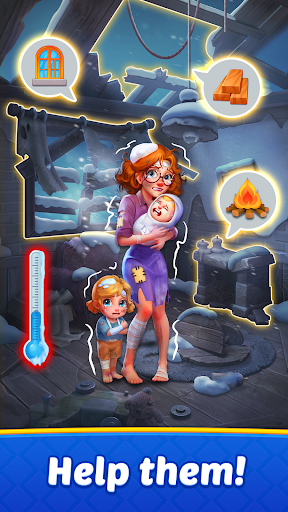
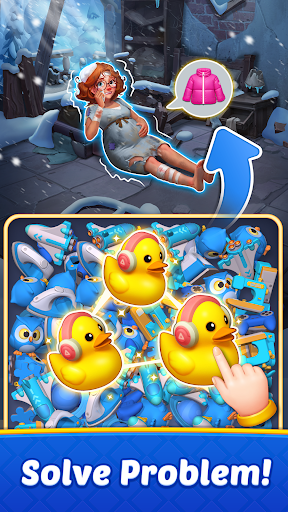
Welcome to Design Match 3D: A triple matching game that you just need to connect 3 same items to clear the board and win the challenge.
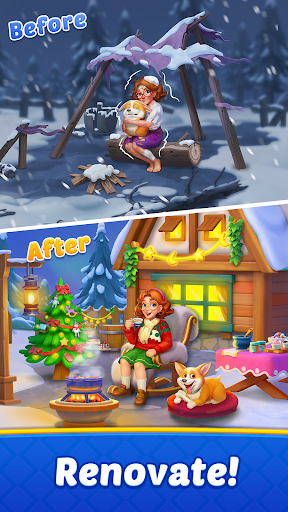
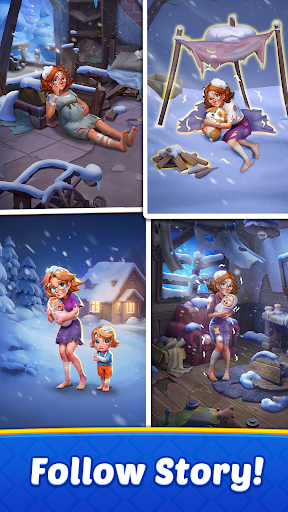
A mysterious alien force has struck! A small town, blanketed in ice and snow, sees its tranquility shattered overnight. Is this a mere accident or part of a long-planned scheme? The town lies in ruins, and its residents are desperate for help! Can you join our protagonist to solve matching puzzles and assist residents in resisting the bitter cold and renovating their homes?
Forget the mundane matching games of the past; here, you'll sort and match stunning 3D items that almost leap off the screen! Every tap and swipe will bring you a stress-relieving experience, and each match 3D puzzle you conquer will earn you chances to design and renovate houses!
Are you ready to bring warmth and beauty back to the town and reveal the secrets it holds?
FEATURES THAT WILL WOW YOU:
Match 3D Puzzles:
Enjoy a fresh twist on classic matching games! Match 3D items with realistic physics animations, bringing a more immersive and stress-relieving gaming experience!
Relax & Train Your Brain:
Immerse yourself in a fun brain-training experience. Sharpen your cognitive skills by finding and matching items within a limited time. Perfect for stress-relieving and keeping your mind sharp!
Free Offline Games:
Free to play anywhere, anytime! The fun never stops, even without wifi or internet!
Renovation & Home Design:
Use your stars to decorate and renovate houses and town buildings. Watch in awe as each room comes to life while having fun in brain-training puzzles!
Explore Different Areas:
New rooms, swimming pool, fascinating garden, a wide range of areas await you to unlock and decorate! Each space offers unique decoration challenges and endless fun!
HOW TO PLAY
- Tap 3 identical items to collect them.
- Keep sorting and matching items until all goal items are collected.
- With a timer in each level, think quickly and act even more quickly to triumph!
- Use boosters to overcome tricky puzzles and shuffle the board to reveal hidden items when you're stuck.
- Achieve level goals set and become a master of 3D puzzle games!
- Earn stars to renovate and decorate houses.
Download Design Match 3D now for free and embark on your match 3D puzzle journey. Start matching, designing, and revealing the mystery today!
Show more

1. Κατεβάστε το πρόγραμμα εγκατάστασης MEmu και ολοκληρώστε την εγκατάσταση

2. Ξεκινήστε το MEmu και στη συνέχεια ανοίξτε το Google Play στην επιφάνεια εργασίας

3. Αναζητήστε τον Design Match 3D: Matching Game στο Google Play
Install
4. Λήψη και εγκατάσταση του Design Match 3D: Matching Game
5. Μόλις ολοκληρωθεί η εγκατάσταση, κάντε κλικ στο εικονίδιο για να ξεκινήσετε

6. Enjoy playing Design Match 3D: Matching Game on PC with MEmu
Το MEmu Play, αποτελεί την ιδανικότερη δωρεάν λύση για την εξομοίωση του λειτουργικού Android, και χρησιμοποιείται ήδη από περισσότερους από 50 εκατομμύρια χρήστες, ο οποίοι απολαμβάνουν, την καταπληκτική εμπειρία παιχνιδιού που προσφέρεται μέσω της εφαρμογής. Με τη χρήση του MEmu Virtualization, είναι δυνατή η αναπαραγωγή παιχνιδιών Android στον υπολογιστή, ακόμη και εκείνων που απαιτούν μεγάλη επεξεργαστική ισχύ γραφικών, δίχως συμβιβασμούς στην ποιότητα και στην εμπειρία χρήσης, ακριβώς όπως ένα τελευταίας γενιάς κινητό τηλέφωνο.
Μεγαλύτερη οθόνη με καλύτερα γραφικά. Μεγάλη διάρκεια ζωής, χωρίς περιορισμό μπαταρίας ή δεδομένων κινητής τηλεφωνίας.
Πλήρης υποστήριξη αντιστοίχισης πλήκτρων για ακριβή έλεγχο του πληκτρολογίου και του ποντικιού ή του gamepad.
Πολλαπλοί λογαριασμοί παιχνιδιών ή εργασίες σε έναν υπολογιστή ταυτόχρονα με τον διαχειριστή πολλαπλών περιπτώσεων.
Play Design Match 3D: Matching Game on PC by following steps: