Fast DS Emulator For Android
Ενημερώθηκε
Τρέχουσα έκδοση
pb1.0.3
Προσφέρεται από

Με όλο το πάθος σας για το παιχνίδι Fast DS Emulator For Android, τα χέρια σας δεν πρέπει να περιορίζονται σε μια μικροσκοπική οθόνη του τηλεφώνου σας. Παίξτε σαν επαγγελματίας και αποκτήστε τον πλήρη έλεγχο του παιχνιδιού σας με πληκτρολόγιο και ποντίκι. Το MEmu σας προσφέρει όλα όσα περιμένετε. Κατεβάστε και παίξτε Fast DS Emulator For Android σε υπολογιστή. Παίξτε όσο θέλετε, χωρίς άλλους περιορισμούς μπαταρίας, δεδομένων κινητής τηλεφωνίας και ενοχλητικών κλήσεων. Το ολοκαίνουργιο MEmu 9 είναι η καλύτερη επιλογή για να παίξετε Fast DS Emulator For Android σε υπολογιστή. Ετοιμασμένο με την εμπειρία μας, το εξαιρετικό σύστημα προκαθορισμένης αντιστοίχισης πλήκτρων καθιστά το Fast DS Emulator For Android ένα πραγματικό παιχνίδι υπολογιστή. Ο διαχειριστής πολλαπλών περιπτώσεων MEmu καθιστά δυνατό το παιχνίδι με 2 ή περισσότερους λογαριασμούς στην ίδια συσκευή. Και το πιο σημαντικό, η αποκλειστική μηχανή εξομοίωσης μας μπορεί να απελευθερώσει πλήρως τις δυνατότητες του υπολογιστή σας, κάνοντας τα πάντα ομαλά.
Show more
Απολαύστε την υπέροχη εμπειρία αναπαραγωγής του Fast DS Emulator For Android σε υπολογιστή με το MEMU App Player. Πρόκειται για έναν ισχυρό δωρεάν εξομοιωτή Android που σας επιτρέπει να παίζετε χιλιάδες παιχνίδια Android. Rediscover classic dual-screen gaming on your Android device with smooth performance and powerful customization options.
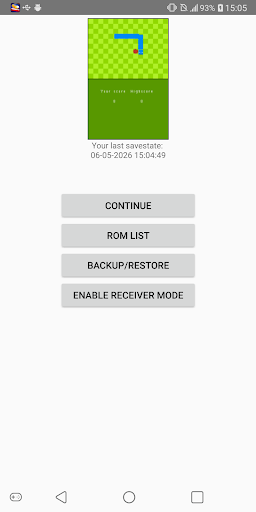
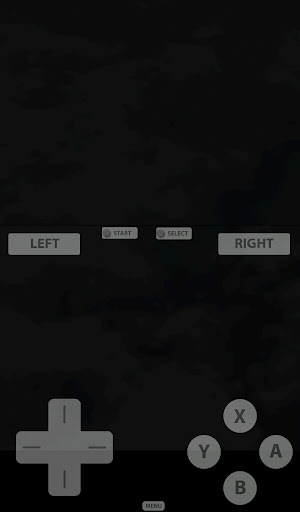
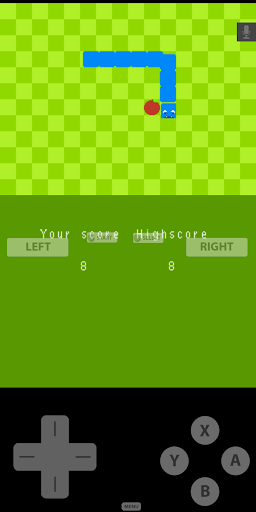
Rediscover classic dual-screen gaming on your Android device with smooth performance and powerful customization options.
Fast DS Emulator is built for players who want to enjoy their favorite DS games on modern devices. Whether you're revisiting old adventures or continuing your personal game collection, the emulator provides fast performance, flexible controls, and convenient save features.
Enjoy playing your DS games with 3D mode on your Android device at highest speed.
Features:
- Play compatible game backups from: .nds, .3ds, .zip ...
- High-performance DS / NDS emulation.
- Save and load game states anytime.
- Customizable touch controls and screen layout.
- External controller support.
- Fast loading and optimized gameplay.
- Designed for phones and tablets.
- Regular updates and improvements.
- Transfer Session (Beta)
Transfer Session allows you to instantly continue your current gameplay on another device connected to the same local Wi-Fi network.
How to it work:
1. Connect both devices to the same Wi-Fi network.
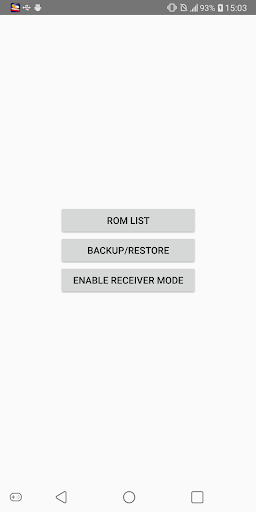
2. On the Receiver device, enable Receiver Mode from the Home screen.
3. On the Sender device, open: Menu Button -> Game Menu -> Transfer Session.
4. If the devices have never connected before, scan the QR code displayed on the Receiver device.
5. If the devices have been paired previously, they will automatically discover and reconnect to each other.
Once connected, the current game state will be transferred to the Receiver device, allowing you to continue playing seamlessly on the second device.
Note: Transfer Session does NOT work with 3D Mode.
Enjoy classic handheld gaming with features designed for today's Android devices.
Important Notes:
* This emulator is intended only for playing legally owned game backups.
* ROM files are not included with this application.
* When using 3D Mode, your game backup must be decrypted and compatible with the feature.
* 3D Mode is not supported by all games.
* Transfer Session does NOT work with 3D Mode.
* This product is not affiliated with, authorized, endorsed, or licensed by Nintendo.
* Please do not request ROMs, game downloads, or copyrighted game files.
Show more

1. Κατεβάστε το πρόγραμμα εγκατάστασης MEmu και ολοκληρώστε την εγκατάσταση

2. Ξεκινήστε το MEmu και στη συνέχεια ανοίξτε το Google Play στην επιφάνεια εργασίας

3. Αναζητήστε τον Fast DS Emulator For Android στο Google Play
Install
4. Λήψη και εγκατάσταση του Fast DS Emulator For Android
5. Μόλις ολοκληρωθεί η εγκατάσταση, κάντε κλικ στο εικονίδιο για να ξεκινήσετε

6. Enjoy playing Fast DS Emulator For Android on PC with MEmu
Το MEmu Play, αποτελεί την ιδανικότερη δωρεάν λύση για την εξομοίωση του λειτουργικού Android, και χρησιμοποιείται ήδη από περισσότερους από 50 εκατομμύρια χρήστες, ο οποίοι απολαμβάνουν, την καταπληκτική εμπειρία παιχνιδιού που προσφέρεται μέσω της εφαρμογής. Με τη χρήση του MEmu Virtualization, είναι δυνατή η αναπαραγωγή παιχνιδιών Android στον υπολογιστή, ακόμη και εκείνων που απαιτούν μεγάλη επεξεργαστική ισχύ γραφικών, δίχως συμβιβασμούς στην ποιότητα και στην εμπειρία χρήσης, ακριβώς όπως ένα τελευταίας γενιάς κινητό τηλέφωνο.
Μεγαλύτερη οθόνη με καλύτερα γραφικά. Μεγάλη διάρκεια ζωής, χωρίς περιορισμό μπαταρίας ή δεδομένων κινητής τηλεφωνίας.
Πλήρης υποστήριξη αντιστοίχισης πλήκτρων για ακριβή έλεγχο του πληκτρολογίου και του ποντικιού ή του gamepad.
Πολλαπλοί λογαριασμοί παιχνιδιών ή εργασίες σε έναν υπολογιστή ταυτόχρονα με τον διαχειριστή πολλαπλών περιπτώσεων.
Play Fast DS Emulator For Android on PC by following steps: