Genesis War
Ενημερώθηκε
Τρέχουσα έκδοση
2.0.26
Προσφέρεται από

Με όλο το πάθος σας για το παιχνίδι Genesis War, τα χέρια σας δεν πρέπει να περιορίζονται σε μια μικροσκοπική οθόνη του τηλεφώνου σας. Παίξτε σαν επαγγελματίας και αποκτήστε τον πλήρη έλεγχο του παιχνιδιού σας με πληκτρολόγιο και ποντίκι. Το MEmu σας προσφέρει όλα όσα περιμένετε. Κατεβάστε και παίξτε Genesis War σε υπολογιστή. Παίξτε όσο θέλετε, χωρίς άλλους περιορισμούς μπαταρίας, δεδομένων κινητής τηλεφωνίας και ενοχλητικών κλήσεων. Το ολοκαίνουργιο MEmu 9 είναι η καλύτερη επιλογή για να παίξετε Genesis War σε υπολογιστή. Ετοιμασμένο με την εμπειρία μας, το εξαιρετικό σύστημα προκαθορισμένης αντιστοίχισης πλήκτρων καθιστά το Genesis War ένα πραγματικό παιχνίδι υπολογιστή. Ο διαχειριστής πολλαπλών περιπτώσεων MEmu καθιστά δυνατό το παιχνίδι με 2 ή περισσότερους λογαριασμούς στην ίδια συσκευή. Και το πιο σημαντικό, η αποκλειστική μηχανή εξομοίωσης μας μπορεί να απελευθερώσει πλήρως τις δυνατότητες του υπολογιστή σας, κάνοντας τα πάντα ομαλά.
Show more
Απολαύστε την υπέροχη εμπειρία αναπαραγωγής του Genesis War σε υπολογιστή με το MEMU App Player. Πρόκειται για έναν ισχυρό δωρεάν εξομοιωτή Android που σας επιτρέπει να παίζετε χιλιάδες παιχνίδια Android. The Ultimate Tactical Saga Reborn.
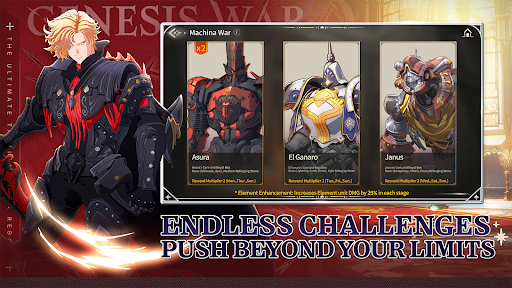
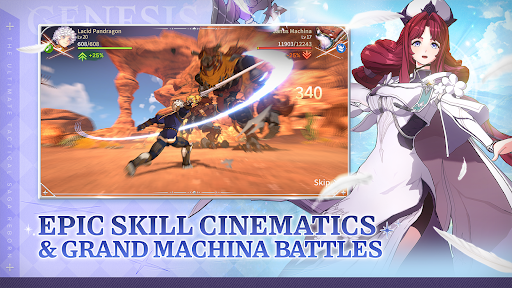
The Ultimate Tactical Saga Reborn
Command the Legend. Forge Your Destiny.
War engulfs the continent of Antaria,
where countless heroes clash, each driven by their own beliefs and destiny.
The Geysir Empire marches forward, conquering the continent with overwhelming might.
Princess Iyolin and her companions rise to reclaim the fallen kingdom of Pandragon.
And in the shadow of war, a vast and hidden truth begins to emerge.
Join a cast of unforgettable heroes in the strategic RPG "Genesis War."
The grand journey of the Genesis War unfolds now.
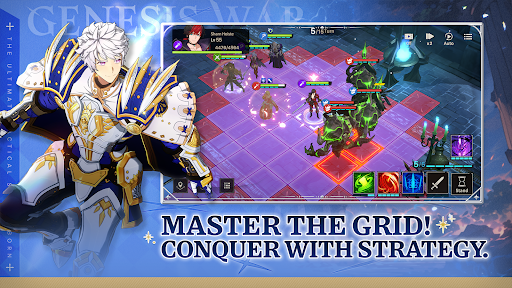
■ Strategic Turn-Based Combat with True Depth
Precision turn-based battles shaped by elemental advantages and terrain mechanics!
Outmaneuver your enemies with calculated tactics and savor the thrill of hard-earned victory.
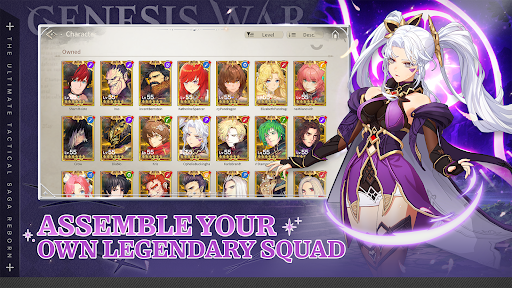
■ Build Your Ultimate Team
Charismatic heroes from the world of Genesis War!
Design your own unstoppable line-up and unlock tremendous team synergy.
■ Ever-Expanding Content and Relentless Challenges
From Boss Raids and exploration to high-difficulty stages and intense PvP!
Prove your true skill and rise to the top.
■ Immersive, High-Quality Visuals
Witness your heroes unleash their skills in spectacular cinematics and dynamic 3D battle sequences!
Experience breathtaking scale in epic battles against colossal Machina.
■ A Grand Narrative of Factions and Heroes
Prepare yourself for an epic journey forged in the vortex of war.
Discover a deeply immersive story where emotion and destiny collide.
[Minimum Requirements]
- OS: Android 11 or newer
- RAM: 6GB
- Storage: at least 7GB
[Optional Access]
The following access is requested upon use.
You may still continue using the service without the specific feature even if access is declined.
- Camera: Capture and attach photos/videos
- Photos/Media/Files: Community attachment feature
- Notifications: Receive informational and promotional push notifications
[How to Remove Access]
- Android 6.0 or above: Settings > Apps > Select App > Permissions > Allow or Remove Access
- Lower than Android 6.0: Update the OS to Remove Access or Uninstall the App
[Information on Paid Contents and Usage]
※ Probabilistic items are included in the game.
※ Purchasing paid contents will incur additional charges.
- Provider: ⓒ LINE Games Corporation
- Terms of Service and Service Period: Refer to the information provided in-game
(If service period is not shown, the game service end date is to be regarded as the service period)
- Payment amount and method: Refer to the amounts and methods provided for each content in-game
(Billed amount may differ depending on exchange rate and fees when using foreign currency)
- Content provision method: Issued directly to the game account that carried out the purchase or issued to the in-game mailbox
- Refund policy: In accordance with Article 5 of the Terms of Service
- Compensation for damages and handling of complaints: Refer to Articles 11 and 15 of the Terms of Service
- Inquiries: Submit online through the in-game customer support center
[Developer Contact] E-mail: game_service@linegames.support
[Business Address]
LINE Games Corporation, 2F, AP Tower, Teheran-ro 218, Gangnam-gu, Seoul, 06221, South Korea
[Privacy Policy]
https://cs.line.games/policy/store/privacy?companyCd=LINE_GAMES&svcCd=STORE&langCd=en
[Terms of Service]
https://cs.line.games/policy/store/terms?companyCd=LINE_GAMES&svcCd=STORE&langCd=en
ⓒLINE Games Corporation & Meerkat Games Co., Ltd. All Rights Reserved.
Show more

1. Κατεβάστε το πρόγραμμα εγκατάστασης MEmu και ολοκληρώστε την εγκατάσταση

2. Ξεκινήστε το MEmu και στη συνέχεια ανοίξτε το Google Play στην επιφάνεια εργασίας

3. Αναζητήστε τον Genesis War στο Google Play
Install
4. Λήψη και εγκατάσταση του Genesis War
5. Μόλις ολοκληρωθεί η εγκατάσταση, κάντε κλικ στο εικονίδιο για να ξεκινήσετε

6. Enjoy playing Genesis War on PC with MEmu
Το MEmu Play, αποτελεί την ιδανικότερη δωρεάν λύση για την εξομοίωση του λειτουργικού Android, και χρησιμοποιείται ήδη από περισσότερους από 50 εκατομμύρια χρήστες, ο οποίοι απολαμβάνουν, την καταπληκτική εμπειρία παιχνιδιού που προσφέρεται μέσω της εφαρμογής. Με τη χρήση του MEmu Virtualization, είναι δυνατή η αναπαραγωγή παιχνιδιών Android στον υπολογιστή, ακόμη και εκείνων που απαιτούν μεγάλη επεξεργαστική ισχύ γραφικών, δίχως συμβιβασμούς στην ποιότητα και στην εμπειρία χρήσης, ακριβώς όπως ένα τελευταίας γενιάς κινητό τηλέφωνο.
Μεγαλύτερη οθόνη με καλύτερα γραφικά. Μεγάλη διάρκεια ζωής, χωρίς περιορισμό μπαταρίας ή δεδομένων κινητής τηλεφωνίας.
Πλήρης υποστήριξη αντιστοίχισης πλήκτρων για ακριβή έλεγχο του πληκτρολογίου και του ποντικιού ή του gamepad.
Πολλαπλοί λογαριασμοί παιχνιδιών ή εργασίες σε έναν υπολογιστή ταυτόχρονα με τον διαχειριστή πολλαπλών περιπτώσεων.
Play Genesis War on PC by following steps: