Meowdoku: Brain Puzzle Games
Ενημερώθηκε
Τρέχουσα έκδοση
1.10.0
Προσφέρεται από

Με όλο το πάθος σας για το παιχνίδι Meowdoku: Brain Puzzle Games, τα χέρια σας δεν πρέπει να περιορίζονται σε μια μικροσκοπική οθόνη του τηλεφώνου σας. Παίξτε σαν επαγγελματίας και αποκτήστε τον πλήρη έλεγχο του παιχνιδιού σας με πληκτρολόγιο και ποντίκι. Το MEmu σας προσφέρει όλα όσα περιμένετε. Κατεβάστε και παίξτε Meowdoku: Brain Puzzle Games σε υπολογιστή. Παίξτε όσο θέλετε, χωρίς άλλους περιορισμούς μπαταρίας, δεδομένων κινητής τηλεφωνίας και ενοχλητικών κλήσεων. Το ολοκαίνουργιο MEmu 9 είναι η καλύτερη επιλογή για να παίξετε Meowdoku: Brain Puzzle Games σε υπολογιστή. Ετοιμασμένο με την εμπειρία μας, το εξαιρετικό σύστημα προκαθορισμένης αντιστοίχισης πλήκτρων καθιστά το Meowdoku: Brain Puzzle Games ένα πραγματικό παιχνίδι υπολογιστή. Ο διαχειριστής πολλαπλών περιπτώσεων MEmu καθιστά δυνατό το παιχνίδι με 2 ή περισσότερους λογαριασμούς στην ίδια συσκευή. Και το πιο σημαντικό, η αποκλειστική μηχανή εξομοίωσης μας μπορεί να απελευθερώσει πλήρως τις δυνατότητες του υπολογιστή σας, κάνοντας τα πάντα ομαλά.
Show more
Απολαύστε την υπέροχη εμπειρία αναπαραγωγής του Meowdoku: Brain Puzzle Games σε υπολογιστή με το MEMU App Player. Πρόκειται για έναν ισχυρό δωρεάν εξομοιωτή Android που σας επιτρέπει να παίζετε χιλιάδες παιχνίδια Android. Looking for a game that soothes the soul but keeps your brain spinning?
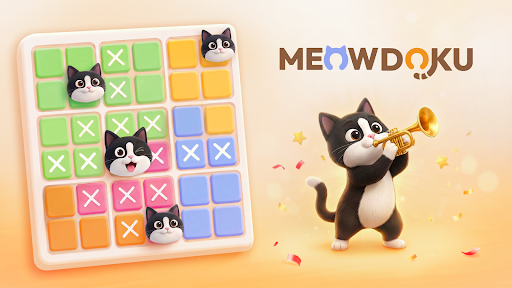
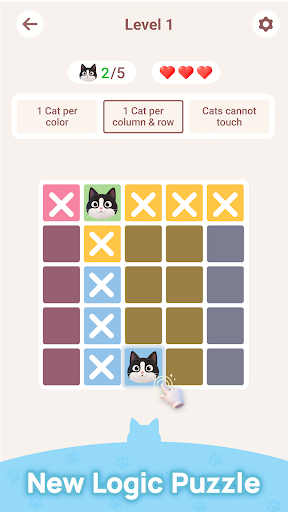
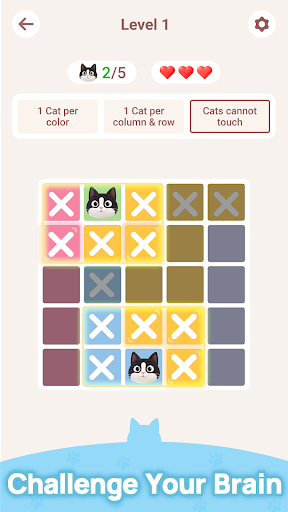
Looking for a game that soothes the soul but keeps your brain spinning? Welcome to Meowdoku — a pure logic puzzle game that flawlessly blends the rigorous reasoning of Sudoku with the thrilling deduction of Minesweeper.
Here, you have only one mission: find the perfect "exclusive territory" for every aloof little cat!
Simple Rules, Deep Strategy
The concept is elegant and intuitive, yet anything but simple:
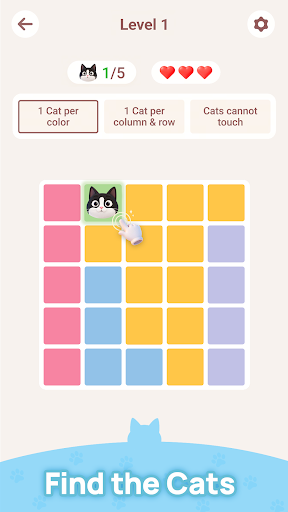
• Exclusive Territory: The board is divided into colored sections. You must place exactly one cat in each section.
• The Aloof Rule: Cats need absolute personal space! They absolutely cannot share the same row, column, or touch each other—not even diagonally.
• Risk & Reward: Double-tap a tile to place a cat. You only have 3 chances to make a mistake (hearts). Guess right, and you're rewarded with pure puzzle-solving satisfaction; guess wrong, and you lose a heart. Guessing won't save you; every single move must be carefully calculated!
Key Features
Pure & Immersive Experience
- Non-Intrusive Ads: Zero interruptions to your gameplay, letting you fully enjoy a completely focused, Zen-like flow state.
- Play Offline Anytime: No internet required. Perfectly fills up the puzzle-shaped hole in your daily commute, time spent waiting in line, or your morning coffee break.
Daily Brain Teasers
- Wake up your mind with brand-new "Daily Puzzles" every single day.
- Push your limits and see if you can break your fastest completion times on the global leaderboards.
Why Meowdoku Will Stay on Your Phone
Meowdoku won't hijack your attention with tedious social mechanics or endless daily grinds—it earns your love through pure gameplay quality. With its minimalist aesthetic and satisfying tactile feedback, it takes just seconds to learn. Yet, long after you put your phone down, its elegant logic loop will keep lingering in your mind.
Ready for a brain-teasing puzzle adventure filled with adorable felines?
Download Meowdoku now, put your logic to the test, and become the ultimate feline puzzle master!
Show more

1. Κατεβάστε το πρόγραμμα εγκατάστασης MEmu και ολοκληρώστε την εγκατάσταση

2. Ξεκινήστε το MEmu και στη συνέχεια ανοίξτε το Google Play στην επιφάνεια εργασίας

3. Αναζητήστε τον Meowdoku: Brain Puzzle Games στο Google Play
Install
4. Λήψη και εγκατάσταση του Meowdoku: Brain Puzzle Games
5. Μόλις ολοκληρωθεί η εγκατάσταση, κάντε κλικ στο εικονίδιο για να ξεκινήσετε

6. Enjoy playing Meowdoku: Brain Puzzle Games on PC with MEmu
Το MEmu Play, αποτελεί την ιδανικότερη δωρεάν λύση για την εξομοίωση του λειτουργικού Android, και χρησιμοποιείται ήδη από περισσότερους από 50 εκατομμύρια χρήστες, ο οποίοι απολαμβάνουν, την καταπληκτική εμπειρία παιχνιδιού που προσφέρεται μέσω της εφαρμογής. Με τη χρήση του MEmu Virtualization, είναι δυνατή η αναπαραγωγή παιχνιδιών Android στον υπολογιστή, ακόμη και εκείνων που απαιτούν μεγάλη επεξεργαστική ισχύ γραφικών, δίχως συμβιβασμούς στην ποιότητα και στην εμπειρία χρήσης, ακριβώς όπως ένα τελευταίας γενιάς κινητό τηλέφωνο.
Μεγαλύτερη οθόνη με καλύτερα γραφικά. Μεγάλη διάρκεια ζωής, χωρίς περιορισμό μπαταρίας ή δεδομένων κινητής τηλεφωνίας.
Πλήρης υποστήριξη αντιστοίχισης πλήκτρων για ακριβή έλεγχο του πληκτρολογίου και του ποντικιού ή του gamepad.
Πολλαπλοί λογαριασμοί παιχνιδιών ή εργασίες σε έναν υπολογιστή ταυτόχρονα με τον διαχειριστή πολλαπλών περιπτώσεων.
Play Meowdoku: Brain Puzzle Games on PC by following steps: