Sheru Bhai Life Simulator Game
Ενημερώθηκε
Τρέχουσα έκδοση
7
Προσφέρεται από

Με όλο το πάθος σας για το παιχνίδι Sheru Bhai Life Simulator Game, τα χέρια σας δεν πρέπει να περιορίζονται σε μια μικροσκοπική οθόνη του τηλεφώνου σας. Παίξτε σαν επαγγελματίας και αποκτήστε τον πλήρη έλεγχο του παιχνιδιού σας με πληκτρολόγιο και ποντίκι. Το MEmu σας προσφέρει όλα όσα περιμένετε. Κατεβάστε και παίξτε Sheru Bhai Life Simulator Game σε υπολογιστή. Παίξτε όσο θέλετε, χωρίς άλλους περιορισμούς μπαταρίας, δεδομένων κινητής τηλεφωνίας και ενοχλητικών κλήσεων. Το ολοκαίνουργιο MEmu 9 είναι η καλύτερη επιλογή για να παίξετε Sheru Bhai Life Simulator Game σε υπολογιστή. Ετοιμασμένο με την εμπειρία μας, το εξαιρετικό σύστημα προκαθορισμένης αντιστοίχισης πλήκτρων καθιστά το Sheru Bhai Life Simulator Game ένα πραγματικό παιχνίδι υπολογιστή. Ο διαχειριστής πολλαπλών περιπτώσεων MEmu καθιστά δυνατό το παιχνίδι με 2 ή περισσότερους λογαριασμούς στην ίδια συσκευή. Και το πιο σημαντικό, η αποκλειστική μηχανή εξομοίωσης μας μπορεί να απελευθερώσει πλήρως τις δυνατότητες του υπολογιστή σας, κάνοντας τα πάντα ομαλά.
Show more
Απολαύστε την υπέροχη εμπειρία αναπαραγωγής του Sheru Bhai Life Simulator Game σε υπολογιστή με το MEMU App Player. Πρόκειται για έναν ισχυρό δωρεάν εξομοιωτή Android που σας επιτρέπει να παίζετε χιλιάδες παιχνίδια Android. Sheru Bhai Game 3D is an open-world action game where you play as Sheru Bhai: a royal white lion in a white-and-gold suit, full of desi Bhai swagger, and the richest lion in the city.
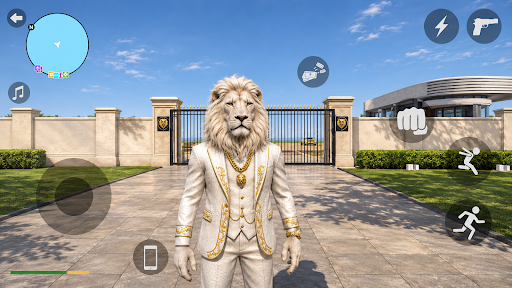
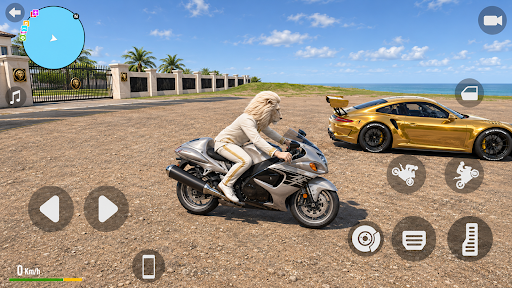
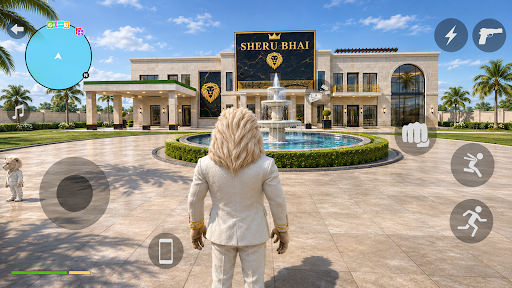
Sheru Bhai Game 3D is an open-world action game where you play as Sheru Bhai: a royal white lion in a white-and-gold suit, full of desi Bhai swagger, and the richest lion in the city. Explore a big island, drive luxury supercars, fly jets and a helicopter, live in your own gold mansion, change your royal look and grow your fame with your phone's photo app.
Your Royal Mansion
• Live in Sheru Bhai's mansion on Royal Hill, with marble floors, gold lion statues, a pool deck and a gold room with a huge pile of gold.
• Walk through every room: the master suite, the office, the guest room and more.
• Doors swing open as you walk through, and the main gate slides open when you arrive on foot or by car.
• Make it rain: throw money with the lion money button.
Your Royal Look
• Open the wardrobe in the master bedroom and pick your style.
• Suits: White Gold, White Classic and Black Premium.
• Specs: gold aviators, black shades or diamond specs.
• On your head: a gold crown, a diamond crown, or a black or white cap.
Supercars, Bikes and Aircraft
• 15 luxury cars, from supercars and hypercars to a big luxury SUV and a formula racing car.
• Two cars in Sheru Bhai's own designs: a white, black and gold lion hypercar and a diamond-and-gold supercar.
• Ride superbikes, and fly fighter jets, a big jet, a propeller plane and a helicopter.
• Call any vehicle from your phone and drive anywhere on the island.
• Visit the luxury car showroom, where a gold racing car turns on its stand.
An Island to Explore
• Roam a big open island: highways and hill roads, an airport, sandy beaches and a beach island, a village, a stadium, a police station and more.
• Day, night, clouds and rain: let the weather change by itself, or pick the one you like in Settings.
• Cause trouble, like blowing up cars, and police cars will come after you.
Your Royal Phone
A gold-and-ivory phone with your own apps:
• Vehicle: call cars, bikes and aircraft.
• Weapon: pick your weapons and change their colours.
• Bank: see Sheru Bhai's royal fortune.
• Camera: take photos and selfies anywhere on the island.
Play Your Way
• Simple touch controls to walk, run, drive and fly.
• Play offline: no internet needed.
• No sign-up and no account.
Live like a king and drive like a legend. Become Sheru Bhai!
Show more

1. Κατεβάστε το πρόγραμμα εγκατάστασης MEmu και ολοκληρώστε την εγκατάσταση

2. Ξεκινήστε το MEmu και στη συνέχεια ανοίξτε το Google Play στην επιφάνεια εργασίας

3. Αναζητήστε τον Sheru Bhai Life Simulator Game στο Google Play
Install
4. Λήψη και εγκατάσταση του Sheru Bhai Life Simulator Game
5. Μόλις ολοκληρωθεί η εγκατάσταση, κάντε κλικ στο εικονίδιο για να ξεκινήσετε

6. Enjoy playing Sheru Bhai Life Simulator Game on PC with MEmu
Το MEmu Play, αποτελεί την ιδανικότερη δωρεάν λύση για την εξομοίωση του λειτουργικού Android, και χρησιμοποιείται ήδη από περισσότερους από 50 εκατομμύρια χρήστες, ο οποίοι απολαμβάνουν, την καταπληκτική εμπειρία παιχνιδιού που προσφέρεται μέσω της εφαρμογής. Με τη χρήση του MEmu Virtualization, είναι δυνατή η αναπαραγωγή παιχνιδιών Android στον υπολογιστή, ακόμη και εκείνων που απαιτούν μεγάλη επεξεργαστική ισχύ γραφικών, δίχως συμβιβασμούς στην ποιότητα και στην εμπειρία χρήσης, ακριβώς όπως ένα τελευταίας γενιάς κινητό τηλέφωνο.
Μεγαλύτερη οθόνη με καλύτερα γραφικά. Μεγάλη διάρκεια ζωής, χωρίς περιορισμό μπαταρίας ή δεδομένων κινητής τηλεφωνίας.
Πλήρης υποστήριξη αντιστοίχισης πλήκτρων για ακριβή έλεγχο του πληκτρολογίου και του ποντικιού ή του gamepad.
Πολλαπλοί λογαριασμοί παιχνιδιών ή εργασίες σε έναν υπολογιστή ταυτόχρονα με τον διαχειριστή πολλαπλών περιπτώσεων.
Play Sheru Bhai Life Simulator Game on PC by following steps: