Sheru Bhai Life Simulator Game
Updated
Current Version
7
Offered By

With your passion for Sheru Bhai Life Simulator Game, you shouldn’t have to limit yourself to the small screen of a phone. Play like a pro and take full control of the game using a keyboard and mouse. MEmu gives you everything you’re looking for. Download and play Sheru Bhai Life Simulator Game on PC. Play as long as you want — no more worries about battery life, mobile data, or unexpected calls. The all-new MEmu 9 is the best way to play Sheru Bhai Life Simulator Game on PC. With our expertly designed keymapping system, Sheru Bhai Life Simulator Game feels just like a real PC game. The MEmu multi-instance manager lets you run two or more accounts on the same device at the same time. Most importantly, our exclusive emulation engine unlocks your PC’s full potential, delivering smooth and seamless performance.
Show more
Download Sheru Bhai Life Simulator Game on PC with MEmu Android Emulator. Enjoy playing on big screen. Sheru Bhai Game 3D is an open-world action game where you play as Sheru Bhai: a royal white lion in a white-and-gold suit, full of desi Bhai swagger, and the richest lion in the city.
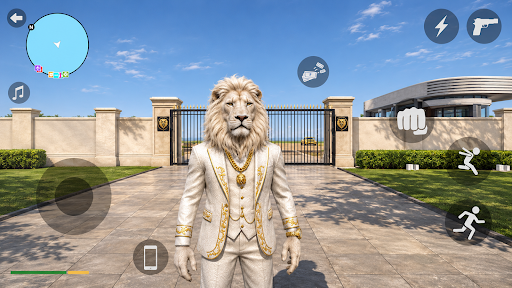
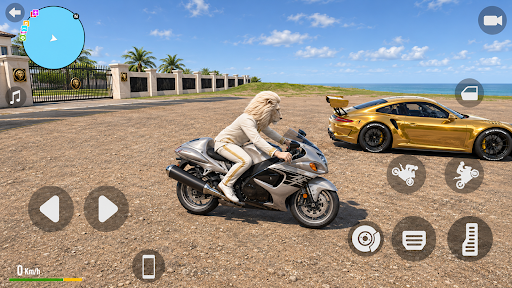
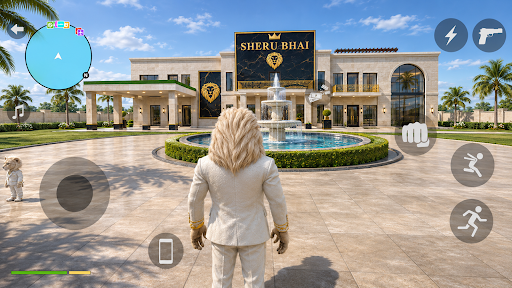
Sheru Bhai Game 3D is an open-world action game where you play as Sheru Bhai: a royal white lion in a white-and-gold suit, full of desi Bhai swagger, and the richest lion in the city. Explore a big island, drive luxury supercars, fly jets and a helicopter, live in your own gold mansion, change your royal look and grow your fame with your phone's photo app.
Your Royal Mansion
• Live in Sheru Bhai's mansion on Royal Hill, with marble floors, gold lion statues, a pool deck and a gold room with a huge pile of gold.
• Walk through every room: the master suite, the office, the guest room and more.
• Doors swing open as you walk through, and the main gate slides open when you arrive on foot or by car.
• Make it rain: throw money with the lion money button.
Your Royal Look
• Open the wardrobe in the master bedroom and pick your style.
• Suits: White Gold, White Classic and Black Premium.
• Specs: gold aviators, black shades or diamond specs.
• On your head: a gold crown, a diamond crown, or a black or white cap.
Supercars, Bikes and Aircraft
• 15 luxury cars, from supercars and hypercars to a big luxury SUV and a formula racing car.
• Two cars in Sheru Bhai's own designs: a white, black and gold lion hypercar and a diamond-and-gold supercar.
• Ride superbikes, and fly fighter jets, a big jet, a propeller plane and a helicopter.
• Call any vehicle from your phone and drive anywhere on the island.
• Visit the luxury car showroom, where a gold racing car turns on its stand.
An Island to Explore
• Roam a big open island: highways and hill roads, an airport, sandy beaches and a beach island, a village, a stadium, a police station and more.
• Day, night, clouds and rain: let the weather change by itself, or pick the one you like in Settings.
• Cause trouble, like blowing up cars, and police cars will come after you.
Your Royal Phone
A gold-and-ivory phone with your own apps:
• Vehicle: call cars, bikes and aircraft.
• Weapon: pick your weapons and change their colours.
• Bank: see Sheru Bhai's royal fortune.
• Camera: take photos and selfies anywhere on the island.
Play Your Way
• Simple touch controls to walk, run, drive and fly.
• Play offline: no internet needed.
• No sign-up and no account.
Live like a king and drive like a legend. Become Sheru Bhai!
Show more

1. Download MEmu installer and finish the setup

2. Start MEmu then open Google Play on the desktop

3. Search Sheru Bhai Life Simulator Game in Google Play
Install
4. Download and Install Sheru Bhai Life Simulator Game
5. On install completion click the icon to start

6. Enjoy playing Sheru Bhai Life Simulator Game on PC with MEmu
MEmu Play is the best Android emulator and 100 million people already enjoy its superb Android gaming experience. The MEmu virtualization technology empowers you to play thousands of Android games smoothly on your PC, even the most graphic-intensive ones.
Bigger screen with better graphics; Long duration, without limitation of battery or mobile data.
Full Keymapping support for precise control of keyboard and mouse or gamepad.
Multiple game accounts or tasks on single PC at one time with Multi-Instance manager.
Play Sheru Bhai Life Simulator Game on PC by following steps: