Summoners War: Rush
Ενημερώθηκε
Τρέχουσα έκδοση
1.3.23449
Προσφέρεται από

Με όλο το πάθος σας για το παιχνίδι Summoners War: Rush, τα χέρια σας δεν πρέπει να περιορίζονται σε μια μικροσκοπική οθόνη του τηλεφώνου σας. Παίξτε σαν επαγγελματίας και αποκτήστε τον πλήρη έλεγχο του παιχνιδιού σας με πληκτρολόγιο και ποντίκι. Το MEmu σας προσφέρει όλα όσα περιμένετε. Κατεβάστε και παίξτε Summoners War: Rush σε υπολογιστή. Παίξτε όσο θέλετε, χωρίς άλλους περιορισμούς μπαταρίας, δεδομένων κινητής τηλεφωνίας και ενοχλητικών κλήσεων. Το ολοκαίνουργιο MEmu 9 είναι η καλύτερη επιλογή για να παίξετε Summoners War: Rush σε υπολογιστή. Ετοιμασμένο με την εμπειρία μας, το εξαιρετικό σύστημα προκαθορισμένης αντιστοίχισης πλήκτρων καθιστά το Summoners War: Rush ένα πραγματικό παιχνίδι υπολογιστή. Ο διαχειριστής πολλαπλών περιπτώσεων MEmu καθιστά δυνατό το παιχνίδι με 2 ή περισσότερους λογαριασμούς στην ίδια συσκευή. Και το πιο σημαντικό, η αποκλειστική μηχανή εξομοίωσης μας μπορεί να απελευθερώσει πλήρως τις δυνατότητες του υπολογιστή σας, κάνοντας τα πάντα ομαλά.
Show more
Απολαύστε την υπέροχη εμπειρία αναπαραγωγής του Summoners War: Rush σε υπολογιστή με το MEMU App Player. Πρόκειται για έναν ισχυρό δωρεάν εξομοιωτή Android που σας επιτρέπει να παίζετε χιλιάδες παιχνίδια Android. 《 Game Introduction 》.
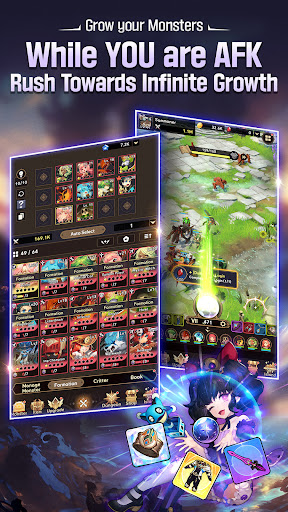
《 Game Introduction 》
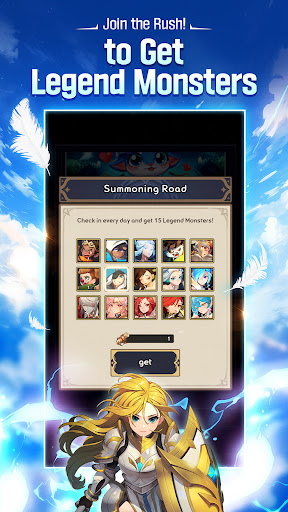
[Legend Monsters Await You]
Participate in the 《Summoning Road》 grand launch event and get 14 Legend Monsters just by logging in.
* Does not include Monsters added after the official launch.
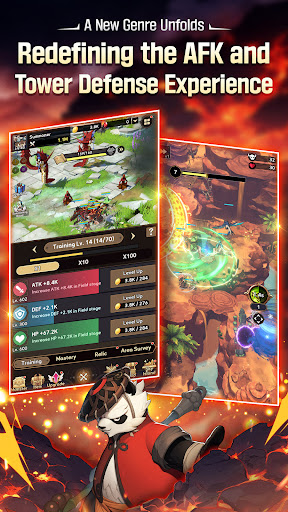
[Experience a New Genre, Idle TD]
Strategic planning meets simplified growth.
Jump into a new experience combining Defense with Idle RPG
[Seamless Monster Growth]
Take a hands-off approach with idle growth.
Kick back and relax as your Monsters grow stronger, even while offline.
[Face a Powerful Foe in Dragon's Nest]
An unforgiving battlefield of lava...
A blood-pumping battle between 25 elite Monsters and a massive dragon.
Unleash your strategic genius and put together your best team!
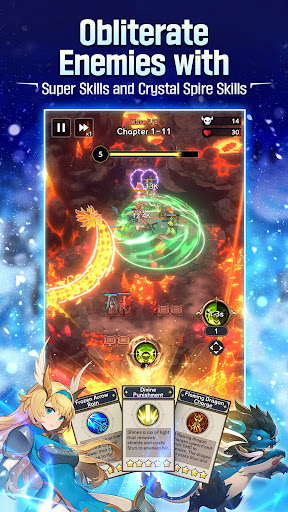
[Dominate the Battlefield with Defense Exclusive Skills]
Tip the battle in your favor with powerful Ultimates!
Use skills at the perfect timing and location to wipe out hordes of enemies.
[Abundant Content, Unlimited Growth]
Upgrade your Monsters in various ways, including Training, Magic Orb, and Area Survey.
Rush towards a world of unlimited growth!
[Unique Monsters from Summoners War]
Collect unique Monsters and build your team.
Try your hand at obtaining special Light and Dark Monsters too!
Countless companions are waiting to join you on your journey!
***
[App Permissions]
We request access permissions to provide the following services when using this app:
1. (Optional) Storage (Photos/Media/Files): We request permission to use storage for downloading and storing game data.
- For Android 12 and below
2. (Optional) Notifications: We request permission to publish notifications related to the app's services.
3. (Optional) Nearby Devices: We request permission for Bluetooth usage on some devices.
- BLUETOOTH: Android API 30 and earlier devices
- BLUETOOTH_CONNECT: Android 12
※ Services can still be used without granting optional access permissions, excluding the functionalities associated with those permissions.
[How to Remove Permissions]
You can reset or remove permissions after allowing them as shown below.
1. Android 6.0 or above: Settings 》 Apps 》 Select App 》 Permissions 》 Allow or Remove Permissions
2. Android 6.0 or below: Upgrade the operating system to remove permissions or delete the app
※ If you are using Android 6.0 or below, we recommend that you upgrade to 6.0 or above as you can't change the optional permissions individually.
• Supported Languages: 한국어, English, 日本語, 简体中文, 繁體中文, Deutsch, Français, Español, ไทย
• This app is free-to-play and offers in-app purchases. Purchasing paid items may incur additional fees, and payment cancelation may not be available depending on the type of the item.
• Conditions regarding the usage of this game (contract termination/payment cancelation, etc.) can be viewed in the game or the Com2uS mobile game Terms of Service (available on the website, https://terms.withhive.com/terms/policy/view/M121/T1 ).
• Inquiries regarding the game can be submitted via Com2uS Customer Support 1:1 Inquiry (http://m.withhive.com 》 Customer Support 》 1:1 Inquiry).
***
- Official Brand Site: https://rush.summonerswar.com/
Show more

1. Κατεβάστε το πρόγραμμα εγκατάστασης MEmu και ολοκληρώστε την εγκατάσταση

2. Ξεκινήστε το MEmu και στη συνέχεια ανοίξτε το Google Play στην επιφάνεια εργασίας

3. Αναζητήστε τον Summoners War: Rush στο Google Play
Install
4. Λήψη και εγκατάσταση του Summoners War: Rush
5. Μόλις ολοκληρωθεί η εγκατάσταση, κάντε κλικ στο εικονίδιο για να ξεκινήσετε

6. Enjoy playing Summoners War: Rush on PC with MEmu
Το MEmu Play, αποτελεί την ιδανικότερη δωρεάν λύση για την εξομοίωση του λειτουργικού Android, και χρησιμοποιείται ήδη από περισσότερους από 50 εκατομμύρια χρήστες, ο οποίοι απολαμβάνουν, την καταπληκτική εμπειρία παιχνιδιού που προσφέρεται μέσω της εφαρμογής. Με τη χρήση του MEmu Virtualization, είναι δυνατή η αναπαραγωγή παιχνιδιών Android στον υπολογιστή, ακόμη και εκείνων που απαιτούν μεγάλη επεξεργαστική ισχύ γραφικών, δίχως συμβιβασμούς στην ποιότητα και στην εμπειρία χρήσης, ακριβώς όπως ένα τελευταίας γενιάς κινητό τηλέφωνο.
Μεγαλύτερη οθόνη με καλύτερα γραφικά. Μεγάλη διάρκεια ζωής, χωρίς περιορισμό μπαταρίας ή δεδομένων κινητής τηλεφωνίας.
Πλήρης υποστήριξη αντιστοίχισης πλήκτρων για ακριβή έλεγχο του πληκτρολογίου και του ποντικιού ή του gamepad.
Πολλαπλοί λογαριασμοί παιχνιδιών ή εργασίες σε έναν υπολογιστή ταυτόχρονα με τον διαχειριστή πολλαπλών περιπτώσεων.
Play Summoners War: Rush on PC by following steps: