OG Arcade - 150+ Retro Games
Ενημερώθηκε
Τρέχουσα έκδοση
Προσφέρεται από

Με όλο το πάθος σας για το παιχνίδι OG Arcade - 150+ Retro Games, τα χέρια σας δεν πρέπει να περιορίζονται σε μια μικροσκοπική οθόνη του τηλεφώνου σας. Παίξτε σαν επαγγελματίας και αποκτήστε τον πλήρη έλεγχο του παιχνιδιού σας με πληκτρολόγιο και ποντίκι. Το MEmu σας προσφέρει όλα όσα περιμένετε. Κατεβάστε και παίξτε OG Arcade - 150+ Retro Games σε υπολογιστή. Παίξτε όσο θέλετε, χωρίς άλλους περιορισμούς μπαταρίας, δεδομένων κινητής τηλεφωνίας και ενοχλητικών κλήσεων. Το ολοκαίνουργιο MEmu 9 είναι η καλύτερη επιλογή για να παίξετε OG Arcade - 150+ Retro Games σε υπολογιστή. Ετοιμασμένο με την εμπειρία μας, το εξαιρετικό σύστημα προκαθορισμένης αντιστοίχισης πλήκτρων καθιστά το OG Arcade - 150+ Retro Games ένα πραγματικό παιχνίδι υπολογιστή. Ο διαχειριστής πολλαπλών περιπτώσεων MEmu καθιστά δυνατό το παιχνίδι με 2 ή περισσότερους λογαριασμούς στην ίδια συσκευή. Και το πιο σημαντικό, η αποκλειστική μηχανή εξομοίωσης μας μπορεί να απελευθερώσει πλήρως τις δυνατότητες του υπολογιστή σας, κάνοντας τα πάντα ομαλά.
Show more
Απολαύστε την υπέροχη εμπειρία αναπαραγωγής του OG Arcade - 150+ Retro Games σε υπολογιστή με το MEMU App Player. Πρόκειται για έναν ισχυρό δωρεάν εξομοιωτή Android που σας επιτρέπει να παίζετε χιλιάδες παιχνίδια Android. Looking to feel the nostalgia of a classic game from the 70s, 80s and 90s?
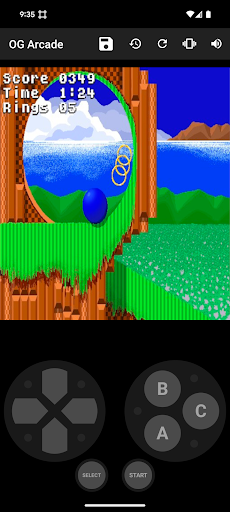
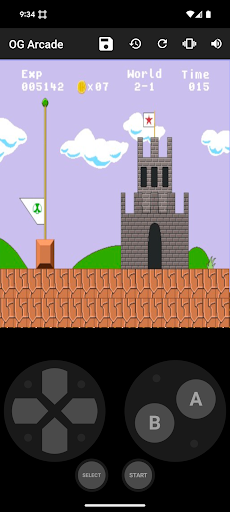
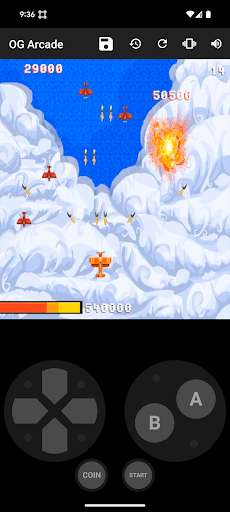
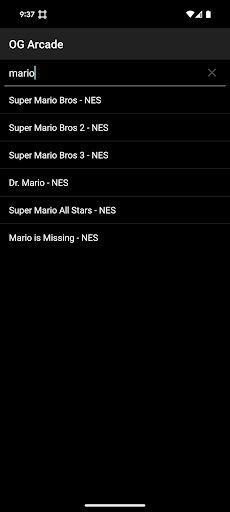
Looking to feel the nostalgia of a classic game from the 70s, 80s and 90s?
OG Arcade is the place.
Looking for a retro NES (TM), Genesis (TM), Arcade or PC Game?
OG Arcade is the place.
Play a ever expanding list of classic games found on the Internet Archive.
They have everything from Mario Bros (TM) to Oregon Trail (TM) and we will make it so all of those work on your device.
To get started it is as simple as this:
1) Choose the game from the list.
2) Use the built-in controls.
Most games have user guides that can be found online if it is not obvious, but we will add links later.
You need internet access the first time you play a game, but you don't afterwards.
If you want to save your progress, you must click the save button in the app regardless of whether the game supports save slots or not. Later you must use the restore button to get back your progress. This is different than the normal save and restore functionality on a console. It is better in that you can save at any point. It is worse in that you must click restore the next time around. This will be improved over time.
No technical steps are required. You don't need to provide a ROM file or anything like that.
What am I paying for:
This app just acts as a browser extension of sorts and loads the publicly available streaming versions of the games posted on the Internet Archive unmodified. These generally don't work well on an Android device. It then provides the ability to find the games easily and control that makes playing them possible on a Android device. We also game test to make sure the games function as expected and match the age rating of this app.
Future plans:
MORE GAMES - continuously adding
Play games in landscape - coming soon
Search, sort and filter the game list (basic search only now) - will improve soon
Support in game save capability (basic functionality ready now) - will improve soon
Add ability to save game states - coming soon
Multiplayer - longer term goal
Cast to larger screen - longer term goal
Use physical controllers - longer term goal
What if I want a game added?
Just send a request to support@userland.tech
What if I want a game removed?
If it is a copyright issue please see: https://help.archive.org/help/how-do-i-request-to-remove-something-from-archive-org
We don't host any files ourselves and just link to their content and make it useable.
What if I have some other issue:
Just report it to support@userland.tech
Show more

1. Κατεβάστε το πρόγραμμα εγκατάστασης MEmu και ολοκληρώστε την εγκατάσταση

2. Ξεκινήστε το MEmu και στη συνέχεια ανοίξτε το Google Play στην επιφάνεια εργασίας

3. Αναζητήστε τον OG Arcade - 150+ Retro Games στο Google Play
Install
4. Λήψη και εγκατάσταση του OG Arcade - 150+ Retro Games
5. Μόλις ολοκληρωθεί η εγκατάσταση, κάντε κλικ στο εικονίδιο για να ξεκινήσετε

6. Enjoy playing OG Arcade - 150+ Retro Games on PC with MEmu
Το MEmu Play, αποτελεί την ιδανικότερη δωρεάν λύση για την εξομοίωση του λειτουργικού Android, και χρησιμοποιείται ήδη από περισσότερους από 50 εκατομμύρια χρήστες, ο οποίοι απολαμβάνουν, την καταπληκτική εμπειρία παιχνιδιού που προσφέρεται μέσω της εφαρμογής. Με τη χρήση του MEmu Virtualization, είναι δυνατή η αναπαραγωγή παιχνιδιών Android στον υπολογιστή, ακόμη και εκείνων που απαιτούν μεγάλη επεξεργαστική ισχύ γραφικών, δίχως συμβιβασμούς στην ποιότητα και στην εμπειρία χρήσης, ακριβώς όπως ένα τελευταίας γενιάς κινητό τηλέφωνο.
Μεγαλύτερη οθόνη με καλύτερα γραφικά. Μεγάλη διάρκεια ζωής, χωρίς περιορισμό μπαταρίας ή δεδομένων κινητής τηλεφωνίας.
Πλήρης υποστήριξη αντιστοίχισης πλήκτρων για ακριβή έλεγχο του πληκτρολογίου και του ποντικιού ή του gamepad.
Πολλαπλοί λογαριασμοί παιχνιδιών ή εργασίες σε έναν υπολογιστή ταυτόχρονα με τον διαχειριστή πολλαπλών περιπτώσεων.
Play OG Arcade - 150+ Retro Games on PC by following steps: