Total War: MEDIEVAL II
Ενημερώθηκε
Τρέχουσα έκδοση
1777471733
Προσφέρεται από

Με όλο το πάθος σας για το παιχνίδι Total War: MEDIEVAL II, τα χέρια σας δεν πρέπει να περιορίζονται σε μια μικροσκοπική οθόνη του τηλεφώνου σας. Παίξτε σαν επαγγελματίας και αποκτήστε τον πλήρη έλεγχο του παιχνιδιού σας με πληκτρολόγιο και ποντίκι. Το MEmu σας προσφέρει όλα όσα περιμένετε. Κατεβάστε και παίξτε Total War: MEDIEVAL II σε υπολογιστή. Παίξτε όσο θέλετε, χωρίς άλλους περιορισμούς μπαταρίας, δεδομένων κινητής τηλεφωνίας και ενοχλητικών κλήσεων. Το ολοκαίνουργιο MEmu 9 είναι η καλύτερη επιλογή για να παίξετε Total War: MEDIEVAL II σε υπολογιστή. Ετοιμασμένο με την εμπειρία μας, το εξαιρετικό σύστημα προκαθορισμένης αντιστοίχισης πλήκτρων καθιστά το Total War: MEDIEVAL II ένα πραγματικό παιχνίδι υπολογιστή. Ο διαχειριστής πολλαπλών περιπτώσεων MEmu καθιστά δυνατό το παιχνίδι με 2 ή περισσότερους λογαριασμούς στην ίδια συσκευή. Και το πιο σημαντικό, η αποκλειστική μηχανή εξομοίωσης μας μπορεί να απελευθερώσει πλήρως τις δυνατότητες του υπολογιστή σας, κάνοντας τα πάντα ομαλά.
Show more
Απολαύστε την υπέροχη εμπειρία αναπαραγωγής του Total War: MEDIEVAL II σε υπολογιστή με το MEMU App Player. Πρόκειται για έναν ισχυρό δωρεάν εξομοιωτή Android που σας επιτρέπει να παίζετε χιλιάδες παιχνίδια Android. MEDIEVAL II brings Total War’s compelling mix of massive real-time battles and intricate turn-based strategy to Android.
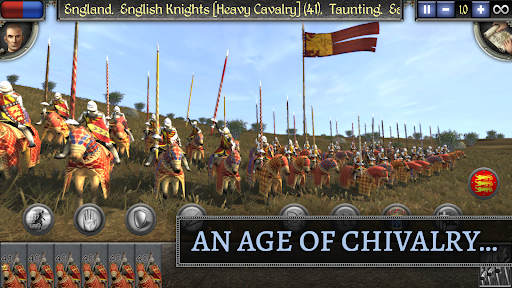
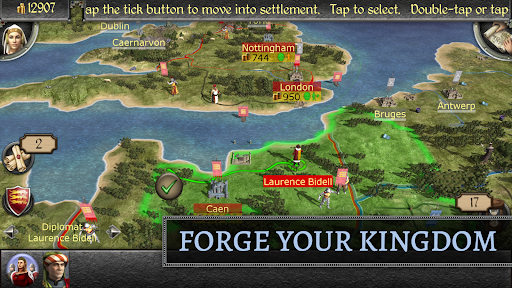
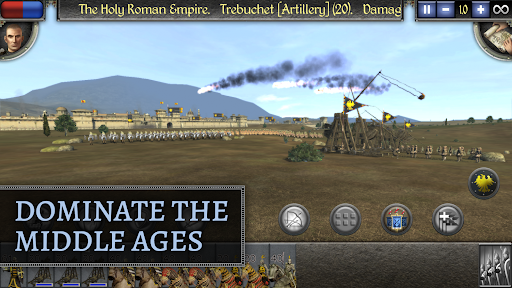
MEDIEVAL II brings Total War’s compelling mix of massive real-time battles and intricate turn-based strategy to Android. Set across three continents during the turbulent Middle Ages, spectacular conflicts and scheming rivals line the path to power as the great kingdoms of the medieval world vie for supremacy. Be it through diplomacy or conquest, trade or subterfuge, you must secure the resources and loyalty required to rule an empire from the shores of Western Europe to the sands of Arabia.
THE STRENGTH OF NATIONS
Unlock up to 17 playable factions and build them into major world powers through statecraft, subterfuge or all-out war.
THE KINGDOMS EXPANSION
Available via in-app purchase, this massive expansion includes 24 playable factions across four unique, fully featured campaigns. Wage war from the jungles of the Americas to the deserts of the Holy Land, from the deceptively gentle shores of the British Isles to the frigid Baltic plains.
THE ART OF WAR
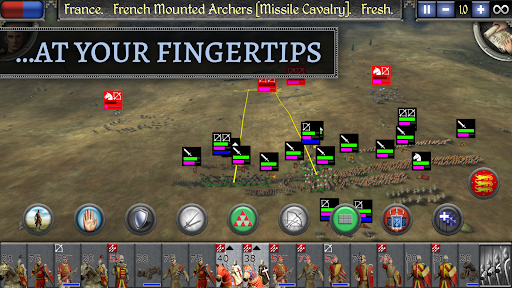
Deploy infantry, archers and cavalry into huge real-time battles, with a full range of medieval weaponry at your command.
THE TOOLS OF STATE
Use sophisticated diplomacy, lucrative trade agreements and daring agents to forge alliances or destabilise your rivals.
THE TEST OF TIME
Shape the destinies of Europe, North Africa and the Middle East through five momentous centuries of combat, competition and conquest.
THE POWER IN YOUR HANDS
Take command, with a brand-new user interface and enhanced touch controls for fingertip control of the battlefield. Or, play with any Android-compatible mouse & keyboard.
THE HOTSEATS & HALBERDS UPDATE
This major update adds a host of balance improvements to Pikemen, Zweihanders and other late-era units, and, for owners of the Kingdoms expansion, introduces asynchronous multiplayer campaigns on a single device.
===
Total War: MEDIEVAL II requires Android 12 or later. You need 4.3GB of free space on your device, though we recommend at least double this to avoid initial installation issues.
A further 8.04GB is required to install the Kingdoms DLC. To save space, you can install each campaign individually.
To avoid disappointment, we aim to block users from purchasing a game if their device is not capable of running it. If you are able to purchase this game on your device then we expect it to run well in most cases.
However, we are aware of rare instances where users are able to purchase the game on unsupported devices. This can occur when a device is not correctly identified by the Google Play Store, and therefore cannot be blocked from purchasing. For full details on the supported chipsets for this game, plus a list of tested and verified devices, we recommend that you visit https://feral.in/medieval2-android-devices
===
Supported Languages: English, Čeština, Deutsch, Español, Français, Italiano, Polski, Pусский
===
© 2007–2025 The Creative Assembly Limited. Originally developed by The Creative Assembly Limited. Originally published by SEGA. Creative Assembly, the Creative Assembly logo, Total War, Total War: MEDIEVAL and the Total War logo are either trademarks or registered trademarks of The Creative Assembly Limited. SEGA and the SEGA logo are registered trademarks or trademarks of SEGA Corporation. Developed for and published on Android by Feral Interactive. Android is a trademark of Google LLC. Feral and the Feral logo are trademarks of Feral Interactive Ltd. All other trademarks, logos and copyrights are property of their respective owners. All rights reserved.
Show more

1. Κατεβάστε το πρόγραμμα εγκατάστασης MEmu και ολοκληρώστε την εγκατάσταση

2. Ξεκινήστε το MEmu και στη συνέχεια ανοίξτε το Google Play στην επιφάνεια εργασίας

3. Αναζητήστε τον Total War: MEDIEVAL II στο Google Play
Install
4. Λήψη και εγκατάσταση του Total War: MEDIEVAL II
5. Μόλις ολοκληρωθεί η εγκατάσταση, κάντε κλικ στο εικονίδιο για να ξεκινήσετε

6. Enjoy playing Total War: MEDIEVAL II on PC with MEmu
Το MEmu Play, αποτελεί την ιδανικότερη δωρεάν λύση για την εξομοίωση του λειτουργικού Android, και χρησιμοποιείται ήδη από περισσότερους από 50 εκατομμύρια χρήστες, ο οποίοι απολαμβάνουν, την καταπληκτική εμπειρία παιχνιδιού που προσφέρεται μέσω της εφαρμογής. Με τη χρήση του MEmu Virtualization, είναι δυνατή η αναπαραγωγή παιχνιδιών Android στον υπολογιστή, ακόμη και εκείνων που απαιτούν μεγάλη επεξεργαστική ισχύ γραφικών, δίχως συμβιβασμούς στην ποιότητα και στην εμπειρία χρήσης, ακριβώς όπως ένα τελευταίας γενιάς κινητό τηλέφωνο.
Μεγαλύτερη οθόνη με καλύτερα γραφικά. Μεγάλη διάρκεια ζωής, χωρίς περιορισμό μπαταρίας ή δεδομένων κινητής τηλεφωνίας.
Πλήρης υποστήριξη αντιστοίχισης πλήκτρων για ακριβή έλεγχο του πληκτρολογίου και του ποντικιού ή του gamepad.
Πολλαπλοί λογαριασμοί παιχνιδιών ή εργασίες σε έναν υπολογιστή ταυτόχρονα με τον διαχειριστή πολλαπλών περιπτώσεων.
Play Total War: MEDIEVAL II on PC by following steps: