Mega Photo
Ενημερώθηκε
Τρέχουσα έκδοση
1.6.3
Προσφέρεται από

Σταματήστε να ανησυχείτε για υπερβολικές χρεώσεις όταν χρησιμοποιείτε το Mega Photo στο κινητό σας, απελευθερώστε τον εαυτό σας από τη μικροσκοπική οθόνη και απολαύστε τη χρήση της εφαρμογής σε μια πολύ μεγαλύτερη οθόνη. Από τώρα και στο εξής, αποκτήστε εμπειρία πλήρους οθόνης της εφαρμογής σας με πληκτρολόγιο και ποντίκι. Το MEmu σας προσφέρει όλες τις εκπληκτικές δυνατότητες που περιμένατε: γρήγορη εγκατάσταση και εύκολη εγκατάσταση, διαισθητικά χειριστήρια, όχι περισσότερους περιορισμούς μπαταρίας, δεδομένα κινητής τηλεφωνίας και ενοχλητικές κλήσεις. Το ολοκαίνουργιο MEmu 9 είναι η καλύτερη επιλογή για χρήση του Mega Photo στον υπολογιστή σας. Κωδικοποιημένο με την απορρόφηση μας, ο διαχειριστής πολλαπλών παρουσιών καθιστά δυνατό το άνοιγμα 2 ή περισσότερων λογαριασμών ταυτόχρονα. Και το πιο σημαντικό, ο αποκλειστικός κινητήρας εξομοίωσης μπορεί να απελευθερώσει όλες τις δυνατότητες του υπολογιστή σας, να κάνει τα πάντα ομαλά και ευχάριστα.
Show more
Απολαύστε την υπέροχη εμπειρία αναπαραγωγής του Mega Photo σε υπολογιστή με το MEMU App Player. Πρόκειται για έναν ισχυρό δωρεάν εξομοιωτή Android που σας επιτρέπει να παίζετε χιλιάδες παιχνίδια Android. Mega Photo is the #1 app for transforming your photos and videos into fun and inspiring masterpieces with 100+ of FREE effects!
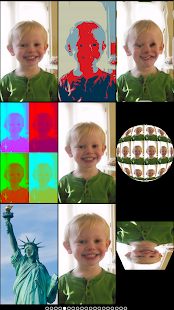
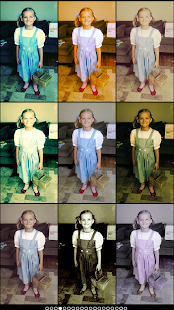
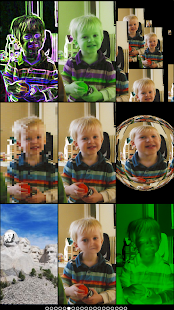
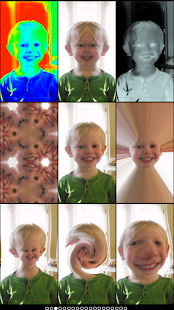
Mega Photo is the #1 app for transforming your photos and videos into fun and inspiring masterpieces with 100+ of FREE effects!
Twist, morph, pinch, and warp your photos into outrageous designs! You can even spin your images in 3-D. There are over 100 free effects to choose from and you see them all in real-time. You can take videos with the effects too! You can pause the recording to switch effects in the middle of your video. Make a music video by selecting a soundtrack from your music library!
Effects include: tunnel, mosaic, puzzle, hue shift, motion blur, tile, emboss, spinning cube, x-ray, collage, night vision, halftone, light tunnel, and many more. There's also 40 vintage camera effects for a retro feel.
Mega Photo will transform your photos and videos with amazing effects you won't find in other photography apps. It's the most fun you can have with your photos!
** TRANSFORM YOUR PHOTOS IN AMAZING WAYS **
Mega Photo makes your photos and videos as unique as you are. Over 100 free effects are shown to you in real-time. You can play a tile puzzle with a live camera feed, go through a wormhole tunnel, view a spinning globe, and much more!
The app can switch from the front to rear facing camera with the touch of a button. You can use the live camera or a still image - just choose a favorite picture from your library or take a new picture.
Many of the photo effects are interactive so you can personalize it even before taking your picture or video. Tap and drag, zoom with two fingers, rotate, and more to make it your own.
** SHARE THE FUN WITH FRIENDS **
Photos are more fun with your friends, and Mega Photo makes it easy. Share your zany and funny photos (like you as the Mona Lisa!) easily. Just tap to email your photo or post to Facebook or Twitter.
Are your friends nearby? Snap a photo with all of you using the helpful timer. Set the timer for up to 30 seconds so all your buddies can get in the picture. Don't forget to choose your favorite photo transformation to amaze your friends.
** APP FEATURES **
• Transform Your Photos - Distort, pinch, and change colors of your photos and videos
• 100+ Free Effects - Apply eye-popping effects to your images with just a tap of your finger
• Interactive Adjustable Filters - View and change your photo effects in real-time
• Share with Friends - Easily post your photos to Facebook or Twitter, and email to friends and family.
• Use Existing Photos - Snap a new photo or use your existing pics on your camera roll.
• Play Games - Take your photos and play classic arcade games with your photos.
• Take Video - Mega Photo can be used for video too with effects that would make Michael Bay jealous.
• Add Music to Videos - Add music to your videos and become the next Justin Bieber with Mega Photo... or not.
Show more

1. Κατεβάστε το πρόγραμμα εγκατάστασης MEmu και ολοκληρώστε την εγκατάσταση

2. Ξεκινήστε το MEmu και στη συνέχεια ανοίξτε το Google Play στην επιφάνεια εργασίας

3. Αναζητήστε τον Mega Photo στο Google Play
Install
4. Λήψη και εγκατάσταση του Mega Photo
5. Μόλις ολοκληρωθεί η εγκατάσταση, κάντε κλικ στο εικονίδιο για να ξεκινήσετε

6. Απολαύστε τη χρήση του Mega Photo σε υπολογιστή με το MEmu
Το MEmu Play είναι ο καλύτερος δωρεάν εξομοιωτής Android, που χρησιμοποιείται αυτήν τη στιγμή από πάνω από 50 εκατομμύρια χρήστες που απολαμβάνουν την εμπειρία εφαρμογών που προσφέρει. Μέσω της τεχνολογίας εικονικοποίησης MEmu 9, οι χρήστες μπορούν να δοκιμάσουν εφαρμογές Android στους υπολογιστές τους, ακόμα και σε εκείνους που απαιτούν υψηλή ισχύ επεξεργασίας γραφικών, οι οποίες λειτουργούν ομαλά σαν να λειτουργούν στα κινητά τηλέφωνα τελευταίας γενιάς, χωρίς να θυσιάζεται η ποιότητα της εικόνας και η εμπειρία χρήστη.
Μεγαλύτερη οθόνη με καλύτερα γραφικά. Μεγάλη διάρκεια ζωής, χωρίς περιορισμό μπαταρίας ή δεδομένων κινητής τηλεφωνίας.
Πλήρης υποστήριξη αντιστοίχισης πλήκτρων για ακριβή έλεγχο του πληκτρολογίου και του ποντικιού ή του gamepad.
Πολλαπλοί λογαριασμοί παιχνιδιών ή εργασίες σε έναν υπολογιστή ταυτόχρονα με τον διαχειριστή πολλαπλών περιπτώσεων.
Use Mega Photo on PC by following steps: