Garena
Ενημερώθηκε
Τρέχουσα έκδοση
2.4.6.107
Προσφέρεται από

Σταματήστε να ανησυχείτε για υπερβολικές χρεώσεις όταν χρησιμοποιείτε το Garena στο κινητό σας, απελευθερώστε τον εαυτό σας από τη μικροσκοπική οθόνη και απολαύστε τη χρήση της εφαρμογής σε μια πολύ μεγαλύτερη οθόνη. Από τώρα και στο εξής, αποκτήστε εμπειρία πλήρους οθόνης της εφαρμογής σας με πληκτρολόγιο και ποντίκι. Το MEmu σας προσφέρει όλες τις εκπληκτικές δυνατότητες που περιμένατε: γρήγορη εγκατάσταση και εύκολη εγκατάσταση, διαισθητικά χειριστήρια, όχι περισσότερους περιορισμούς μπαταρίας, δεδομένα κινητής τηλεφωνίας και ενοχλητικές κλήσεις. Το ολοκαίνουργιο MEmu 9 είναι η καλύτερη επιλογή για χρήση του Garena στον υπολογιστή σας. Κωδικοποιημένο με την απορρόφηση μας, ο διαχειριστής πολλαπλών παρουσιών καθιστά δυνατό το άνοιγμα 2 ή περισσότερων λογαριασμών ταυτόχρονα. Και το πιο σημαντικό, ο αποκλειστικός κινητήρας εξομοίωσης μπορεί να απελευθερώσει όλες τις δυνατότητες του υπολογιστή σας, να κάνει τα πάντα ομαλά και ευχάριστα.
Show more
Απολαύστε την υπέροχη εμπειρία αναπαραγωγής του Garena σε υπολογιστή με το MEMU Play. Πρόκειται για έναν ισχυρό δωρεάν εξομοιωτή Android που σας επιτρέπει να παίζετε χιλιάδες παιχνίδια Android. Garena brings players into a unified hub for discovering games, keeping profiles organized, and staying close to active communities.
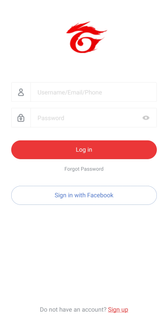

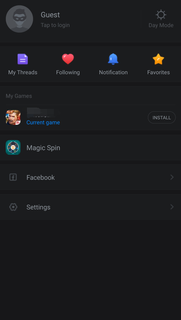
Garena brings players into a unified hub for discovering games, keeping profiles organized, and staying close to active communities. It connects mobile and PC experiences across selected regions, so you always know what to play and who is online. The platform was established in 2009 and is part of Sea Limited, with a footprint that spans more than 160 markets. Therefore, you get a consistent experience designed for regional needs, community events, and publisher news. Within Garena, you can explore key titles such as Free Fire, Arena of Valor, and Call of Duty: Mobile.Key featuresRegional access to Garena titlesGarena organizes available games by region so you see titles that are officially supported where you live. You can browse, follow, and launch supported games from one place. Moreover, you get localized announcements and event information tied to your selected market.Game Assist for stats and match recordsThrough Game Assist, you can check your personal stats, match history, and performance snapshots. You can view your own data and compare trends with friends or recent opponents. In addition, sharing options help you post achievements to your circles with a few taps.Magic Spin rewards across gamesGarena offers players Magic Spin, so you can spin for rewards that are usable in supported titles. The reward pool and redemption options vary by region and event schedule. Therefore, you can check the app regularly to see current spins and claim items when available.Chats that follow you between mobile and PCYour buddy list and messages in one chat hub. You can message friends who are on Garena PC while you are on mobile and continue conversations when you switch devices. This helps teams coordinate sessions without leaving the app.Social play and discoveryGarena helps you discover teammates, groups, and communities related to your favorite titles. You can find new friends through shared interests and recent matches. Also, moderated spaces make it easier to join events or discuss tactics without noise.Stay informed with game updates and eventsGarena surfaces updates from the games you follow so you see patch notes, event calendars, and schedule reminders. You can review timely alerts before a session and plan ahead with your squad. As a result, you do not miss limited time activities.Regions and availability in GarenaGame availability in Garena differs by market. You can confirm your region inside the app so the catalog, events, and support match your location. Examples of supported markets include Singapore, Indonesia, Malaysia, the Philippines, Taiwan, Thailand, Korea, Vietnam, and Mexico.Content and rewards may vary by region and time period. Therefore, you should check the app regularly for local updates, tournament notices, and region-specific events.Garena PC and mobile continuityGarena works together with Garena PC so your chats and social presence can move across devices. You can chat with friends who are on desktop while you are away from your computer and receive notifications on your phone.In addition, certain rewards and activities can be accessed from mobile and used in selected games on PC or mobile, depending on regional rules. This creates a simple bridge between your play sessions at home and on the go.Quick start guide for the Garena appThe following steps help you set up Garena and get into your games faster. You only need a few minutes to sign in, choose your region, and connect with friends. Then you can track progress and rewards in one place.Download Garena APK latest version from APKPure.Install and open Garena, then sign in with your account or create a new one.Open Profile or Settings and confirm your region so the app shows the correct catalog and events for your market.After that, browse the game list, follow your favorite titles, and open a game page to see news and highlights.Open Game Assist on a supported title to view stats, match records, and recent achievements, then share results with friends.Then go to the Chat tab to find your buddies, create groups, and message friends who are on Garena PC or mobile.Download and start playingDownload Garena APK latest version on APKPure to access supported games, stats, rewards, and chats in one app. Download Garena now to keep your play and friends within reach.FAQsWhich games can I access through Garena?Available games vary by region in Garena, and examples include Free Fire, Arena of Valor, Call of Duty: Mobile (Garena), Speed Drifters, Garena Undawn, HAIKYU!! FLY HIGH, Free City, and Garena Delta Force. Open the app, set your region, and the catalog will reflect titles supported in your market.Can I chat with friends on Garena PC from the mobile app?Yes, Garena supports mobile to PC continuity for chats. You can message friends who are on Garena PC from your phone and continue the same conversation when you switch devices. This helps teams coordinate without leaving the app.How do I change regions in Garena?Garena offers a region selector inside the app. Open Profile or Settings, choose your region, and confirm the change so your catalog and events refresh. After switching, the list of games and promotions will update to match that market.
Show more

1. Κατεβάστε το πρόγραμμα εγκατάστασης MEmu και ολοκληρώστε την εγκατάσταση

2. Ξεκινήστε το MEmu και στη συνέχεια ανοίξτε το Google Play στην επιφάνεια εργασίας

3. Αναζητήστε τον Garena στο Google Play
Install
4. Λήψη και εγκατάσταση του Garena
5. Μόλις ολοκληρωθεί η εγκατάσταση, κάντε κλικ στο εικονίδιο για να ξεκινήσετε

6. Απολαύστε τη χρήση του Garena σε υπολογιστή με το MEmu
Το MEmu Play είναι ο καλύτερος δωρεάν εξομοιωτής Android, που χρησιμοποιείται αυτήν τη στιγμή από πάνω από 50 εκατομμύρια χρήστες που απολαμβάνουν την εμπειρία εφαρμογών που προσφέρει. Μέσω της τεχνολογίας εικονικοποίησης MEmu 9, οι χρήστες μπορούν να δοκιμάσουν εφαρμογές Android στους υπολογιστές τους, ακόμα και σε εκείνους που απαιτούν υψηλή ισχύ επεξεργασίας γραφικών, οι οποίες λειτουργούν ομαλά σαν να λειτουργούν στα κινητά τηλέφωνα τελευταίας γενιάς, χωρίς να θυσιάζεται η ποιότητα της εικόνας και η εμπειρία χρήστη.
Μεγαλύτερη οθόνη με καλύτερα γραφικά. Μεγάλη διάρκεια ζωής, χωρίς περιορισμό μπαταρίας ή δεδομένων κινητής τηλεφωνίας.
Πλήρης υποστήριξη αντιστοίχισης πλήκτρων για ακριβή έλεγχο του πληκτρολογίου και του ποντικιού ή του gamepad.
Πολλαπλοί λογαριασμοί παιχνιδιών ή εργασίες σε έναν υπολογιστή ταυτόχρονα με τον διαχειριστή πολλαπλών περιπτώσεων.
Use Garena on PC by following steps: