Notability: AI Note Workspace
Ενημερώθηκε
Τρέχουσα έκδοση
1.0.4
Προσφέρεται από

Σταματήστε να ανησυχείτε για υπερβολικές χρεώσεις όταν χρησιμοποιείτε το Notability: AI Note Workspace στο κινητό σας, απελευθερώστε τον εαυτό σας από τη μικροσκοπική οθόνη και απολαύστε τη χρήση της εφαρμογής σε μια πολύ μεγαλύτερη οθόνη. Από τώρα και στο εξής, αποκτήστε εμπειρία πλήρους οθόνης της εφαρμογής σας με πληκτρολόγιο και ποντίκι. Το MEmu σας προσφέρει όλες τις εκπληκτικές δυνατότητες που περιμένατε: γρήγορη εγκατάσταση και εύκολη εγκατάσταση, διαισθητικά χειριστήρια, όχι περισσότερους περιορισμούς μπαταρίας, δεδομένα κινητής τηλεφωνίας και ενοχλητικές κλήσεις. Το ολοκαίνουργιο MEmu 9 είναι η καλύτερη επιλογή για χρήση του Notability: AI Note Workspace στον υπολογιστή σας. Κωδικοποιημένο με την απορρόφηση μας, ο διαχειριστής πολλαπλών παρουσιών καθιστά δυνατό το άνοιγμα 2 ή περισσότερων λογαριασμών ταυτόχρονα. Και το πιο σημαντικό, ο αποκλειστικός κινητήρας εξομοίωσης μπορεί να απελευθερώσει όλες τις δυνατότητες του υπολογιστή σας, να κάνει τα πάντα ομαλά και ευχάριστα.
Show more
Απολαύστε την υπέροχη εμπειρία αναπαραγωγής του Notability: AI Note Workspace σε υπολογιστή με το MEMU Play. Πρόκειται για έναν ισχυρό δωρεάν εξομοιωτή Android που σας επιτρέπει να παίζετε χιλιάδες παιχνίδια Android. From your first lecture to your next meeting, Notability helps you think, learn, and work better.
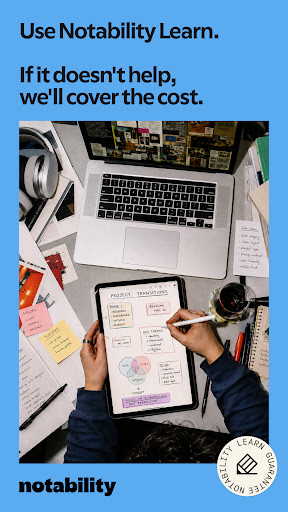
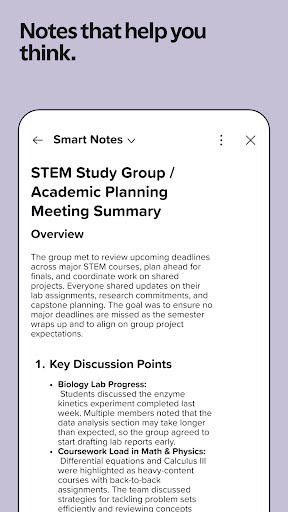
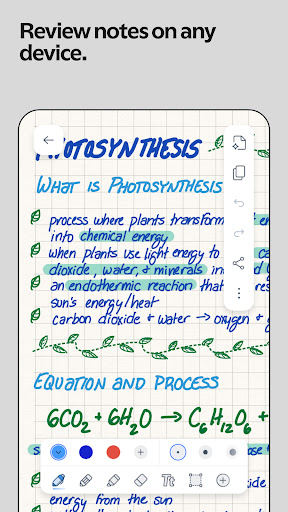
From your first lecture to your next meeting, Notability helps you think, learn, and work better. Take handwritten lecture notes, add annotations, transcribe using the voice recorder, and use the app as a study organizer, workspace or notebook. Keep your learnings in one place so your ideas are ready when you need them.
FREE DIGITAL NOTEBOOK FOR LEARNING, WORK & PRODUCTIVITY
• Use handwriting, type, or sketch with digital ink, whiteboard pens, highlighters, annotation and text tools in this notebook app.
• Use your own handwriting in the app to mark up PDFs, textbooks, lecture notes, learnings, images, and more.
• Combine handwriting, typed text, images, diagrams, annotations, and sketches in the same in-app workspace.
• Ditch the notebooks: Boost your learning and productivity with customizable folders, study organizers, and subjects that grow with you.
PRODUCTIVITY FOR PROFESSIONALS
• Mark up documents, capture meetings, organize ideas, and present with confidence.
• Import and add handwriting or annotations to any document with the app: PDFs, DOCs, presentations, learning summaries, reports, and more.
• Fill out forms in the office or on a job site.
• Combine handwriting, text, photos, and documents in a collaborative app workspace.
• Use the voice recorder in calls and meetings to transcribe in real-time.
• Receive automated meeting takeaways, learnings, and summaries.
• Search handwriting, transcripts, text, and PDFs in the app to quickly revisit decisions, learnings, and action items.
• Use as a notebook or whiteboard, or present learnings, documents, and ideas in full screen, with a laser pointer to guide attention.
• View and edit two notes side-by-side to stay focused and boost productivity.
• Share a PDF of your notebook in one tap.
LEARNING FOR STUDENTS: STUDY SMARTER AND ACE EXAMS
• Use as a digital notebook, study organizer or whiteboard. Create a collaborative workspace for group projects.
• Use your handwriting to add annotations to lecture notes, slides, or your textbooks in the app.
• Use the voice recorder to get instant audio transcripts and real-time learning summaries.
• Voice recorder syncs to the exact moment you write — perfect for taking lecture notes.
• Study organizer: Import lecture notes, notebooks, textbook PDFs, and assignments into categorized folders and subjects. Add annotations in the app with ease.
• Search handwriting, typed annotations, and transcripts in the app to instantly find learnings from classes.
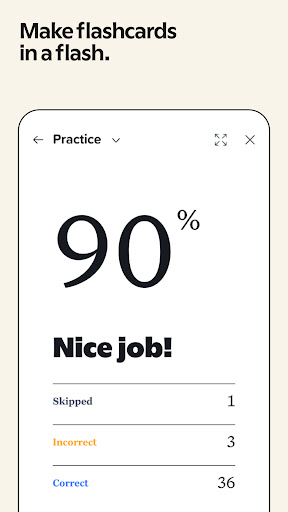
• Study content from your digital notebook with personalized quizzes and flashcards to check your learning progress and practise active recall.
• Chat with your lecture notes to review learnings, clarify ideas, and prepare for exams.
WORK YOUR WAY
• Seamlessly switch between handwriting and typing in the app workspace.
• Create a shared workspace to collaborate or get feedback when needed. Use as a whiteboard or notebook to take quick notes.
• Access your lecture notes and learnings across the web, and Android and Apple devices.
• Create beautiful digital notebooks, study organizers and whiteboards using templates from the Notability Gallery.
UPGRADE TO A NOTABILITY SUBSCRIPTION
Notability is free to use. With an upgraded subscription, you can receive:
• Unlimited note-taking
• AI-powered productivity and study organizer tools
• Handwriting recognition and math conversion in the app
• Live audio transcripts with the voice recorder
• Auto-backup and sync across devices
Download for free on Android and web.
Privacy Policy: notability.com/privacy
Terms of Service: notability.com/terms
Show more

1. Κατεβάστε το πρόγραμμα εγκατάστασης MEmu και ολοκληρώστε την εγκατάσταση

2. Ξεκινήστε το MEmu και στη συνέχεια ανοίξτε το Google Play στην επιφάνεια εργασίας

3. Αναζητήστε τον Notability: AI Note Workspace στο Google Play
Install
4. Λήψη και εγκατάσταση του Notability: AI Note Workspace
5. Μόλις ολοκληρωθεί η εγκατάσταση, κάντε κλικ στο εικονίδιο για να ξεκινήσετε

6. Απολαύστε τη χρήση του Notability: AI Note Workspace σε υπολογιστή με το MEmu
Το MEmu Play είναι ο καλύτερος δωρεάν εξομοιωτής Android, που χρησιμοποιείται αυτήν τη στιγμή από πάνω από 50 εκατομμύρια χρήστες που απολαμβάνουν την εμπειρία εφαρμογών που προσφέρει. Μέσω της τεχνολογίας εικονικοποίησης MEmu 9, οι χρήστες μπορούν να δοκιμάσουν εφαρμογές Android στους υπολογιστές τους, ακόμα και σε εκείνους που απαιτούν υψηλή ισχύ επεξεργασίας γραφικών, οι οποίες λειτουργούν ομαλά σαν να λειτουργούν στα κινητά τηλέφωνα τελευταίας γενιάς, χωρίς να θυσιάζεται η ποιότητα της εικόνας και η εμπειρία χρήστη.
Μεγαλύτερη οθόνη με καλύτερα γραφικά. Μεγάλη διάρκεια ζωής, χωρίς περιορισμό μπαταρίας ή δεδομένων κινητής τηλεφωνίας.
Πλήρης υποστήριξη αντιστοίχισης πλήκτρων για ακριβή έλεγχο του πληκτρολογίου και του ποντικιού ή του gamepad.
Πολλαπλοί λογαριασμοί παιχνιδιών ή εργασίες σε έναν υπολογιστή ταυτόχρονα με τον διαχειριστή πολλαπλών περιπτώσεων.
Use Notability: AI Note Workspace on PC by following steps: