
SD Maid 2/SE - System Cleaner
Ενημερώθηκε
Τρέχουσα έκδοση
1.7.3-rc0
Προσφέρεται από

Σταματήστε να ανησυχείτε για υπερβολικές χρεώσεις όταν χρησιμοποιείτε το SD Maid 2/SE - System Cleaner στο κινητό σας, απελευθερώστε τον εαυτό σας από τη μικροσκοπική οθόνη και απολαύστε τη χρήση της εφαρμογής σε μια πολύ μεγαλύτερη οθόνη. Από τώρα και στο εξής, αποκτήστε εμπειρία πλήρους οθόνης της εφαρμογής σας με πληκτρολόγιο και ποντίκι. Το MEmu σας προσφέρει όλες τις εκπληκτικές δυνατότητες που περιμένατε: γρήγορη εγκατάσταση και εύκολη εγκατάσταση, διαισθητικά χειριστήρια, όχι περισσότερους περιορισμούς μπαταρίας, δεδομένα κινητής τηλεφωνίας και ενοχλητικές κλήσεις. Το ολοκαίνουργιο MEmu 9 είναι η καλύτερη επιλογή για χρήση του SD Maid 2/SE - System Cleaner στον υπολογιστή σας. Κωδικοποιημένο με την απορρόφηση μας, ο διαχειριστής πολλαπλών παρουσιών καθιστά δυνατό το άνοιγμα 2 ή περισσότερων λογαριασμών ταυτόχρονα. Και το πιο σημαντικό, ο αποκλειστικός κινητήρας εξομοίωσης μπορεί να απελευθερώσει όλες τις δυνατότητες του υπολογιστή σας, να κάνει τα πάντα ομαλά και ευχάριστα.
Show more
Απολαύστε την υπέροχη εμπειρία αναπαραγωγής του SD Maid 2/SE - System Cleaner σε υπολογιστή με το MEMU Play. Πρόκειται για έναν ισχυρό δωρεάν εξομοιωτή Android που σας επιτρέπει να παίζετε χιλιάδες παιχνίδια Android. SD Maid 2/SE is your Android’s trusted assistant, to keep it clean and tidy.
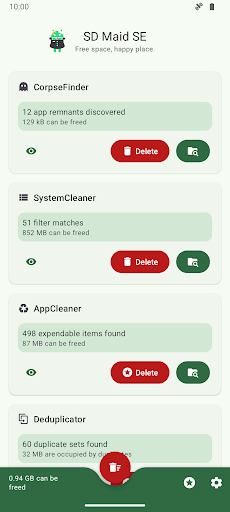
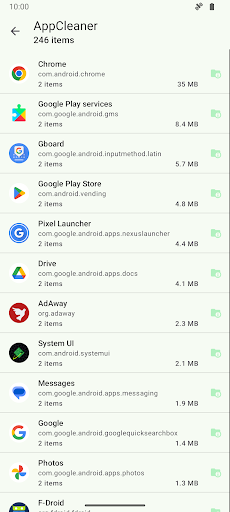
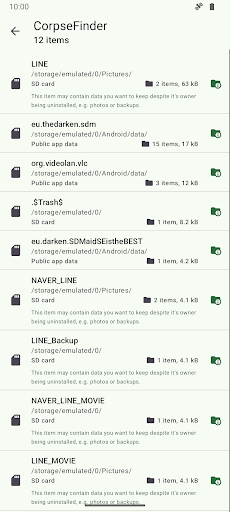
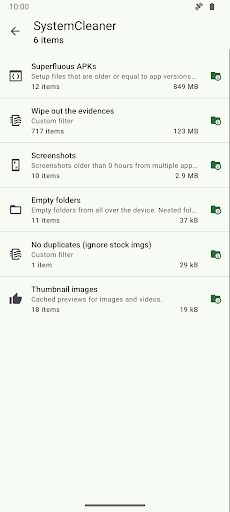
SD Maid 2/SE is your Android’s trusted assistant, to keep it clean and tidy.
Nobody is perfect and neither is Android.
* Apps you have already removed leave something behind.
* Logs, crash reports and other files you don't want are constantly being created.
* Your storage is collecting files and folders you don't recognize.
* Duplicate photos in your gallery.
Let’s not go on here… Let SD Maid 2/SE help you!
SD Maid 2/SE is an app and file manager that specializes in knowing which apps have created specific files on your device. SD Maid 2/SE searches your device and compares files with installed apps to offer options for safely freeing up storage space.
Clean up after uninstalling apps
If apps create files outside their designated folders then files can remain even after uninstalling the apps. The "CorpseFinder" tool finds app remnants, tells you to which app they belonged and helps you delete them.
Search your device the smart way
Filter for empty folders, temporary files, already installed apps and more. You can even create your own search criteria. The "SystemCleaner" tool allows you to automatically search your device and delete files based on various criteria.
Delete expendable files and hidden caches
Thumbnails, trash bins, offline caches and more: If apps don't clean up after themselves, then this app will. The "AppCleaner" tool finds apps with expendable files.
Manage all of your apps
Get a comprehensive list of all apps installed on your device. Enabled, disabled, user or system app: no app can hide from you. The "AppControl" tool is an app manager that allows you to search, sort and control your apps.
What is using all your space
Storage management can be complex with apps, media, system, and other files across phone storage, SD cards, and USB devices. "StorageAnalyzer" is a file manager that displays how space is used on your device, simplifying your storage management.
Find duplicate data
Duplicate downloads, photos sent through social media or just similar pictures of the same scene: Over time copies can accumulate. The "Deduplicator" tool finds files that are exactly the same or similar and helps you delete extra copies.
Declutter with a swipe
Pick a folder and go through files one by one with simple swipes to keep, delete, or skip. The "Swiper" tool lets you review all decisions before anything is deleted, and you can save a session to continue later.
Save space without deleting photos
Photos can take up a lot of storage, but you don't always want to remove them. The "Media Squeeze" tool compresses your images with adjustable quality settings to free up space while keeping your pictures.
This app is ad-free. Some features require a paid upgrade.
SD Maid 2/SE is the successor to SD Maid 1/Legacy.
Optimized for newer Android versions and focused on cleaning up.
This app has optional features that utilize the AccessibilityService API to automate tedious actions.
Using the AccessibilityService API, this app can click buttons for you to perform operations on multiple apps, e.g. deleting caches.
This app does not use the AccessibilityService API to collect information.
SD Maid 2/SE is a File Manager & Cleaner App.
Show more

1. Κατεβάστε το πρόγραμμα εγκατάστασης MEmu και ολοκληρώστε την εγκατάσταση

2. Ξεκινήστε το MEmu και στη συνέχεια ανοίξτε το Google Play στην επιφάνεια εργασίας

3. Αναζητήστε τον SD Maid 2/SE - System Cleaner στο Google Play
Install
4. Λήψη και εγκατάσταση του SD Maid 2/SE - System Cleaner
5. Μόλις ολοκληρωθεί η εγκατάσταση, κάντε κλικ στο εικονίδιο για να ξεκινήσετε

6. Απολαύστε τη χρήση του SD Maid 2/SE - System Cleaner σε υπολογιστή με το MEmu
Το MEmu Play είναι ο καλύτερος δωρεάν εξομοιωτής Android, που χρησιμοποιείται αυτήν τη στιγμή από πάνω από 50 εκατομμύρια χρήστες που απολαμβάνουν την εμπειρία εφαρμογών που προσφέρει. Μέσω της τεχνολογίας εικονικοποίησης MEmu 9, οι χρήστες μπορούν να δοκιμάσουν εφαρμογές Android στους υπολογιστές τους, ακόμα και σε εκείνους που απαιτούν υψηλή ισχύ επεξεργασίας γραφικών, οι οποίες λειτουργούν ομαλά σαν να λειτουργούν στα κινητά τηλέφωνα τελευταίας γενιάς, χωρίς να θυσιάζεται η ποιότητα της εικόνας και η εμπειρία χρήστη.
Μεγαλύτερη οθόνη με καλύτερα γραφικά. Μεγάλη διάρκεια ζωής, χωρίς περιορισμό μπαταρίας ή δεδομένων κινητής τηλεφωνίας.
Πλήρης υποστήριξη αντιστοίχισης πλήκτρων για ακριβή έλεγχο του πληκτρολογίου και του ποντικιού ή του gamepad.
Πολλαπλοί λογαριασμοί παιχνιδιών ή εργασίες σε έναν υπολογιστή ταυτόχρονα με τον διαχειριστή πολλαπλών περιπτώσεων.
Use SD Maid 2/SE - System Cleaner on PC by following steps: