Step Tracker - Pedometer Free & Calorie Tracker
Ενημερώθηκε
Τρέχουσα έκδοση
1.2.1
Προσφέρεται από

Σταματήστε να ανησυχείτε για υπερβολικές χρεώσεις όταν χρησιμοποιείτε το Step Tracker - Pedometer Free & Calorie Tracker στο κινητό σας, απελευθερώστε τον εαυτό σας από τη μικροσκοπική οθόνη και απολαύστε τη χρήση της εφαρμογής σε μια πολύ μεγαλύτερη οθόνη. Από τώρα και στο εξής, αποκτήστε εμπειρία πλήρους οθόνης της εφαρμογής σας με πληκτρολόγιο και ποντίκι. Το MEmu σας προσφέρει όλες τις εκπληκτικές δυνατότητες που περιμένατε: γρήγορη εγκατάσταση και εύκολη εγκατάσταση, διαισθητικά χειριστήρια, όχι περισσότερους περιορισμούς μπαταρίας, δεδομένα κινητής τηλεφωνίας και ενοχλητικές κλήσεις. Το ολοκαίνουργιο MEmu 9 είναι η καλύτερη επιλογή για χρήση του Step Tracker - Pedometer Free & Calorie Tracker στον υπολογιστή σας. Κωδικοποιημένο με την απορρόφηση μας, ο διαχειριστής πολλαπλών παρουσιών καθιστά δυνατό το άνοιγμα 2 ή περισσότερων λογαριασμών ταυτόχρονα. Και το πιο σημαντικό, ο αποκλειστικός κινητήρας εξομοίωσης μπορεί να απελευθερώσει όλες τις δυνατότητες του υπολογιστή σας, να κάνει τα πάντα ομαλά και ευχάριστα.
Show more
Απολαύστε την υπέροχη εμπειρία αναπαραγωγής του Step Tracker - Pedometer Free & Calorie Tracker σε υπολογιστή με το MEMU App Player. Πρόκειται για έναν ισχυρό δωρεάν εξομοιωτή Android που σας επιτρέπει να παίζετε χιλιάδες παιχνίδια Android. The most accurate & simple step tracker auto tracks your daily steps, burned calories , walking distance, duration, pace, health data, etc.
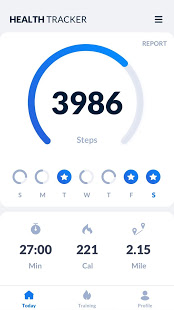
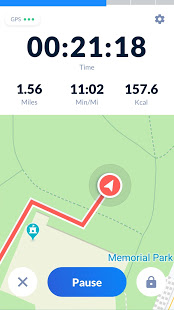
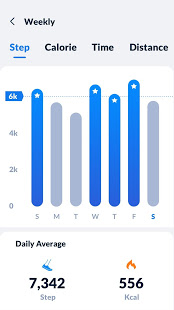
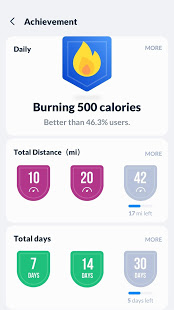
The most accurate & simple step tracker auto tracks your daily steps, burned calories , walking distance, duration, pace, health data, etc., and display them in intuitive graphs for easy checking.
Power Saving Pedometer
Step counter counts your daily steps with the built-in sensor, which greatly saves battery. It records steps accurately even when the screen is locked, whether your phone is in your hand, your pocket, your bag, or your armband.
Real-time Map Tracker
In GPS tracking mode, step counter tracks your fitness activity in detail (distance, pace, time, calories), and records your routes on the map with GPS in real-time. But if you don’t choose GPS tracking, it will count steps with built-in sensor to save battery.
100% Free & 100% Private
No locked features. No login required. You can freely use all features without login.
Easy to Use Step Counter
It auto records your steps. Pause, resume steps counting, reset steps to count from 0 if you want. Once you pause it, background data refreshing will stop. You will get your daily steps report on time, you can also check your real-time steps in the notification bar.
Report Graph
You walking data will be displayed in clear graphs. You can easily check your daily, weekly and monthly walking statistics. Support for syncing data with Google Fit.
Targets and Achievements
Set daily steps goal. Continuously achieve your goal will keep you motivated. You can also set targets for your fitness activity (distance, calories, duration, etc.).
Fashion & Simple Design
Designed and developed by our Google Play Best of 2018 winning team, its clean, simple, and fashion design brings excellent user experience.
Colorful Themes
More themes coming soon. Select your favorite theme for the step tracker and enjoy the step counting.
Health Tracker App
Health tracker app records your health data (weight trends, sleep conditions, water intake details, diet, etc.) and helps you maintain a healthy lifestyle. Stay active, lose weight and keep fit with activity & health tracker.
More features coming soon, such as sync data with Fitbit, Samsung Health, MyFitnessPal...
Important Notes
* To ensure accurate step counting, make sure the information you entered on the settings page is correct.
* You can adjust the sensitivity level of the step tracker for more accurate step counting.
* Some devices may stop counting when the screen is locked due to their power saving processing.
* Devices with older version can’t count steps with locked screen.
Steps app free
Steps app free can accurately count your steps and burned calories. Try steps app free now!
Steps tracker
Want a steps tracker to track your daily steps? This accurate steps tracker can help you.
Steps counter
Steps counter helps track your daily steps, burned calories, and weight loss progress. Lose weight with steps counter.
Step counter app
This step counter app is very easy to use. Open it and start to walk, step counter app automatically records your steps.
Pedometer step counter
A simple pedometer step counter auto tracks your steps. Walk with pedometer step counter, keep fit and get in better shape.
Pedometer free app for android
Count steps, tracker weight loss progress with pedometer free app for android. You'll find it is the best pedometer free app for android.
Pedometer for walking
Need a pedometer for walking to track your steps? This pedometer for walking is your best choice.
Pedometer with calorie burner
This pedometer with calorie burner tracks your steps and calculates burned calories. It's a full-featured pedometer with calorie burner.
Show more

1. Κατεβάστε το πρόγραμμα εγκατάστασης MEmu και ολοκληρώστε την εγκατάσταση

2. Ξεκινήστε το MEmu και στη συνέχεια ανοίξτε το Google Play στην επιφάνεια εργασίας

3. Αναζητήστε τον Step Tracker - Pedometer Free & Calorie Tracker στο Google Play
Install
4. Λήψη και εγκατάσταση του Step Tracker - Pedometer Free & Calorie Tracker
5. Μόλις ολοκληρωθεί η εγκατάσταση, κάντε κλικ στο εικονίδιο για να ξεκινήσετε

6. Απολαύστε τη χρήση του Step Tracker - Pedometer Free & Calorie Tracker σε υπολογιστή με το MEmu
Το MEmu Play είναι ο καλύτερος δωρεάν εξομοιωτής Android, που χρησιμοποιείται αυτήν τη στιγμή από πάνω από 50 εκατομμύρια χρήστες που απολαμβάνουν την εμπειρία εφαρμογών που προσφέρει. Μέσω της τεχνολογίας εικονικοποίησης MEmu 9, οι χρήστες μπορούν να δοκιμάσουν εφαρμογές Android στους υπολογιστές τους, ακόμα και σε εκείνους που απαιτούν υψηλή ισχύ επεξεργασίας γραφικών, οι οποίες λειτουργούν ομαλά σαν να λειτουργούν στα κινητά τηλέφωνα τελευταίας γενιάς, χωρίς να θυσιάζεται η ποιότητα της εικόνας και η εμπειρία χρήστη.
Μεγαλύτερη οθόνη με καλύτερα γραφικά. Μεγάλη διάρκεια ζωής, χωρίς περιορισμό μπαταρίας ή δεδομένων κινητής τηλεφωνίας.
Πλήρης υποστήριξη αντιστοίχισης πλήκτρων για ακριβή έλεγχο του πληκτρολογίου και του ποντικιού ή του gamepad.
Πολλαπλοί λογαριασμοί παιχνιδιών ή εργασίες σε έναν υπολογιστή ταυτόχρονα με τον διαχειριστή πολλαπλών περιπτώσεων.
Use Step Tracker - Pedometer Free & Calorie Tracker on PC by following steps: