Booster Pack Heroes
अपडेट किया गया
वर्तमान वर्शन
संसाधन

अपने सेलफोन पर Booster Pack Heroes का उपयोग करते समय ओवरचार्ज के बारे में चिंता करना बंद करें, अपने आप को छोटी स्क्रीन से मुक्त करें और बहुत बड़े डिस्प्ले पर ऐप का उपयोग करने का आनंद लें। अब से, कीबोर्ड और माउस के साथ अपने ऐप का पूर्ण-स्क्रीन अनुभव प्राप्त करें। एमईएमयू आपको उन सभी आश्चर्यजनक सुविधाओं की पेशकश करता है जिनकी आपको उम्मीद थी: त्वरित इंस्टॉल और आसान सेटअप, सहज नियंत्रण, बैटरी की कोई सीमा नहीं, मोबाइल डेटा और परेशान कॉल। आपके कंप्यूटर पर Booster Pack Heroes का उपयोग करने का सबसे अच्छा विकल्प नया MEmu 9 है। हमारे अवशोषण के साथ कोडित, बहु-उदाहरण प्रबंधक एक ही समय में 2 या अधिक खाते खोलना संभव बनाता है। और सबसे महत्वपूर्ण, हमारा अनन्य उत्सर्जन इंजन आपके पीसी की पूरी क्षमता को जारी कर सकता है, सब कुछ सुचारू और सुखद बना सकता है।
और दिखाएं
डाउनलोड करें Booster Pack Heroes पीसी पर MEmu एंड्रॉयड एमुलेटर के साथ बड़े पर्दे पर खेलने का आनंद लें। Booster Pack Heroes is an incremental game where every pack could contain your next powerhouse.
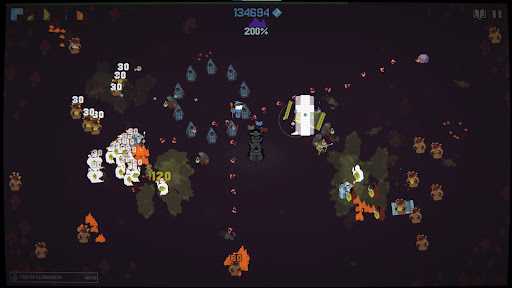
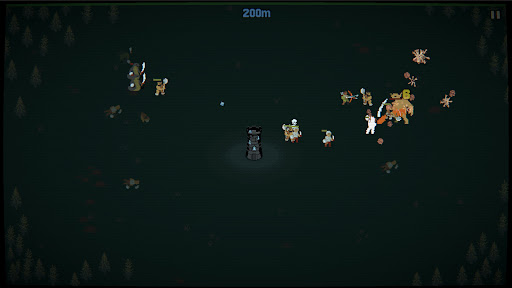
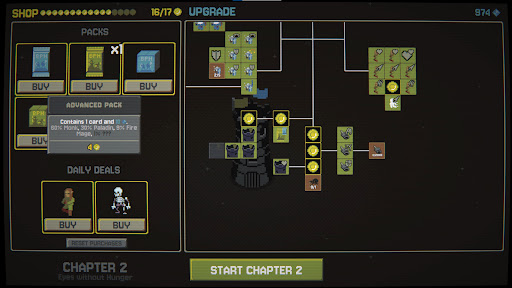
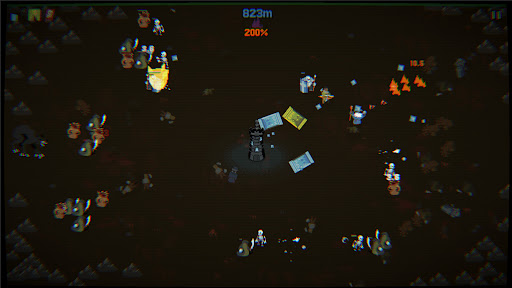
Booster Pack Heroes is an incremental game where every pack could contain your next powerhouse. Discover heroes and spells, upgrade their abilities, and survive endless monster hordes as you fight your way through the realms.
OPEN PACKS
Rip open booster packs, each with its own pool of heroes and spells. Hunt for rare cards and build a collection powerful enough to crush the toughest foes.
UPGRADE YOUR POWER
Survive to earn Mastery. Use it to upgrade your heroes and spells, unlock powerful new abilities, and turn your collection into an unstoppable force.
SURVIVE THE HORDE
Monsters are coming for the tower. Fight through increasingly dangerous waves, unleash devastating abilities, and push your survival as far as you can.
TRAVEL BETWEEN REALMS
Defeat each chapter's boss to unlock new booster packs, heroes, spells, and challenges. Every run feeds the next, giving you more power and letting you survive a bit longer.
…and there's more to discover beyond the tower. Travel between mysterious planes of existence, each with its own secrets.
The cycle has repeated countless times.
You're here to break it.
और दिखाएं

1. MEmu इंस्टॉलर को डाउनलोड करें और इंस्टॉलेशन को पूरा करें

2. MEmu शुरू करें फिर होमपेज पर Google Play खोलें

3. Google Play में Booster Pack Heroes खोजें
Install
4. Booster Pack Heroes डाउनलोड कर इंस्टॉल करें
5. इंस्टॉल पूरा होने पर आइकन दबाएं

6. MEmu से पीसी पर Booster Pack Heroes खेलने का आनंद लें
MEmu Play सबसे बेहतरीन मुफ़्त Android एमुलेटर है और 5 करोड़ लोग पहले ही इसके शानदार Android गेमिंग अनुभव का आनंद ले चुके हैं। MEmu 9 वर्चुअलाइज़ेशन तकनीक आपको अपने PC पर हज़ारों Android गेम, यहाँ तक कि सबसे ज़्यादा ग्राफ़िक्स वाले गेम भी, आसानी से खेलने की सुविधा देती है।
असीमित बैटरी या मोबाइल डेटा के साथ बेहतर ग्राफिक्स के साथ बड़ी स्क्रीन; लंबी अवधि।
कीबोर्ड और माउस या गेमपैड के उत्तम नियंत्रण के लिए संपूर्ण कीमैपिंग का समर्थन करता हैं।
एक ही पीसी पर मल्टी-इंस्टेंस मैनेजर के साथ एक समय में कई गेम खाते या कार्य कर सकते हैं।
Play Booster Pack Heroes on PC by following steps: