MD Classes
अपडेट किया गया
वर्तमान वर्शन
1.4.97.1
संसाधन

MD Classes पर अपनी मोबाइल डेटा सीमा पार करने को अलविदा कहें और छोटी स्क्रीन की सीमाओं से मुक्त होकर बड़े डिस्प्ले के लाभों का अनुभव करें। अब, आप अपने कीबोर्ड और माउस का उपयोग करके फुल-स्क्रीन मोड में टॉपर्स क्लैन की शक्ति का अनुभव कर सकते हैं। MEmu Play में वे सभी बेहतरीन सुविधाएँ हैं जिनकी आप अपेक्षा करते हैं: त्वरित इंस्टॉलेशन और आसान सेटअप, सहज नियंत्रण, बैटरी की आवश्यकता नहीं, और कोई डेटा या कॉल समय सीमा नहीं। नया MEmu 9 आपके कंप्यूटर पर MD Classes का उपयोग करने के लिए सबसे अच्छा विकल्प है। हमारा मालिकाना मल्टी-इंस्टेंस मैनेजर एक साथ दो या अधिक खातों को चलाने का समर्थन करता है। इससे भी महत्वपूर्ण बात यह है कि हमारा अनूठा इम्यूलेशन इंजन आपके कंप्यूटर के प्रदर्शन का पूरा उपयोग करता है, जिससे एक सहज और निर्बाध अनुभव मिलता है।
और दिखाएं
डाउनलोड करें MD Classes पीसी पर MEmu एंड्रॉयड एमुलेटर के साथ बड़े पर्दे पर खेलने का आनंद लें। "Finally the much awaited learning app is here from MD Classes!

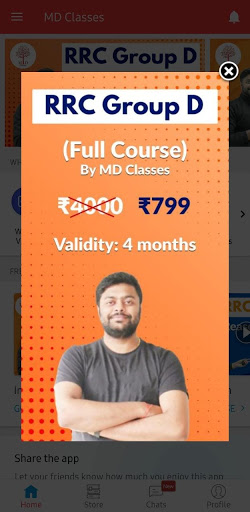
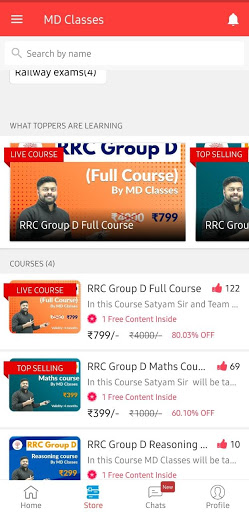
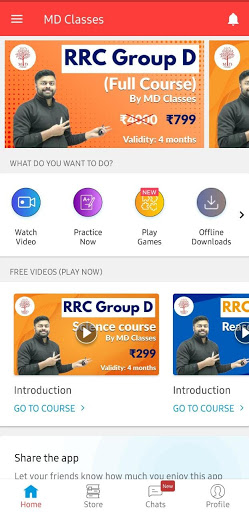
"Finally the much awaited learning app is here from MD Classes!
MD CLasses is India’s leading training institute to prepare for Railways, SSC, NTPC, UPSI Exams .
Under the leadership of Satyam Sir and Team, the institute has groomed over 5000 young boys and girls into future leaders.
The MD Classes has an extremely user-friendly interface with innovative features such as live chat, lesson preview, live classes, assignments, mock tests, performance reports and much more. Find online courses, practice material and free content for Railways, NTPC, UPSI, SSC CGL, SSC CHSL, SSC MTS etc.
Our Classes will initiate the process of change and growth using the most advanced skills.
It is a golden opportunity for the youth of India to get proper preparation and Transformed with the help of our expert mentors who are thorough professionals and have years of experience behind them."
Disclaimer: We are not the Government Organization and not linked with any way with the Government We just provide information gathered from various trusted sources and from several Government organizations which are available in the public domain. All the content provided here is only for the educational and informational purposes to the users. Application is not affiliated with any Government services or person.
Sources of Information -
https://www.wikipedia.org/
https://www.indianrailways.gov.in/
https://ssc.nic.in/
https://joinindianarmy.nic.in/
http://uppsc.up.nic.in/
https://indianairforce.nic.in/
https://www.delhipolice.nic.in/
http://www.jssc.nic.in/
http://biharpolice.bih.nic.in/
और दिखाएं

1. MEmu इंस्टॉलर को डाउनलोड करें और इंस्टॉलेशन को पूरा करें

2. MEmu शुरू करें फिर होमपेज पर Google Play खोलें

3. Google Play में MD Classes खोजें
Install
4. MD Classes डाउनलोड कर इंस्टॉल करें
5. इंस्टॉल पूरा होने पर आइकन दबाएं

6. MEmu का उपयोग करके अपने कंप्यूटर पर MD Classes का अनुभव करें
MEmu Play सबसे बेहतरीन मुफ़्त Android एमुलेटर है और 5 करोड़ लोग पहले ही इसके शानदार Android ऐप अनुभव का आनंद ले चुके हैं। MEmu 9 वर्चुअलाइज़ेशन तकनीक आपको अपने PC पर हज़ारों Android ऐप्स, यहाँ तक कि सबसे ज़्यादा ग्राफ़िक्स वाले ऐप्स भी, आसानी से चलाने की सुविधा देती है।
असीमित बैटरी या मोबाइल डेटा के साथ बेहतर ग्राफिक्स के साथ बड़ी स्क्रीन; लंबी अवधि।
कीबोर्ड और माउस या गेमपैड के उत्तम नियंत्रण के लिए संपूर्ण कीमैपिंग का समर्थन करता हैं।
एक ही पीसी पर मल्टी-इंस्टेंस मैनेजर के साथ एक समय में कई गेम खाते या कार्य कर सकते हैं।
Use MD Classes on PC by following steps: