
iMakkah
अपडेट किया गया
वर्तमान वर्शन
0.4
संसाधन

अपने सेलफोन पर iMakkah का उपयोग करते समय ओवरचार्ज के बारे में चिंता करना बंद करें, अपने आप को छोटी स्क्रीन से मुक्त करें और बहुत बड़े डिस्प्ले पर ऐप का उपयोग करने का आनंद लें। अब से, कीबोर्ड और माउस के साथ अपने ऐप का पूर्ण-स्क्रीन अनुभव प्राप्त करें। एमईएमयू आपको उन सभी आश्चर्यजनक सुविधाओं की पेशकश करता है जिनकी आपको उम्मीद थी: त्वरित इंस्टॉल और आसान सेटअप, सहज नियंत्रण, बैटरी की कोई सीमा नहीं, मोबाइल डेटा और परेशान कॉल। आपके कंप्यूटर पर iMakkah का उपयोग करने का सबसे अच्छा विकल्प नया MEmu 9 है। हमारे अवशोषण के साथ कोडित, बहु-उदाहरण प्रबंधक एक ही समय में 2 या अधिक खाते खोलना संभव बनाता है। और सबसे महत्वपूर्ण, हमारा अनन्य उत्सर्जन इंजन आपके पीसी की पूरी क्षमता को जारी कर सकता है, सब कुछ सुचारू और सुखद बना सकता है।
और दिखाएं
डाउनलोड करें iMakkah पीसी पर MEmu एंड्रॉयड एमुलेटर के साथ बड़े पर्दे पर खेलने का आनंद लें। iMakkah, an App/Game let you live the experience of visiting the Holy Places of Makkah, Madinah.

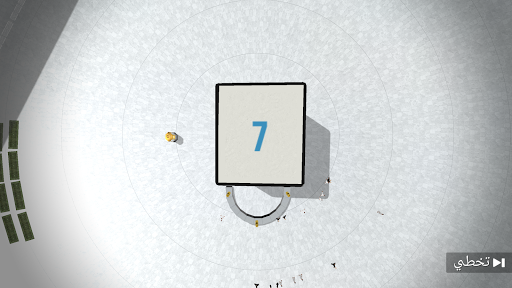

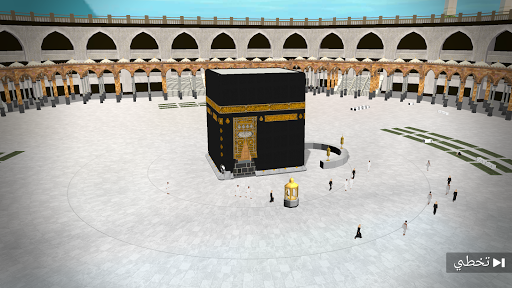
iMakkah, an App/Game let you live the experience of visiting the Holy Places of Makkah, Madinah.
Imagine being able to visit, learn and interact with the virtual world of Makkah, all that in fun, education way.
We offer 2 modes:
- Free movement: You can walk in Al Haram, watch the Muslims performing Tawaf, Pray. Hear the surrounds prayer voices and Athan sound.
- Omrah mode (later to be released): Virtual practice of how Omrah is performed, step by step. A guide sound will be played in the background, narrating the instructions and main journey milestones.
Please note that this is a demo version, we are working hard to deliver the full version of the game, planning to cover the following features:
- Complete Omrah Guide
- Omrah Map
- Kids Mode
- Record the Doa'a Voice
- More Characters
- Al Ehram Simulation
- Sonnat Al Edteba'a Simulation
- Inside Al Ka'abah
- Drone Mode
- Performing Pray Guide
- Simulation: Drinking Zamzam Water
- Lite Quran Reader
- 3D Story: Ka'abah Building
- 3D Story: Zamzam
We wish you enjoy the journey.
For contact: info@imakkah.app
और दिखाएं

1. MEmu इंस्टॉलर को डाउनलोड करें और इंस्टॉलेशन को पूरा करें

2. MEmu शुरू करें फिर होमपेज पर Google Play खोलें

3. Google Play में iMakkah खोजें
Install
4. iMakkah डाउनलोड कर इंस्टॉल करें
5. इंस्टॉल पूरा होने पर आइकन दबाएं

6. MEmu से पीसी पर iMakkah खेलने का आनंद लें
MEmu Play सबसे बेहतरीन मुफ़्त Android एमुलेटर है और 5 करोड़ लोग पहले ही इसके शानदार Android गेमिंग अनुभव का आनंद ले चुके हैं। MEmu 9 वर्चुअलाइज़ेशन तकनीक आपको अपने PC पर हज़ारों Android गेम, यहाँ तक कि सबसे ज़्यादा ग्राफ़िक्स वाले गेम भी, आसानी से खेलने की सुविधा देती है।
असीमित बैटरी या मोबाइल डेटा के साथ बेहतर ग्राफिक्स के साथ बड़ी स्क्रीन; लंबी अवधि।
कीबोर्ड और माउस या गेमपैड के उत्तम नियंत्रण के लिए संपूर्ण कीमैपिंग का समर्थन करता हैं।
एक ही पीसी पर मल्टी-इंस्टेंस मैनेजर के साथ एक समय में कई गेम खाते या कार्य कर सकते हैं।
Play iMakkah on PC by following steps: