Morbid Metal
अपडेट किया गया
वर्तमान वर्शन
संसाधन

अपने सेलफोन पर Morbid Metal का उपयोग करते समय ओवरचार्ज के बारे में चिंता करना बंद करें, अपने आप को छोटी स्क्रीन से मुक्त करें और बहुत बड़े डिस्प्ले पर ऐप का उपयोग करने का आनंद लें। अब से, कीबोर्ड और माउस के साथ अपने ऐप का पूर्ण-स्क्रीन अनुभव प्राप्त करें। एमईएमयू आपको उन सभी आश्चर्यजनक सुविधाओं की पेशकश करता है जिनकी आपको उम्मीद थी: त्वरित इंस्टॉल और आसान सेटअप, सहज नियंत्रण, बैटरी की कोई सीमा नहीं, मोबाइल डेटा और परेशान कॉल। आपके कंप्यूटर पर Morbid Metal का उपयोग करने का सबसे अच्छा विकल्प नया MEmu 9 है। हमारे अवशोषण के साथ कोडित, बहु-उदाहरण प्रबंधक एक ही समय में 2 या अधिक खाते खोलना संभव बनाता है। और सबसे महत्वपूर्ण, हमारा अनन्य उत्सर्जन इंजन आपके पीसी की पूरी क्षमता को जारी कर सकता है, सब कुछ सुचारू और सुखद बना सकता है।
और दिखाएं
डाउनलोड करें Morbid Metal पीसी पर MEmu एंड्रॉयड एमुलेटर के साथ बड़े पर्दे पर खेलने का आनंद लें। Morbid Metal is a high-energy hack 'n' slash action rogue-lite set in a dark, futuristic world where you play as an advanced sentient AI trapped in a simulation.
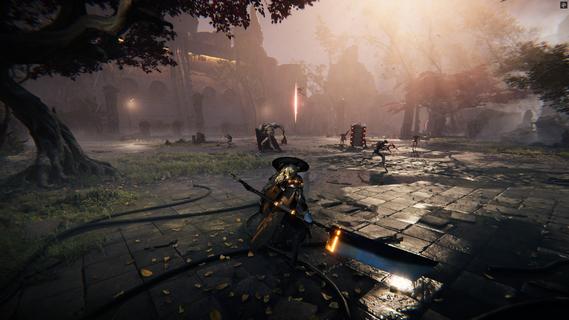
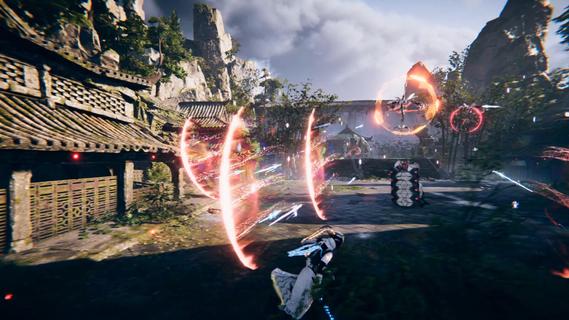
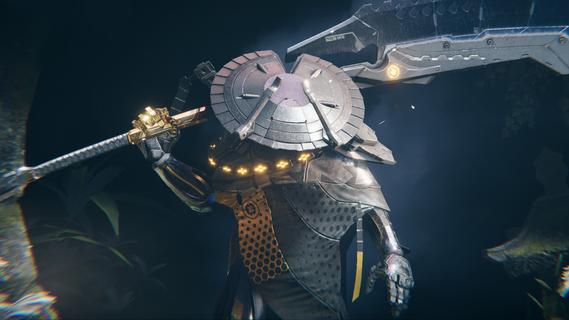
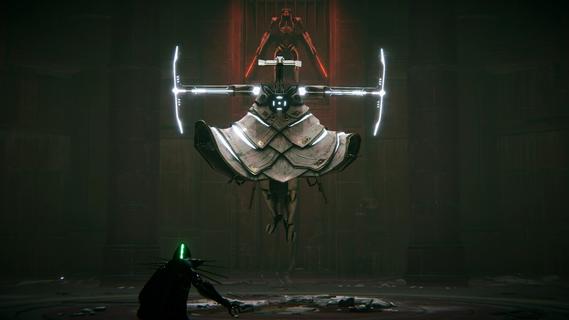
Morbid Metal is a high-energy hack 'n' slash action rogue-lite set in a dark, futuristic world where you play as an advanced sentient AI trapped in a simulation. The game's core mechanic lets you shapeshift in real-time between up to four unique cyborg characters, each with their own abilities, playstyles, and signature moves. This dynamic switching allows you to chain powerful combos and adapt your combat strategy fluidly against hordes of deadly machines and intense boss battles. You start as Flux, a swift katana-wielding warrior with rapid dashes, devastating strikes, and a visually impressive ultimate ability that can take down most enemies instantly. Another key playable character in the demo is Ekku, a heavier-hitting cyborg who excels at area-of-effect hammer attacks and powerful sweeping moves, offering a contrasting slower but more impactful playstyle. Together, they allow for a diverse combat experience where timing your switches and combining their skills efficiently are vital to surviving the semi-procedurally generated levels. Movement is fast and fluid, featuring multiple dashes without cooldown, double jumps, and grappling hooks to traverse vertical and horizontal gaps, making exploration just as thrilling as combat. The dodge system encourages a strategic balance of aggression and patience, rewarding well-timed counterattacks during enemy assaults. This intense gameplay loop is accompanied by a striking cyberpunk aesthetic with a fusion of ruined futuristic environments and Japanese-inspired elements, supported by an immersive, energetic soundtrack. In addition to combat, the game includes roguelite progression where you unlock and permanently upgrade characters with new abilities and skills after each run, keeping each playthrough fresh with new tactical options. As you delve deeper, you uncover the lore of a far-future world where artificial intelligence fights for dominance, with humanity's fate hanging in the balance. Morbid Metal delivers a satisfying blend of stylish combo-based combat, responsive controls, and atmospheric world-building, making it appealing to fans of hack 'n' slash and roguelite genres who appreciate fast-paced, skillful gameplay and rich character variety. Its blend of real-time shapeshifting and tactical depth sets it apart from typical action rogue-lites, promising intense, replayable runs full of devastation and discovery.
और दिखाएं

1. MEmu इंस्टॉलर को डाउनलोड करें और इंस्टॉलेशन को पूरा करें

2. MEmu शुरू करें फिर होमपेज पर Google Play खोलें

3. Google Play में Morbid Metal खोजें
Install
4. Morbid Metal डाउनलोड कर इंस्टॉल करें
5. इंस्टॉल पूरा होने पर आइकन दबाएं

6. MEmu से पीसी पर Morbid Metal खेलने का आनंद लें
MEmu Play सबसे बेहतरीन मुफ़्त Android एमुलेटर है और 5 करोड़ लोग पहले ही इसके शानदार Android गेमिंग अनुभव का आनंद ले चुके हैं। MEmu 9 वर्चुअलाइज़ेशन तकनीक आपको अपने PC पर हज़ारों Android गेम, यहाँ तक कि सबसे ज़्यादा ग्राफ़िक्स वाले गेम भी, आसानी से खेलने की सुविधा देती है।
असीमित बैटरी या मोबाइल डेटा के साथ बेहतर ग्राफिक्स के साथ बड़ी स्क्रीन; लंबी अवधि।
कीबोर्ड और माउस या गेमपैड के उत्तम नियंत्रण के लिए संपूर्ण कीमैपिंग का समर्थन करता हैं।
एक ही पीसी पर मल्टी-इंस्टेंस मैनेजर के साथ एक समय में कई गेम खाते या कार्य कर सकते हैं।
Play Morbid Metal on PC by following steps: