Retro Ark
अपडेट किया गया
वर्तमान वर्शन
3.0
संसाधन

अपने सेलफोन पर Retro Ark का उपयोग करते समय ओवरचार्ज के बारे में चिंता करना बंद करें, अपने आप को छोटी स्क्रीन से मुक्त करें और बहुत बड़े डिस्प्ले पर ऐप का उपयोग करने का आनंद लें। अब से, कीबोर्ड और माउस के साथ अपने ऐप का पूर्ण-स्क्रीन अनुभव प्राप्त करें। एमईएमयू आपको उन सभी आश्चर्यजनक सुविधाओं की पेशकश करता है जिनकी आपको उम्मीद थी: त्वरित इंस्टॉल और आसान सेटअप, सहज नियंत्रण, बैटरी की कोई सीमा नहीं, मोबाइल डेटा और परेशान कॉल। आपके कंप्यूटर पर Retro Ark का उपयोग करने का सबसे अच्छा विकल्प नया MEmu 9 है। हमारे अवशोषण के साथ कोडित, बहु-उदाहरण प्रबंधक एक ही समय में 2 या अधिक खाते खोलना संभव बनाता है। और सबसे महत्वपूर्ण, हमारा अनन्य उत्सर्जन इंजन आपके पीसी की पूरी क्षमता को जारी कर सकता है, सब कुछ सुचारू और सुखद बना सकता है।
और दिखाएं
डाउनलोड करें Retro Ark पीसी पर MEmu एंड्रॉयड एमुलेटर के साथ बड़े पर्दे पर खेलने का आनंद लें। RetroArk is a user-friendly frontend for the RetroArch emulator, designed for speed and ease of use.
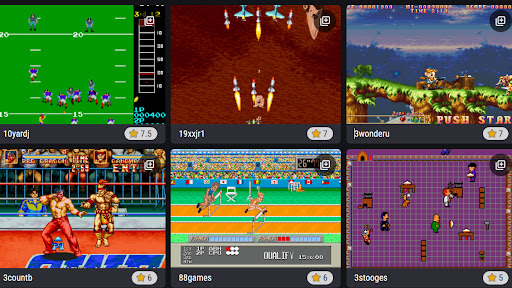
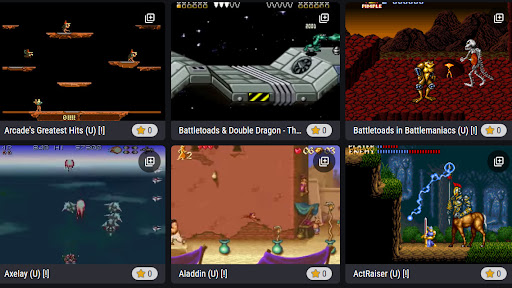
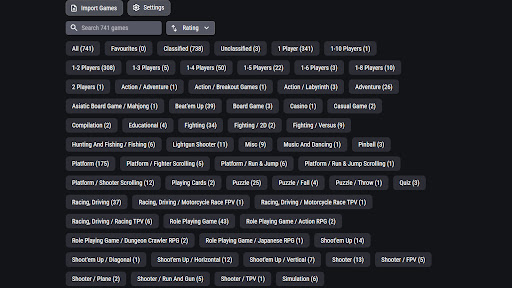
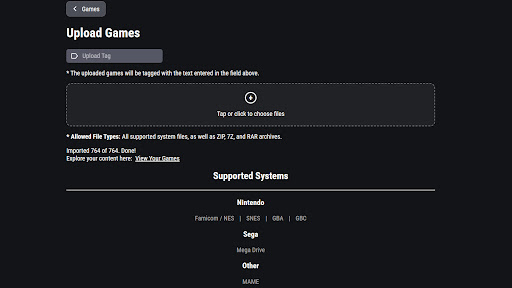
RetroArk is a user-friendly frontend for the RetroArch emulator, designed for speed and ease of use. Supported arcade systems:
- NES
- SNES
- GBC and GBA
- Sega Mega Drive
- MAME
Adding ROMs to Your Library
Once you have downloaded ROMs to your device, you can add them to your library by tapping "Import Games." The ROM must be compatible with one of the supported arcade systems listed above.
Automatic Scraping for Game Data
When you start importing games, a built-in scraper automatically fetches game data for you. Scraping collects metadata, screenshots, and video previews to enhance your library.
If the scraper isn’t working, it may be due to:
- No internet connection.
- The source site being down or overloaded.
In such cases, you’ll need to wait until the source is back online.
What Scraping Adds to Your Games
Scraping enhances your game library by retrieving details such as:
- Publisher
- Developer
- Release Year
- Genre
- Description
- Number of Players Supported
- Rating
Even if a ROM isn't found in the scraper’s database, a string similarity algorithm is used to find the closest match. This algorithm employs fuzzy string matching, allowing it to identify games even if the ROM filename contains misspellings or incomplete titles.
और दिखाएं

1. MEmu इंस्टॉलर को डाउनलोड करें और इंस्टॉलेशन को पूरा करें

2. MEmu शुरू करें फिर होमपेज पर Google Play खोलें

3. Google Play में Retro Ark खोजें
Install
4. Retro Ark डाउनलोड कर इंस्टॉल करें
5. इंस्टॉल पूरा होने पर आइकन दबाएं

6. MEmu से पीसी पर Retro Ark खेलने का आनंद लें
MEmu Play सबसे बेहतरीन मुफ़्त Android एमुलेटर है और 5 करोड़ लोग पहले ही इसके शानदार Android गेमिंग अनुभव का आनंद ले चुके हैं। MEmu 9 वर्चुअलाइज़ेशन तकनीक आपको अपने PC पर हज़ारों Android गेम, यहाँ तक कि सबसे ज़्यादा ग्राफ़िक्स वाले गेम भी, आसानी से खेलने की सुविधा देती है।
असीमित बैटरी या मोबाइल डेटा के साथ बेहतर ग्राफिक्स के साथ बड़ी स्क्रीन; लंबी अवधि।
कीबोर्ड और माउस या गेमपैड के उत्तम नियंत्रण के लिए संपूर्ण कीमैपिंग का समर्थन करता हैं।
एक ही पीसी पर मल्टी-इंस्टेंस मैनेजर के साथ एक समय में कई गेम खाते या कार्य कर सकते हैं।
Play Retro Ark on PC by following steps: