RPG Leingham Tavern Story
अपडेट किया गया
वर्तमान वर्शन
1.08g
संसाधन

अपने सेलफोन पर RPG Leingham Tavern Story का उपयोग करते समय ओवरचार्ज के बारे में चिंता करना बंद करें, अपने आप को छोटी स्क्रीन से मुक्त करें और बहुत बड़े डिस्प्ले पर ऐप का उपयोग करने का आनंद लें। अब से, कीबोर्ड और माउस के साथ अपने ऐप का पूर्ण-स्क्रीन अनुभव प्राप्त करें। एमईएमयू आपको उन सभी आश्चर्यजनक सुविधाओं की पेशकश करता है जिनकी आपको उम्मीद थी: त्वरित इंस्टॉल और आसान सेटअप, सहज नियंत्रण, बैटरी की कोई सीमा नहीं, मोबाइल डेटा और परेशान कॉल। आपके कंप्यूटर पर RPG Leingham Tavern Story का उपयोग करने का सबसे अच्छा विकल्प नया MEmu 9 है। हमारे अवशोषण के साथ कोडित, बहु-उदाहरण प्रबंधक एक ही समय में 2 या अधिक खाते खोलना संभव बनाता है। और सबसे महत्वपूर्ण, हमारा अनन्य उत्सर्जन इंजन आपके पीसी की पूरी क्षमता को जारी कर सकता है, सब कुछ सुचारू और सुखद बना सकता है।
और दिखाएं
डाउनलोड करें RPG Leingham Tavern Story पीसी पर MEmu एंड्रॉयड एमुलेटर के साथ बड़े पर्दे पर खेलने का आनंद लें। [Supported Devices].
[Supported Devices]
Requires higher specs than previous titles.
A trial version is available to test performance.
Recommended: Android OS 11+, 8 GB+ RAM.
[Story]
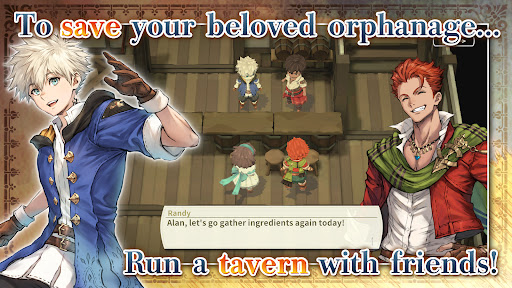
Save an orphanage from closure and build a thriving tavern in Leingham Tavern Story: Alan and the Time Goddess, a charming fantasy RPG combining cooking, tavern management, and dungeon exploration!
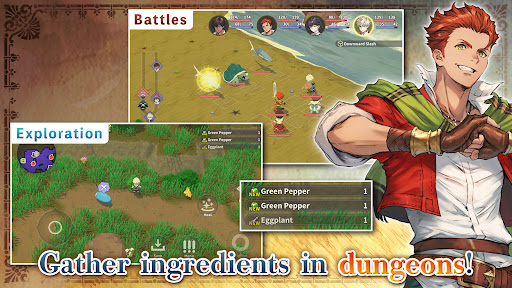
Join Alan and his friends as they venture into monster-filled dungeons in search of ingredients, discover new recipes, and serve delicious dishes to bring customers through the door. Along the way, meet the people of the Kingdom of Leingham and enjoy a heartwarming story where food, friendship, and adventure come together.
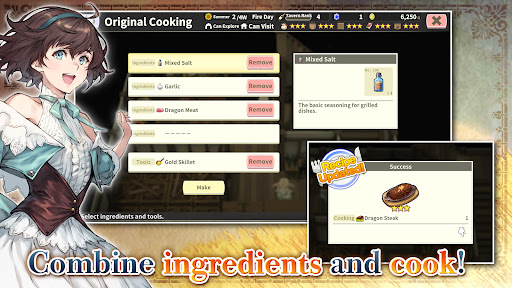
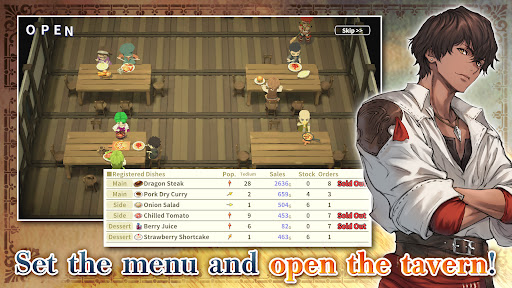
Explore dungeons, gather ingredients, and battle roaming monsters in classic turn-based RPG combat, then return to your tavern to create from over 800 different dishes. Experiment with ingredients, expand your recipe collection, adjust your menu to seasonal trends, and assign employees strategically to maximize sales. Grow vegetables on your farm, relax with a spot of fishing, and strengthen your characters by eating the meals you prepare instead of earning experience from battles.
From dungeon crawling and character progression to cooking and tavern management simulation, build your business and enjoy a deliciously different fantasy RPG adventure!
[IMPORTANT NOTICE]
Your use of the application requires your agreement to the following EULA and 'Privacy Policy and Notice'. If you do not agree, please do not download our application.
End User License Agreement: http://kemco.jp/eula/index.html
Privacy Policy and Notice: http://www.kemco.jp/app_pp/privacy.html
[Game Controller]
- Not Supported
[Languages]
- English (Coming Soon), Japanese
[Non-Supported Devices]
This app has generally been tested to work on any mobile device released in Japan. We cannot guarantee full support on other devices. If you have the Developer Options enabled in your device, please turn off the "Don't keep activities" option in case of any issue.
Get the latest information!
[Newsletter]
http://kemcogame.com/c8QM
[Facebook page]
https://www.facebook.com/kemco.global
*The actual price might differ depending on the region.
© 2024-2026 KEMCO/RideonJapan,Inc./Rideon,Inc.
और दिखाएं

1. MEmu इंस्टॉलर को डाउनलोड करें और इंस्टॉलेशन को पूरा करें

2. MEmu शुरू करें फिर होमपेज पर Google Play खोलें

3. Google Play में RPG Leingham Tavern Story खोजें
Install
4. RPG Leingham Tavern Story डाउनलोड कर इंस्टॉल करें
5. इंस्टॉल पूरा होने पर आइकन दबाएं

6. MEmu से पीसी पर RPG Leingham Tavern Story खेलने का आनंद लें
MEmu Play सबसे बेहतरीन मुफ़्त Android एमुलेटर है और 5 करोड़ लोग पहले ही इसके शानदार Android गेमिंग अनुभव का आनंद ले चुके हैं। MEmu 9 वर्चुअलाइज़ेशन तकनीक आपको अपने PC पर हज़ारों Android गेम, यहाँ तक कि सबसे ज़्यादा ग्राफ़िक्स वाले गेम भी, आसानी से खेलने की सुविधा देती है।
असीमित बैटरी या मोबाइल डेटा के साथ बेहतर ग्राफिक्स के साथ बड़ी स्क्रीन; लंबी अवधि।
कीबोर्ड और माउस या गेमपैड के उत्तम नियंत्रण के लिए संपूर्ण कीमैपिंग का समर्थन करता हैं।
एक ही पीसी पर मल्टी-इंस्टेंस मैनेजर के साथ एक समय में कई गेम खाते या कार्य कर सकते हैं।
Play RPG Leingham Tavern Story on PC by following steps: