Rummy Master
अपडेट किया गया
वर्तमान वर्शन
3.11
संसाधन

अपने सेलफोन पर Rummy Master का उपयोग करते समय ओवरचार्ज के बारे में चिंता करना बंद करें, अपने आप को छोटी स्क्रीन से मुक्त करें और बहुत बड़े डिस्प्ले पर ऐप का उपयोग करने का आनंद लें। अब से, कीबोर्ड और माउस के साथ अपने ऐप का पूर्ण-स्क्रीन अनुभव प्राप्त करें। एमईएमयू आपको उन सभी आश्चर्यजनक सुविधाओं की पेशकश करता है जिनकी आपको उम्मीद थी: त्वरित इंस्टॉल और आसान सेटअप, सहज नियंत्रण, बैटरी की कोई सीमा नहीं, मोबाइल डेटा और परेशान कॉल। आपके कंप्यूटर पर Rummy Master का उपयोग करने का सबसे अच्छा विकल्प नया MEmu 9 है। हमारे अवशोषण के साथ कोडित, बहु-उदाहरण प्रबंधक एक ही समय में 2 या अधिक खाते खोलना संभव बनाता है। और सबसे महत्वपूर्ण, हमारा अनन्य उत्सर्जन इंजन आपके पीसी की पूरी क्षमता को जारी कर सकता है, सब कुछ सुचारू और सुखद बना सकता है।
और दिखाएं
डाउनलोड करें Rummy Master पीसी पर MEmu एंड्रॉयड एमुलेटर के साथ बड़े पर्दे पर खेलने का आनंद लें। Rummy Master introduces the ultimate Rummy game in a brand-new Online, Multiplayer version.
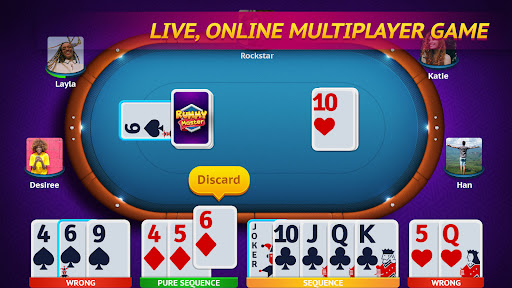
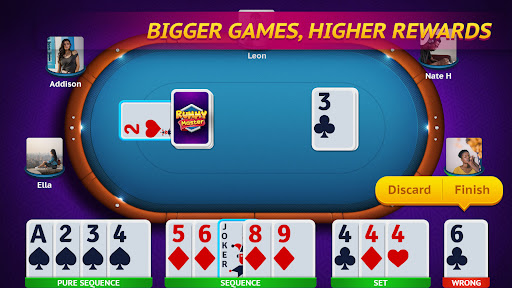

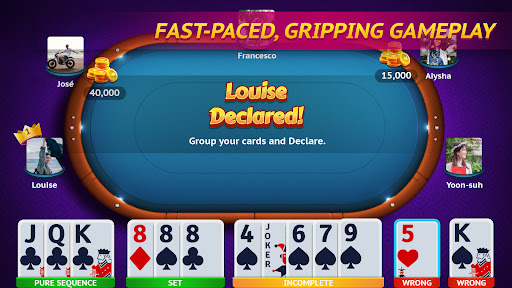
Rummy Master introduces the ultimate Rummy game in a brand-new Online, Multiplayer version.
This popular Indian Rummy game is a favorite of all card game lovers across the world.
The objective of this Indian Rummy game is to form sequences or sets of cards, using the 13 cards dealt at the beginning of the game.
Rummy Master is an extension of the popular American card game Gin Rummy and Rummy 500.
We bring the simplest form of this popular game into your mobile phones with fun graphics and user-friendly game controls.
Features:
• LIVE, ONLINE multiplayer version of the Indian Rummy game
• Play with gamers all over the world with MULTIPLAYER mode
• Play a custom game with friends using the PRIVATE mode
• OFFLINE turn-based gameplay
• CHAT Live with opponents while playing
• Rule the LEADERBOARD by being the ultimate Rummy champion
• Login with FACEBOOK
If you love card games and casino games, you will love Rummy Master. Download now for hours of unlimited fun!
और दिखाएं

1. MEmu इंस्टॉलर को डाउनलोड करें और इंस्टॉलेशन को पूरा करें

2. MEmu शुरू करें फिर होमपेज पर Google Play खोलें

3. Google Play में Rummy Master खोजें
Install
4. Rummy Master डाउनलोड कर इंस्टॉल करें
5. इंस्टॉल पूरा होने पर आइकन दबाएं

6. MEmu से पीसी पर Rummy Master खेलने का आनंद लें
MEmu Play सबसे बेहतरीन मुफ़्त Android एमुलेटर है और 5 करोड़ लोग पहले ही इसके शानदार Android गेमिंग अनुभव का आनंद ले चुके हैं। MEmu 9 वर्चुअलाइज़ेशन तकनीक आपको अपने PC पर हज़ारों Android गेम, यहाँ तक कि सबसे ज़्यादा ग्राफ़िक्स वाले गेम भी, आसानी से खेलने की सुविधा देती है।
असीमित बैटरी या मोबाइल डेटा के साथ बेहतर ग्राफिक्स के साथ बड़ी स्क्रीन; लंबी अवधि।
कीबोर्ड और माउस या गेमपैड के उत्तम नियंत्रण के लिए संपूर्ण कीमैपिंग का समर्थन करता हैं।
एक ही पीसी पर मल्टी-इंस्टेंस मैनेजर के साथ एक समय में कई गेम खाते या कार्य कर सकते हैं।
Play Rummy Master on PC by following steps: