Showem: Charades Party Game
अपडेट किया गया
वर्तमान वर्शन
3.0.0
संसाधन

अपने सेलफोन पर Showem: Charades Party Game का उपयोग करते समय ओवरचार्ज के बारे में चिंता करना बंद करें, अपने आप को छोटी स्क्रीन से मुक्त करें और बहुत बड़े डिस्प्ले पर ऐप का उपयोग करने का आनंद लें। अब से, कीबोर्ड और माउस के साथ अपने ऐप का पूर्ण-स्क्रीन अनुभव प्राप्त करें। एमईएमयू आपको उन सभी आश्चर्यजनक सुविधाओं की पेशकश करता है जिनकी आपको उम्मीद थी: त्वरित इंस्टॉल और आसान सेटअप, सहज नियंत्रण, बैटरी की कोई सीमा नहीं, मोबाइल डेटा और परेशान कॉल। आपके कंप्यूटर पर Showem: Charades Party Game का उपयोग करने का सबसे अच्छा विकल्प नया MEmu 9 है। हमारे अवशोषण के साथ कोडित, बहु-उदाहरण प्रबंधक एक ही समय में 2 या अधिक खाते खोलना संभव बनाता है। और सबसे महत्वपूर्ण, हमारा अनन्य उत्सर्जन इंजन आपके पीसी की पूरी क्षमता को जारी कर सकता है, सब कुछ सुचारू और सुखद बना सकता है।
और दिखाएं
डाउनलोड करें Showem: Charades Party Game पीसी पर MEmu एंड्रॉयड एमुलेटर के साथ बड़े पर्दे पर खेलने का आनंद लें। Looking for a fun and stress-free way to entertain friends and family?
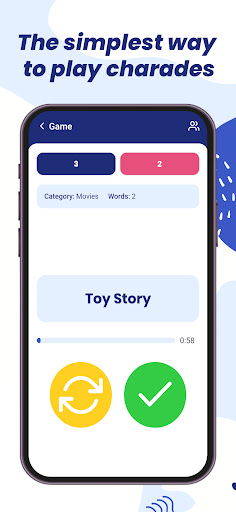
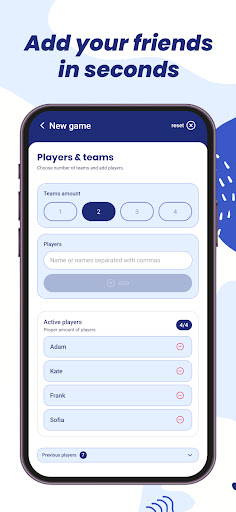
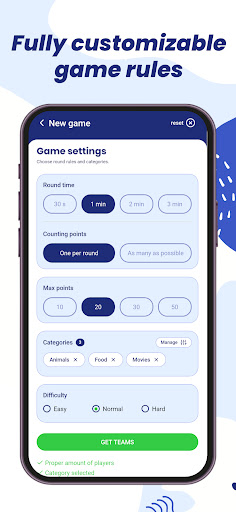
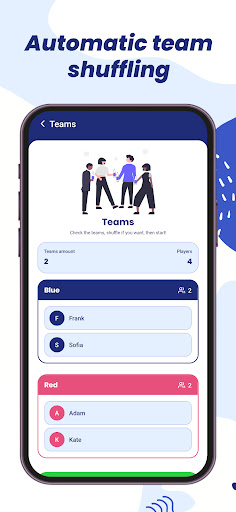
Looking for a fun and stress-free way to entertain friends and family? Showem: Charades Party Game is the simplest way to turn any gathering into a hilarious game night.
We have stripped away the complexity to give you a clean and fast paced experience. There are no awkward tilting or confusing sensors. Our app uses big and clear buttons that make gameplay smooth for everyone. Whether you are a charades pro or a total beginner, Showem is designed so you can jump in and play immediately.
- Simple Setup -
Getting started is easy. Just enter the names of your players and the app handles the rest. Showem automatically shuffles your friends into random teams like Blue, Red, Green, or Yellow. Please note that you need at least 4 players to start a team game.
- How to Play -
First, enter player names and let the app randomly assign the teams. Next, choose your favorite categories like Movies, Animals, Food, or Famous People. One player acts out the word while their team guesses with no sounds allowed. Use the Green Check for a correct guess. If you are stuck on a word, use the Yellow Refresh button to get a random new word. Be careful because you can only use this swap once per turn.
- Features You Will Love -
The app features a clean and minimalist UI that is very easy to use. The random team generator keeps every game fair and exciting. You can choose from a huge variety of categories including Pokemon, Books, and Occupations. Our smart history tracking remembers which words you have already seen. You also get fully customizable settings for round time and winning points.
Stop fighting with complicated apps and start having fun. Download Showem Charades Party Game today and show them how it is done!
और दिखाएं

1. MEmu इंस्टॉलर को डाउनलोड करें और इंस्टॉलेशन को पूरा करें

2. MEmu शुरू करें फिर होमपेज पर Google Play खोलें

3. Google Play में Showem: Charades Party Game खोजें
Install
4. Showem: Charades Party Game डाउनलोड कर इंस्टॉल करें
5. इंस्टॉल पूरा होने पर आइकन दबाएं

6. MEmu से पीसी पर Showem: Charades Party Game खेलने का आनंद लें
MEmu Play सबसे बेहतरीन मुफ़्त Android एमुलेटर है और 5 करोड़ लोग पहले ही इसके शानदार Android गेमिंग अनुभव का आनंद ले चुके हैं। MEmu 9 वर्चुअलाइज़ेशन तकनीक आपको अपने PC पर हज़ारों Android गेम, यहाँ तक कि सबसे ज़्यादा ग्राफ़िक्स वाले गेम भी, आसानी से खेलने की सुविधा देती है।
असीमित बैटरी या मोबाइल डेटा के साथ बेहतर ग्राफिक्स के साथ बड़ी स्क्रीन; लंबी अवधि।
कीबोर्ड और माउस या गेमपैड के उत्तम नियंत्रण के लिए संपूर्ण कीमैपिंग का समर्थन करता हैं।
एक ही पीसी पर मल्टी-इंस्टेंस मैनेजर के साथ एक समय में कई गेम खाते या कार्य कर सकते हैं।
Play Showem: Charades Party Game on PC by following steps: