Tiny Glade
अपडेट किया गया
वर्तमान वर्शन
संसाधन

अपने सेलफोन पर Tiny Glade का उपयोग करते समय ओवरचार्ज के बारे में चिंता करना बंद करें, अपने आप को छोटी स्क्रीन से मुक्त करें और बहुत बड़े डिस्प्ले पर ऐप का उपयोग करने का आनंद लें। अब से, कीबोर्ड और माउस के साथ अपने ऐप का पूर्ण-स्क्रीन अनुभव प्राप्त करें। एमईएमयू आपको उन सभी आश्चर्यजनक सुविधाओं की पेशकश करता है जिनकी आपको उम्मीद थी: त्वरित इंस्टॉल और आसान सेटअप, सहज नियंत्रण, बैटरी की कोई सीमा नहीं, मोबाइल डेटा और परेशान कॉल। आपके कंप्यूटर पर Tiny Glade का उपयोग करने का सबसे अच्छा विकल्प नया MEmu 9 है। हमारे अवशोषण के साथ कोडित, बहु-उदाहरण प्रबंधक एक ही समय में 2 या अधिक खाते खोलना संभव बनाता है। और सबसे महत्वपूर्ण, हमारा अनन्य उत्सर्जन इंजन आपके पीसी की पूरी क्षमता को जारी कर सकता है, सब कुछ सुचारू और सुखद बना सकता है।
और दिखाएं
डाउनलोड करें Tiny Glade पीसी पर MEmu एंड्रॉयड एमुलेटर के साथ बड़े पर्दे पर खेलने का आनंद लें। Step into the serene haven of Tiny Glade, where the art of construction meets tranquility in the gaming universe.
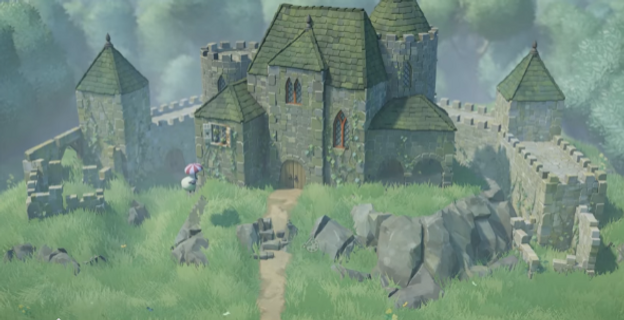

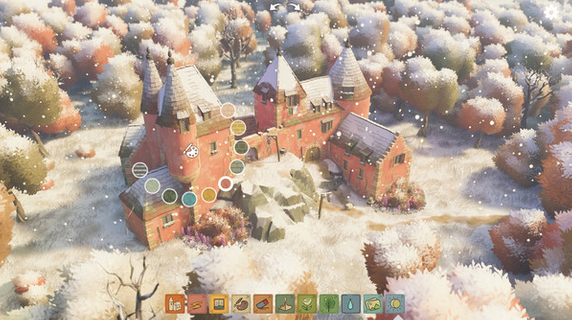
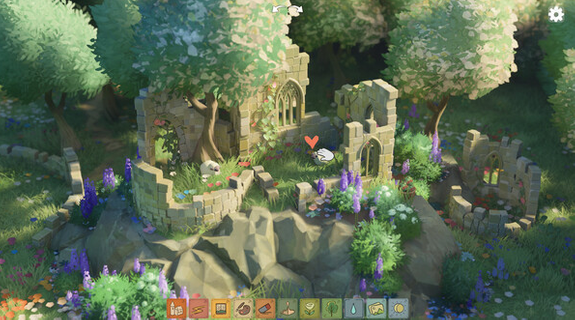
Step into the serene haven of Tiny Glade, where the art of construction meets tranquility in the gaming universe. Indulge in the sheer joy of unleashing your imagination in a world free from the constraints of management, battles, or rigid regulations. Take a break from the ordinary and let your creativity soar as you design picturesque fortresses and metamorphose forgotten meadows into whimsical realms of wonder. Explore an innovative building mechanism that defies conventional grids, witnessing each element blend seamlessly together, from bricks to pebbles to timber. Whether you sketch a passage through a wall or expand a towering arch, witness the captivating evolution of your creations with every alteration. As you lower walls, observe as arches gracefully morph into quaint fences and gates, breathing vitality into the miniature worlds you meticulously craft. Let the enchanting allure of Tiny Glade transport you to a realm where building transcends mere construction, inviting you to shape captivating landscapes that echo the depths of your creativity.
और दिखाएं

1. MEmu इंस्टॉलर को डाउनलोड करें और इंस्टॉलेशन को पूरा करें

2. MEmu शुरू करें फिर होमपेज पर Google Play खोलें

3. Google Play में Tiny Glade खोजें
Install
4. Tiny Glade डाउनलोड कर इंस्टॉल करें
5. इंस्टॉल पूरा होने पर आइकन दबाएं

6. MEmu से पीसी पर Tiny Glade खेलने का आनंद लें
MEmu Play सबसे बेहतरीन मुफ़्त Android एमुलेटर है और 5 करोड़ लोग पहले ही इसके शानदार Android गेमिंग अनुभव का आनंद ले चुके हैं। MEmu 9 वर्चुअलाइज़ेशन तकनीक आपको अपने PC पर हज़ारों Android गेम, यहाँ तक कि सबसे ज़्यादा ग्राफ़िक्स वाले गेम भी, आसानी से खेलने की सुविधा देती है।
असीमित बैटरी या मोबाइल डेटा के साथ बेहतर ग्राफिक्स के साथ बड़ी स्क्रीन; लंबी अवधि।
कीबोर्ड और माउस या गेमपैड के उत्तम नियंत्रण के लिए संपूर्ण कीमैपिंग का समर्थन करता हैं।
एक ही पीसी पर मल्टी-इंस्टेंस मैनेजर के साथ एक समय में कई गेम खाते या कार्य कर सकते हैं।
Play Tiny Glade on PC by following steps: