AI Photo Studio: Art Magic
अपडेट किया गया
वर्तमान वर्शन
1.0.2
संसाधन

AI Photo Studio: Art Magic पर अपनी मोबाइल डेटा सीमा पार करने को अलविदा कहें और छोटी स्क्रीन की सीमाओं से मुक्त होकर बड़े डिस्प्ले के लाभों का अनुभव करें। अब, आप अपने कीबोर्ड और माउस का उपयोग करके फुल-स्क्रीन मोड में टॉपर्स क्लैन की शक्ति का अनुभव कर सकते हैं। MEmu Play में वे सभी बेहतरीन सुविधाएँ हैं जिनकी आप अपेक्षा करते हैं: त्वरित इंस्टॉलेशन और आसान सेटअप, सहज नियंत्रण, बैटरी की आवश्यकता नहीं, और कोई डेटा या कॉल समय सीमा नहीं। नया MEmu 9 आपके कंप्यूटर पर AI Photo Studio: Art Magic का उपयोग करने के लिए सबसे अच्छा विकल्प है। हमारा मालिकाना मल्टी-इंस्टेंस मैनेजर एक साथ दो या अधिक खातों को चलाने का समर्थन करता है। इससे भी महत्वपूर्ण बात यह है कि हमारा अनूठा इम्यूलेशन इंजन आपके कंप्यूटर के प्रदर्शन का पूरा उपयोग करता है, जिससे एक सहज और निर्बाध अनुभव मिलता है।
और दिखाएं
MEmu Play के साथ PC पर AI Photo Studio: Art Magic इस्तेमाल करने के शानदार अनुभव का आनंद लें। यह एक शक्तिशाली मुफ़्त Android एमुलेटर है जो आपको डेस्कटॉप वर्ज़न के लिए हज़ारों Android ऐप्स उपलब्ध कराता है। दोस्तों से जुड़ने और अपने काम को और भी बेहतर बनाने का आनंद लें! AI Photo Studio: Art Magic is an AI-powered photo app that helps you create artistic images and fun photo transformations.
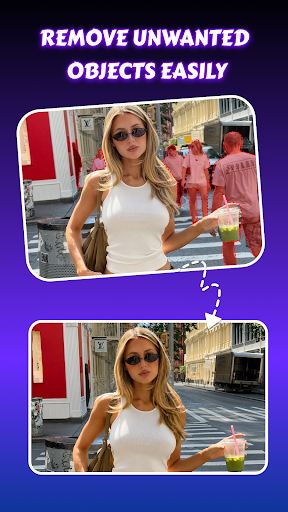
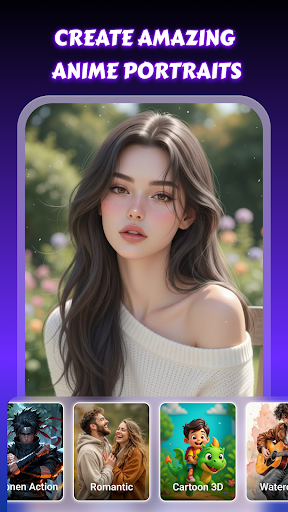
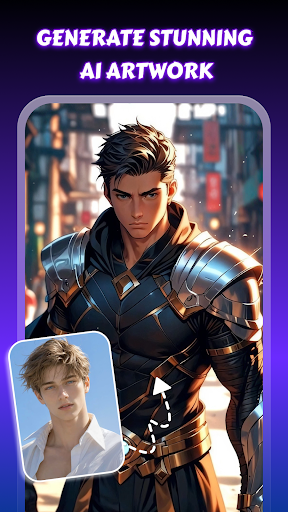
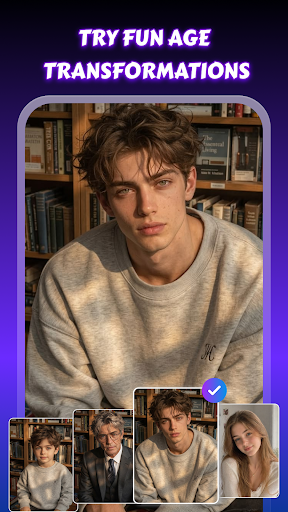
AI Photo Studio: Art Magic is an AI-powered photo app that helps you create artistic images and fun photo transformations. Explore creative AI art styles, customize your photos with simple editing tools, and enjoy interactive AI features for expressive visual results.
Create AI Art & Creative Photo Styles:
Turn your selfies into artistic portraits, stylized visuals, or AI-generated photos. Discover creative looks inspired by anime, fashion, cinematic scenes, cartoon styles, and artistic themes while creating personalized images with an AI image generator.
AI Gen - Interactive AI Face Features:
Discover features such as Aging, Gender Swap, Future Baby, and Virtual Hug. Enjoy expressive photo transformations with realistic AI-powered effects and fun visual results.
AI Tools - Easy Photo Editing:
Enhance photos, remove unwanted objects, and change backgrounds using practical editing tools. Personalize your photos and create polished visuals, stylish photo art, and clean photo edits with ease.
Why You'll Love AI Photo Studio: Art Magic
Create artistic visuals with flexible AI customization
Discover fun AI face features for creative photo experiences
Simple and intuitive interface for easy photo editing
Enjoy Virtual Hug, Aging filters, Gender Swap, and Future Baby features for fun experiences
Express your creativity with AI Photo Studio: Art Magic. Create artistic visuals, explore fun AI-powered features, and personalize your photos using creative styles and easy editing tools in one simple app.
और दिखाएं

1. MEmu इंस्टॉलर को डाउनलोड करें और इंस्टॉलेशन को पूरा करें

2. MEmu शुरू करें फिर होमपेज पर Google Play खोलें

3. Google Play में AI Photo Studio: Art Magic खोजें
Install
4. AI Photo Studio: Art Magic डाउनलोड कर इंस्टॉल करें
5. इंस्टॉल पूरा होने पर आइकन दबाएं

6. MEmu का उपयोग करके अपने कंप्यूटर पर AI Photo Studio: Art Magic का अनुभव करें
MEmu Play सबसे बेहतरीन मुफ़्त Android एमुलेटर है और 5 करोड़ लोग पहले ही इसके शानदार Android ऐप अनुभव का आनंद ले चुके हैं। MEmu 9 वर्चुअलाइज़ेशन तकनीक आपको अपने PC पर हज़ारों Android ऐप्स, यहाँ तक कि सबसे ज़्यादा ग्राफ़िक्स वाले ऐप्स भी, आसानी से चलाने की सुविधा देती है।
असीमित बैटरी या मोबाइल डेटा के साथ बेहतर ग्राफिक्स के साथ बड़ी स्क्रीन; लंबी अवधि।
कीबोर्ड और माउस या गेमपैड के उत्तम नियंत्रण के लिए संपूर्ण कीमैपिंग का समर्थन करता हैं।
एक ही पीसी पर मल्टी-इंस्टेंस मैनेजर के साथ एक समय में कई गेम खाते या कार्य कर सकते हैं।
Use AI Photo Studio: Art Magic on PC by following steps: